Get Logo Application - Nh.gov - Nh
How it works
-

Open form follow the instructions
-

Easily sign the form with your finger
-

Send filled & signed form or save
How to fill out the Logo Application - NH.gov - Nh online
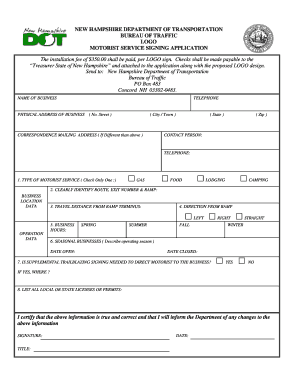
Completing the Logo Application is an important step for businesses seeking to promote their services through signage on New Hampshire's roadways. This guide will walk you through the process of filling out the application form online, ensuring that you provide all necessary information accurately.
Follow the steps to successfully complete your Logo Application.
- Press the ‘Get Form’ button to access the Logo Application form and open it for editing.
- Begin by entering the name of your business in the designated field.
- Provide your business telephone number, ensuring you include the area code.
- Fill in the physical address of your business, including the street number and name. Ensure you also select your city or town from the options provided.
- If your correspondence mailing address differs from your physical address, enter that information in the specified section, including state and zip code.
- Indicate the type of motorist service your business offers by checking only one option: Gas or Food.
- Clearly identify the route, exit number, and ramp associated with your business location by providing accurate details.
- Include the travel distance from the ramp terminus to your business.
- Specify the direction from the ramp towards your business location, using options like Left, Right, or Straight.
- List your business operation hours for each season: Spring, Summer, Fall, and Winter.
- If applicable, provide details about your seasonal business, including the date it opens and the date it closes.
- Indicate whether supplemental trailblazing signing is needed to direct motorists to your business, and if so, specify where it is needed.
- List all local or state licenses or permits that your business holds.
- Finally, certify that the information provided is true and correct. Sign the application and include your title and the date of signing.
- Once you have completed the form, review it for accuracy and completeness. You can then save your changes, download a copy, print it, or share it as necessary.
Complete your Logo Application online today to enhance your business visibility!
To register your business in New Hampshire, visit NH where you can find the necessary forms for various business structures. You will need to choose a business name and provide relevant information about your ownership and operations. After completing and submitting your application along with the fees, your business will be officially registered. Consider using uslegalforms to simplify the process and ensure all requirements are met.