Loading
Form preview
  • US Legal Forms
  • Form Library
  • More Forms
  • More Uncategorized Forms
  • Michigan Irp Login

Get Michigan Irp Login

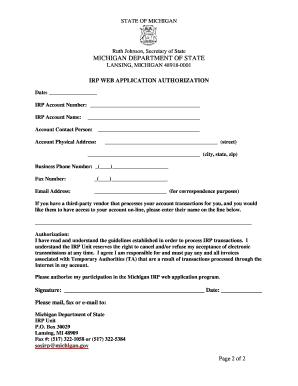
You can use the web program. The authorization can be submitted online at sosirp michigan.gov Do not mail original renewals or supplements if you have electronically submitted your supplement or renewal through the web. When adding a vehicle, a Michigan Gross Vehicle Weight (GVW) plate may be used for credit toward an IRP plate. The credit will not exceed the total Michigan portion amount of the IRP invoice. The GVW registration must be in the same name as the IRP account. If you wan.

How it works

  1. Open form

    Open form follow the instructions

  2. Easily sign form

    Easily sign the form with your finger

  3. Share form

    Send filled & signed form or save

How to fill out the Michigan IRP Login online

This guide provides a clear and concise overview of how to fill out the Michigan IRP Login form online. By following the steps outlined below, you will be able to complete the authorization process efficiently and accurately.

Follow the steps to complete the Michigan IRP Login form online.

  1. Click the ‘Get Form’ button to access the authorization form and open it in the editor.
  2. Enter the date at the top of the form to indicate when you are submitting the application.
  3. Fill in your IRP account number in the designated space to link the form to your existing account.
  4. Provide the IRP account name on the next line to ensure the identification is clear.
  5. Complete the account contact person's information, including their name for correspondence.
  6. Fill in the account physical address, including the street, city, state, and zip code.
  7. Add the business phone number and fax number to ensure you can be contacted.
  8. Input the email address where you would like to receive correspondence.
  9. If applicable, enter the name of any third-party vendor that manages your account transactions.
  10. Read the authorization statement carefully and ensure you understand the guidelines.
  11. Provide your signature and the date to affirm your consent to participate in the Michigan IRP web application program.
  12. Once the form is completed, you may choose to save your changes, download, print, or share the form as needed.

Start filling out the Michigan IRP Login form online today to ensure smooth processing of your authorization!

Get form

Experience a faster way to fill out and sign forms on the web. Access the most extensive library of templates available.
Get form

Related content

SOS - Welcome to Michigan IRP Online - State of...
Log-in information should not be shared. Each person who processes transactions for an IRP...
Learn more
SOS - Fundraising License Plates - State of...
Secretary of State - Supporting your favorite charitable cause or state supported...
Learn more
Calypso Lemonade 200 - Wikipedia
Distance, 137.2 mi (220.8 km). Laps, 200. Previous names, Indianapolis 100 (1972) IRP ARCA...
Learn more

Related links form

Inspection Affidavit Ordinance No. 2011-03 North Florida/South Georgia Veterans Health Service HRPP Office’s Request For Continued Approval Certificate Of Appropriateness For Architectural Modifications

Questions & Answers

Get answers to your most pressing questions about US Legal Forms API.

Contact support

For IRP plates and registration, contact the Lansing IRP office at 517-335-6119 for instructions.

To establish an IRP account you must provide: A valid Michigan driver's license or identification card. ... Proof of Residency - Present three (3) documents establishing Michigan residency (examples include but are not limited to rental agreement, utility bills, property taxes, income tax, bank statement, checks).

To replace a plate online, you will need to: Visit Online Services. Under “Vehicle Transactions” select “More Online Vehicles Services” Follow the prompts to create or log into your account to purchase a plate. Pay with a credit or debit card or e-check/bank account number. ... Review your transaction summary.

To register a trailer, visit a Secretary of State office and provide the following: Your valid Michigan driver's license or ID. The trailer weight or scale weight receipt. Proof of ownership, such as: - Assigned trailer title with the seller's portion and signature completed.

To request replacement registration for a vehicle, watercraft, snowmobile, or moped, select Online Services, and follow the prompts to create or log into your account to print a duplicate copy of your registration.

You can get a temporary Michigan registration permit by making an appointment with your local SOS office and showing proof of insurance and vehicle ownership.

The International Registration Plan (IRP) is an option for registering commercial vehicles that allows for interstate operation under a single registration plate and registration certificate (cab card) issued by your “base” state.

Get This Form Now!

Use professional pre-built templates to fill in and sign documents online faster. Get access to thousands of forms.
Get form
If you believe that this page should be taken down, please follow our DMCA take down processhere.
Get Michigan Irp Login
Get form
  • Adoption
  • Bankruptcy
  • Contractors
  • Divorce
  • Home Sales
  • Employment
  • Identity Theft
  • Incorporation
  • Landlord Tenant
  • Living Trust
  • Name Change
  • Personal Planning
  • Small Business
  • Wills & Estates
  • Packages A-Z
  • Affidavits
  • Bankruptcy
  • Bill of Sale
  • Corporate - LLC
  • Divorce
  • Employment
  • Identity Theft
  • Internet Technology
  • Landlord Tenant
  • Living Wills
  • Name Change
  • Power of Attorney
  • Real Estate
  • Small Estates
  • Wills
  • All Forms
  • Forms A-Z
  • Form Library
  • Legal Hub
  • About Us
  • Help Portal
  • Legal Resources
  • Blog
  • Affiliates
  • Contact Us
  • Delete My Account
  • Site Map
  • Industries
  • Forms in Spanish
  • Localized Forms
  • State-specific Forms
  • Forms Kit
  • Real Estate Handbook
  • All Guides
  • Notarize
  • Incorporation services
  • For Consumers
  • For Small Business
  • For Attorneys
  • USLegal
  • FormsPass
  • pdfFiller
  • signNow
  • altaFlow
  • DocHub
  • Instapage
Form Packages
  • Adoption
  • Bankruptcy
  • Contractors
  • Divorce
  • Home Sales
  • Employment
  • Identity Theft
  • Incorporation
  • Landlord Tenant
  • Living Trust
  • Name Change
  • Personal Planning
  • Small Business
  • Wills & Estates
  • Packages A-Z
Form Categories
  • Affidavits
  • Bankruptcy
  • Bill of Sale
  • Corporate - LLC
  • Divorce
  • Employment
  • Identity Theft
  • Internet Technology
  • Landlord Tenant
  • Living Wills
  • Name Change
  • Power of Attorney
  • Real Estate
  • Small Estates
  • Wills
  • All Forms
  • Forms A-Z
  • Form Library
Customer Service
  • Legal Hub
  • About Us
  • Help Portal
  • Legal Resources
  • Blog
  • Affiliates
  • Contact Us
  • Delete My Account
  • Site Map
  • Industries
  • Forms in Spanish
  • Localized Forms
  • State-specific Forms
  • Forms Kit
Legal Guides
  • Real Estate Handbook
  • All Guides
Prepared for you
  • Notarize
  • Incorporation services
Our Customers
  • For Consumers
  • For Small Business
  • For Attorneys
Our Sites
  • USLegal
  • FormsPass
  • pdfFiller
  • signNow
  • altaFlow
  • DocHub
  • Instapage
Social Media
Call us now toll free:
+1 833 426 79 33
As seen in:
© Copyright 1999-2026 airSlate Legal Forms, Inc. 3720 Flowood Dr, Flowood, Mississippi 39232
  • Your Privacy Choices
  • Terms of Service
  • Privacy Notice
  • Content Takedown Policy
  • Bug Bounty Program