Loading
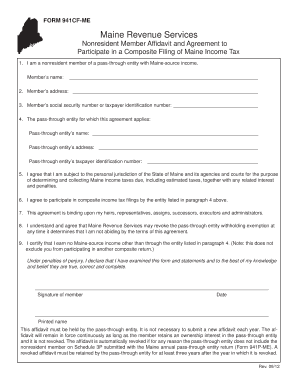
Get Form 941cf-me - Maine
How it works
-

Open form follow the instructions
-

Easily sign the form with your finger
-

Send filled & signed form or save
How to fill out the FORM 941CF-ME - Maine online
Filling out the FORM 941CF-ME is a critical step for nonresident members of pass-through entities participating in composite filing of Maine income tax. This guide will provide clear, step-by-step instructions to help you complete the form accurately online.
Follow the steps to fill out the FORM 941CF-ME - Maine.
- Click ‘Get Form’ button to obtain the form and open it in your preferred editing environment.
- Begin by entering the member’s name in the designated field to represent the nonresident member of the pass-through entity.
- Next, provide the member’s address, ensuring all relevant details are accurately completed.
- Fill in the member’s social security number or taxpayer identification number in the specified area. Be cautious to avoid any errors.
- Continue by entering the name of the pass-through entity for which this affidavit applies in the corresponding field.
- Provide the pass-through entity’s address, ensuring consistency with official records.
- Complete the taxpayer identification number for the pass-through entity in the designated section.
- Review the agreement statements regarding jurisdiction and composite income tax filings, confirming your understanding and agreement by marking accordingly.
- Sign the form to certify the accuracy of the statements provided and date your signature.
- Finally, save your completed form, ensuring all changes are captured. You may download, print, or share the form as needed.
Complete the FORM 941CF-ME online to ensure compliance with Maine income tax regulations.
Related links form
Ordering Maine tax forms is a straightforward process. Visit the Maine Revenue Services website, where you'll find options to download and print forms yourself. Alternatively, if you prefer printed forms, you can request them by mail through the same website.