Loading
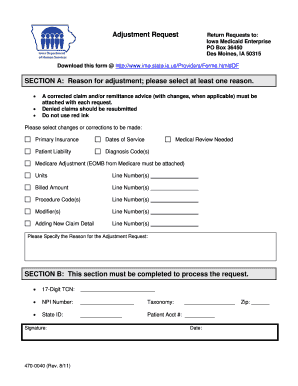
Get Iowa Medicaid Form 470 0040
How it works
-

Open form follow the instructions
-

Easily sign the form with your finger
-

Send filled & signed form or save
How to fill out the Iowa Medicaid Form 470 0040 online
Filling out the Iowa Medicaid Form 470 0040 online can streamline the adjustment request process, ensuring that your needs are addressed efficiently. This comprehensive guide will walk you through each section of the form, providing clear and supportive instructions to help you complete it accurately.
Follow the steps to successfully complete your Iowa Medicaid Form 470 0040.
- Click ‘Get Form’ button to obtain the form and open it in the editor.
- In Section A, select at least one reason for adjustment from the provided options. Consider options like 'Primary Insurance', 'Dates of Service', or 'Diagnosis Code(s)'. Ensure you accurately indicate the changes needed.
- If applicable, attach a corrected claim and/or remittance advice with each request. Remember that denied claims should be resubmitted.
- Specify the adjustments you wish to make, such as 'Billed Amount' or 'Procedure Code(s)', along with the corresponding line numbers.
- In Section B, fill out the required information including the 17-Digit TCN, NPI Number, Taxonomy, State ID, and Patient Account Number. Ensure that all fields are completed to process your request.
- Add your signature and the date at the end of Section B. Double-check that all signatures and data are filled correctly.
- Finally, save your changes, download the completed form, print it, or share it as needed to submit your request.
Start completing your Iowa Medicaid Form 470 0040 online today for a smooth adjustment process.
Filing a claim with Iowa Total Care can be done through their online portal or using the Iowa Medicaid Form 470 0040. Ensure that you have all necessary documentation and that your claim is properly filled out to avoid delays. If you need assistance, consider using the resources available on the USLegalForms platform to streamline the process.