Loading
Form preview
  • US Legal Forms
  • Other Templates
  • More Forms
  • More Uncategorized Forms
  • Livescan For Psychologists In California Form

Get Livescan For Psychologists In California Form

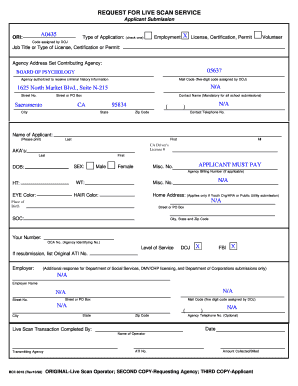
REQUEST FOR LIVE SCAN SERVICE Applicant Submission A0435 ORI: Type of Application: (check one) Employment X License, Certification, Permit Volunteer Code assigned by DOJ Job Title or Type of License,.

How it works

  1. Open form

    Open form follow the instructions

  2. Easily sign form

    Easily sign the form with your finger

  3. Share form

    Send filled & signed form or save

How to fill out the Livescan For Psychologists In California Form online

Filling out the Livescan For Psychologists In California Form is an essential step for those seeking licensure or certification as a psychologist in California. This guide will walk you through the process of completing the form online, ensuring that you provide all necessary information for a smooth submission.

Follow the steps to fill out the Livescan Form seamlessly.

  1. Press the ‘Get Form’ button to acquire the Livescan For Psychologists In California Form and access it in the editor.
  2. Identify the type of application you are submitting by checking the appropriate box. Options include Employment, License, Certification, Permit, and Volunteer.
  3. Enter the job title or type of license, certification, or permit you are applying for in the designated field.
  4. Provide the agency address for the contributing agency. In this case, it is the Board of Psychology, located at 1625 North Market Blvd., Suite N-215, Sacramento, CA 95834.
  5. Fill in your name in the format requested: last name, first name, and middle initial. Include your California driver's license number if applicable.
  6. Indicate your sex and date of birth by selecting the appropriate options provided.
  7. If applicable, provide your agency billing number and any other miscellaneous numbers requested.
  8. Complete the physical descriptions by entering your weight, height, eye color, and hair color.
  9. Fill out your home address, including street or PO box, city, state, and zip code.
  10. If this is a resubmission, enter the original ATI number.
  11. Select the level of service required, indicating both DOJ and FBI.
  12. Complete the employer information only if it is necessary for your submission.
  13. Finish by signing and dating the form where indicated.
  14. Once all fields have been completed, save your changes, and proceed to download or print the form as needed.

Complete your Livescan Form online today to ensure your application is processed quickly.

Get form

Experience a faster way to fill out and sign forms on the web. Access the most extensive library of templates available.
Get form

Related content

Fingerprint Procedures - California Board of...
Fingerprint information will not be submitted to the DOJ and FBI by the Live Scan site...
Learn more
MFT Intern Registration Application Packet...
Therapist Intern. 4. In-State Degree Program Certification – Form A. 5. In-State Degree...
Learn more
Enforcement Petition Application (RE 506), Rev...
STATE OF CALIFORNIA — DEPARTMENT OF CONSUMER AFFAIRS EDMUND G. ... Petition applicants...
Learn more

Related links form

Instructor Resources For Management Of Healthcare Organizations ACVS Form 11 To Download The Listing Label Order Form - Amca 2009 AACP/Wal-Mart Scholars Program

Questions & Answers

Get answers to your most pressing questions about US Legal Forms API.

Contact support

FBI rejections of fingerprints can occur for several reasons, including poor quality of the prints or discrepancies in identifying information. If you faced a rejection, it's crucial to review the Livescan For Psychologists In California Form for completeness and accuracy. Engaging with the right processes and resources can help you understand the next steps for a resubmission. US Legal Forms provides resources to ensure your fingerprints meet the necessary standards.

To obtain a certificate of clearance in California, you must submit your fingerprints for a background check using the Livescan For Psychologists In California Form. Following the background check, you will receive information about your eligibility status. It involves completing the necessary forms and ensuring submissions are done accurately. US Legal Forms offers templates and support that simplify this process.

The BCIA 8016 form is a key document in the live scan process used in California. It serves to authorize the Department of Justice to conduct a background check on individuals, which is essential for roles requiring trust, like psychologists. Filling out the Livescan For Psychologists In California Form involves accurately providing this information to ensure compliance. You can use resources from US Legal Forms for tips on completing this form.

The BCIA 8016 form is a request for live scan fingerprinting, which is a crucial step for professionals, including psychologists, in California. This form collects personal information and details regarding the reasons for fingerprinting, specifically for the Livescan For Psychologists In California Form. Completing this accurately is vital to ensure that your application is processed without delays. You can find guidance on how to fill out this form through the US Legal Forms platform.

If you have felony convictions or certain misdemeanors, these may disqualify you from obtaining a Live Scan. Additionally, specific offenses related to fraud or dishonesty can also lead to disqualification. It’s essential to check the requirements for the Livescan For Psychologists In California Form to ensure eligibility. Understanding your background helps in preparing your application correctly.

To become a certified Live Scan provider in California, you must complete specific training and submit an application to the Department of Justice. This process includes becoming familiar with the Livescan For Psychologists In California Form, as it plays a crucial role in fingerprint submission. Ideally, you will need to gather documentation and prove your qualifications to meet state standards. Once certified, you will play a vital role in ensuring accurate fingerprinting services.

In California, individuals seeking licensure in various professions, including clinical psychology, are required to undergo a Live Scan background check. This requirement applies to applicants for new licenses and those renewing existing ones. Therefore, if you are preparing your Livescan For Psychologists In California Form, ensure you comply with this essential regulation to avoid any delays.

Yes, when you go for a Live Scan appointment, you typically need to present two forms of identification. Acceptable forms usually include a government-issued ID, such as a driver's license, and another form that shows your current address. Having the correct identification ready will help streamline your completion of the Livescan For Psychologists In California Form.

A Live Scan background check consists of fingerprint scans and a review of your criminal history by the Department of Justice in California. The check examines both state and federal records to ensure safety and compliance. This process is vital for obtaining your license and working effectively in your role, making the Livescan For Psychologists In California Form an integral step.

An 8016 form is another term for the background check request form necessary when completing the Livescan For Psychologists In California Form. It serves to authorize the Department of Justice to conduct a thorough background check. The form includes details about your identity and helps ensure that only qualified professionals enter the field.

Get This Form Now!

Use professional pre-built templates to fill in and sign documents online faster. Get access to thousands of forms.
Get form
If you believe that this page should be taken down, please follow our DMCA take down processhere.
Get Livescan For Psychologists In California Form
Get form
  • Adoption
  • Bankruptcy
  • Contractors
  • Divorce
  • Home Sales
  • Employment
  • Identity Theft
  • Incorporation
  • Landlord Tenant
  • Living Trust
  • Name Change
  • Personal Planning
  • Small Business
  • Wills & Estates
  • Packages A-Z
  • Affidavits
  • Bankruptcy
  • Bill of Sale
  • Corporate - LLC
  • Divorce
  • Employment
  • Identity Theft
  • Internet Technology
  • Landlord Tenant
  • Living Wills
  • Name Change
  • Power of Attorney
  • Real Estate
  • Small Estates
  • Wills
  • All Forms
  • Forms A-Z
  • Other Templates
  • Legal Hub
  • About Us
  • Help Portal
  • Legal Resources
  • Blog
  • Affiliates
  • Contact Us
  • Delete My Account
  • Site Map
  • Industries
  • Forms in Spanish
  • Localized Forms
  • State-specific Forms
  • Forms Kit
  • Real Estate Handbook
  • All Guides
  • Notarize
  • Incorporation services
  • For Consumers
  • For Small Business
  • For Attorneys
  • USLegal
  • FormsPass
  • pdfFiller
  • signNow
  • altaFlow
  • DocHub
  • Instapage
Form Packages
  • Adoption
  • Bankruptcy
  • Contractors
  • Divorce
  • Home Sales
  • Employment
  • Identity Theft
  • Incorporation
  • Landlord Tenant
  • Living Trust
  • Name Change
  • Personal Planning
  • Small Business
  • Wills & Estates
  • Packages A-Z
Form Categories
  • Affidavits
  • Bankruptcy
  • Bill of Sale
  • Corporate - LLC
  • Divorce
  • Employment
  • Identity Theft
  • Internet Technology
  • Landlord Tenant
  • Living Wills
  • Name Change
  • Power of Attorney
  • Real Estate
  • Small Estates
  • Wills
  • All Forms
  • Forms A-Z
  • Other Templates
Customer Service
  • Legal Hub
  • About Us
  • Help Portal
  • Legal Resources
  • Blog
  • Affiliates
  • Contact Us
  • Delete My Account
  • Site Map
  • Industries
  • Forms in Spanish
  • Localized Forms
  • State-specific Forms
  • Forms Kit
Legal Guides
  • Real Estate Handbook
  • All Guides
Prepared for you
  • Notarize
  • Incorporation services
Our Customers
  • For Consumers
  • For Small Business
  • For Attorneys
Our Sites
  • USLegal
  • FormsPass
  • pdfFiller
  • signNow
  • altaFlow
  • DocHub
  • Instapage
Social Media
Call us now toll free:
+1 833 426 79 33
As seen in:
© Copyright 1999-2026 airSlate Legal Forms, Inc. 17 Station Street, Ste. 203, Brookline, MA 02445
  • Your Privacy Choices
  • Terms of Service
  • Privacy Notice
  • Content Takedown Policy
  • Bug Bounty Program