We use cookies to improve security, personalize the user experience, enhance our marketing activities (including cooperating with our marketing partners) and for other business use.
Click "here" to read our Cookie Policy. By clicking "Accept" you agree to the use of cookies. Read less
Read more
Accept
Loading
Form preview
  • US Legal Forms
  • Form Library
  • More Forms
  • More Uncategorized Forms
  • Cg5598.pdf. Report Of Abandonment/destruction Personal Property - Uscg

Get Cg5598.pdf. Report Of Abandonment/destruction Personal Property - Uscg

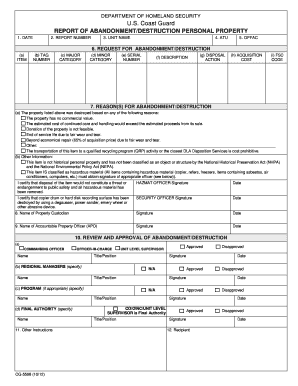
DEPARTMENT OF HOMELAND SECURITY U.S. Coast Guard REPORT OF ABANDONMENT/DESTRUCTION PERSONAL PROPERTY 1. DATE 2. REPORT NUMBER 3. UNIT NAME 4. ATU 5. OPFAC 6. REQUEST FOR ABANDONMENT/DESTRUCTION (a).

How it works

  1. Open form

    Open form follow the instructions

  2. Easily sign form

    Easily sign the form with your finger

  3. Share form

    Send filled & signed form or save

How to fill out the CG5598.PDF. Report Of Abandonment/Destruction Personal Property - Uscg online

The CG5598.PDF form is a crucial document utilized by the U.S. Coast Guard for reporting the abandonment or destruction of personal property. This guide aims to provide clear, step-by-step instructions to help users navigate the form efficiently while ensuring that all necessary information is captured accurately.

Follow the steps to fill out the CG5598.PDF form seamlessly.

  1. Click ‘Get Form’ button to obtain the form and open it in your preferred editor.
  2. In the first section, enter the date when you are completing the form in the designated field.
  3. Next, provide the report number, which uniquely identifies this report.
  4. Fill in the name of the unit submitting the report to accurately indicate the responsible party.
  5. Input the ATU (Area Task Unit) that pertains to this report.
  6. Indicate the OPFAC (Operational Facility) to associate the property with the correct operational unit.
  7. In the request for abandonment/destruction section, describe each item thoroughly, using subsections (a) to (i) for tagging purposes. This includes listing the item name, tag number, major and minor categories, serial number, detailed description, proposed disposal action, acquisition cost, and FSC code.
  8. State the reasons for abandonment/destruction. Check any applicable boxes or fill out other as necessary, explaining the necessity for this action.
  9. If the item is classified as hazardous material, ensure the appropriate officer signs where indicated. Document hazardous material handling and certification as needed.
  10. Have the property custodian, accountable property officer, and commanding officer sign in their respective areas to validate the report.
  11. Complete the review and approvals section, making sure final authority signatures are provided and proper authorization is documented.
  12. Once all sections are filled out and signed, save changes, download, print, or share the completed form as necessary.

Complete your forms online today for a smooth reporting process.

Get form

Experience a faster way to fill out and sign forms on the web. Access the most extensive library of templates available.
Get form

Related content

US Coast Guard REPORT OF ABANDONMENT ......
Nov 6, 2017 — U.S. Coast Guard. REPORT OF ABANDONMENT/DESTRUCTION PERSONAL PROPERTY. 1...
Learn more

Related links form

WI MC-710W - City Of Milwaukee 2018 Lafayette Life Insurance Company 1462-P-FL 2007 CA Alternative Work Program Application - Stanislaus County 2018 CA Alternative Work Program Application - Stanislaus County 2021

Questions & Answers

Get answers to your most pressing questions about US Legal Forms API.

Contact support

Clean read transcriptions do not include: Speech errors, false starts, repetitions, slang words, stutters, filler words, etc. In full verbatim transcriptions, the text is transcribed exactly as it sounds including speech errors, false starts, filler words, slang words, repetitions, and stutters.

Transcription output is in JSON format. The first part of your transcript contains the transcript itself in paragraph form, followed by additional data for every word and punctuation mark. The data provided depends on the features you include in your request.

The AGE() function takes two timestamps as arguments, subtracts the second timestamp from the first one, and retrieves the resultant interval. The basic syntax of the AGE() function will look like this: AGE(First_TIMESTAMP, Second_TIMESTAMP);

The age function returns the age at the time of timestamp (in completed years) of somebody born on date_of_birth. Can be an expression. The timestamp,or expression resolving to a timestamp, up to which to calculate the completed number of years. Date of birth of the person whose age is being calculated.

Age: This is a function in PostgreSQL used to return the interval type. The age function basically accepts the two-parameter to return the result. Age function in PostgreSQL will accept the timestamp value as its input parameter.

The age function returns the age at the time of timestamp (in completed years) of somebody born on date_of_birth. Can be an expression. The timestamp,or expression resolving to a timestamp, up to which to calculate the completed number of years. Date of birth of the person whose age is being calculated.

The method of calculating age involves the comparison of a person's date of birth with the date on which the age needs to be calculated. The date of birth is subtracted from the given date, which gives the age of the person. i.e., Age formula = Given date - Date of birth.

The AGE function returns a numeric value that represents the number of full years, full months, and full days between the current timestamp and the argument. The schema is SYSIBM. If there is less than a full day between the current timestamp and expression, the result is zero.

Get This Form Now!

Use professional pre-built templates to fill in and sign documents online faster. Get access to thousands of forms.
Get form
If you believe that this page should be taken down, please follow our DMCA take down processhere.

Industry-leading security and compliance

US Legal Forms protects your data by complying with industry-specific security standards.
  • In businnes since 1997
    25+ years providing professional legal documents.
  • Accredited business
    Guarantees that a business meets BBB accreditation standards in the US and Canada.
  • Secured by Braintree
    Validated Level 1 PCI DSS compliant payment gateway that accepts most major credit and debit card brands from across the globe.
Get CG5598.PDF. Report Of Abandonment/Destruction Personal Property - Uscg
Get form
Form Packages
Adoption
Bankruptcy
Contractors
Divorce
Home Sales
Employment
Identity Theft
Incorporation
Landlord Tenant
Living Trust
Name Change
Personal Planning
Small Business
Wills & Estates
Packages A-Z
Form Categories
Affidavits
Bankruptcy
Bill of Sale
Corporate - LLC
Divorce
Employment
Identity Theft
Internet Technology
Landlord Tenant
Living Wills
Name Change
Power of Attorney
Real Estate
Small Estates
Wills
All Forms
Forms A-Z
Form Library
Customer Service
Terms of Service
Privacy Notice
Legal Hub
Content Takedown Policy
Bug Bounty Program
About Us
Help Portal
Legal Resources
Blog
Affiliates
Contact Us
Delete My Account
Site Map
Industries
Forms in Spanish
Localized Forms
State-specific Forms
Forms Kit
Legal Guides
Real Estate Handbook
All Guides
Prepared for You
Notarize
Incorporation services
Our Customers
For Consumers
For Small Business
For Attorneys
Our Sites
US Legal Forms
USLegal
FormsPass
pdfFiller
signNow
airSlate WorkFlow
DocHub
Instapage
Social Media
Call us now toll free:
+1 833 426 79 33
As seen in:
  • USA Today logo picture
  • CBC News logo picture
  • LA Times logo picture
  • The Washington Post logo picture
  • AP logo picture
  • Forbes logo picture
© Copyright 1997-2025
airSlate Legal Forms, Inc.
3720 Flowood Dr, Flowood, Mississippi 39232
Form Packages
Adoption
Bankruptcy
Contractors
Divorce
Home Sales
Employment
Identity Theft
Incorporation
Landlord Tenant
Living Trust
Name Change
Personal Planning
Small Business
Wills & Estates
Packages A-Z
Form Categories
Affidavits
Bankruptcy
Bill of Sale
Corporate - LLC
Divorce
Employment
Identity Theft
Internet Technology
Landlord Tenant
Living Wills
Name Change
Power of Attorney
Real Estate
Small Estates
Wills
All Forms
Forms A-Z
Form Library
Customer Service
Terms of Service
Privacy Notice
Legal Hub
Content Takedown Policy
Bug Bounty Program
About Us
Help Portal
Legal Resources
Blog
Affiliates
Contact Us
Delete My Account
Site Map
Industries
Forms in Spanish
Localized Forms
State-specific Forms
Forms Kit
Legal Guides
Real Estate Handbook
All Guides
Prepared for You
Notarize
Incorporation services
Our Customers
For Consumers
For Small Business
For Attorneys
Our Sites
US Legal Forms
USLegal
FormsPass
pdfFiller
signNow
airSlate WorkFlow
DocHub
Instapage
Social Media
Call us now toll free:
+1 833 426 79 33
As seen in:
  • USA Today logo picture
  • CBC News logo picture
  • LA Times logo picture
  • The Washington Post logo picture
  • AP logo picture
  • Forbes logo picture
© Copyright 1997-2025
airSlate Legal Forms, Inc.
3720 Flowood Dr, Flowood, Mississippi 39232