We use cookies to improve security, personalize the user experience, enhance our marketing activities (including cooperating with our marketing partners) and for other business use.
Click "here" to read our Cookie Policy. By clicking "Accept" you agree to the use of cookies. Read less
Read more
Accept
Loading
Form preview
  • US Legal Forms
  • Form Library
  • More Forms
  • More Uncategorized Forms
  • Military Shipping Label

Get Military Shipping Label

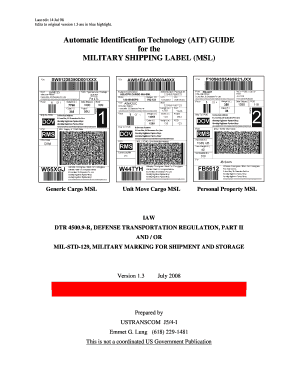
Last edit 14 Jul 08 Edits to original version 1.3 are in blue highlight. Automatic Identification Technology (AIT) GUIDE for the MILITARY SHIPPING LABEL (MSL) Generic Cargo MSL Unit Move Cargo MSL.

How it works

  1. Open form

    Open form follow the instructions

  2. Easily sign form

    Easily sign the form with your finger

  3. Share form

    Send filled & signed form or save

How to fill out the Military Shipping Label online

This guide provides comprehensive instructions on how to accurately fill out the Military Shipping Label (MSL) online. Whether you are a veteran, a service member, or a logistician, this guide will support you through each step of the process.

Follow the steps to successfully complete the Military Shipping Label.

  1. Press the ‘Get Form’ button to access the Military Shipping Label and open it in the editing tool.
  2. Begin by entering the Transportation Control Number (TCN) at the top of the label, ensuring it adheres to the specified format and is unique.
  3. Input the consignor's address, ensuring to include correct identifiers such as the CAGE code or DODAAC where applicable.
  4. Fill in the ship-to address, ensuring clarity and completeness for the delivery location.
  5. Specify the ultimate consignee's address and include the relevant DODAAC.
  6. Indicate the date shipped, which helps in tracking and processing the shipment.
  7. Complete the 'Piece Number' and 'Total Pieces' sections, typically marked as 'piece n of x'.
  8. Enter the weight and cube details for the shipment piece, ensuring all data is accurate.
  9. If applicable, provide supply line item information such as the National Stock Number, quantity, and any required identifiers.
  10. Review all entries meticulously to ensure accuracy before finalizing.
  11. Once complete, users can save the Military Shipping Label, download it, print it, or share it as needed.

Start filling out your Military Shipping Label online today!

Get form

Experience a faster way to fill out and sign forms on the web. Access the most extensive library of templates available.
Get form

Related content

Military & Diplomatic Mail | USPS
Print your own shipping and postage label at home. When your package is ready, schedule a...
Learn more
mil-std-2073-1d, qup = 001
MILITARY SHIPMENT LABEL (MSL). Module 7, Lesson 9: Packaging, Marking, and Unique...
Learn more
Jerrycan - Wikipedia
A jerrycan is a robust liquid container made from pressed steel. It was designed in...
Learn more

Related links form

Grievance Form Employee Exclusion From PERA Membership HOUSE BILL 890 Pre-Application For Housing Assistance Waiting List

Questions & Answers

Get answers to your most pressing questions about US Legal Forms API.

Contact support

The size of a military shipping label typically adheres to standard shipping label dimensions, which often range from 4x6 inches. However, it may vary based on the shipping service you select. To ensure proper placement and visibility, use the recommended size provided by your shipping provider. For added ease, utilizing a platform like US Legal Forms can guide you through the specific requirements for military shipping labels.

To create a military shipping label, you can use online services like US Legal Forms that provide templates tailor-made for military shipments. Start by selecting the military shipping label template and inputting the required details. After filling in the necessary information, you can print the label directly from your home, ensuring quick preparation to send packages overseas.

To properly fill out a shipping label, start by writing the recipient's name and address clearly. Next, include your return address in the designated area. Finally, ensure to select the right shipping method and affix any necessary postage. If you are using a Military Shipping Label, make sure to follow specific military guidelines for addressing.

Creating a military shipping label is simple. Start with a blank label template where you can input the recipient’s full name, military address, and any required postage. Ensure all details are accurate and legible to avoid sending delays. Using the USLegalForms platform can help you generate a Military Shipping Label quickly and efficiently.

Filling out a shipping label for the military requires careful attention to detail. Include the complete address, ensuring you write ‘APO’, ‘FPO’, or ‘DPO’ along with the specific ZIP code. Also, mention the contents within the package, as customs may check these. By using a Military Shipping Label, you can streamline the process and ensure correct delivery.

Entering a military address for shipping involves using the correct format, which typically includes the recipient’s name, unit number, and the designation type like APO or FPO. After writing the name and unit, add the city as either ‘APO’ or ‘FPO’, followed by the ZIP code. This ensures the package reaches the right person. Utilize a Military Shipping Label to make this process easier.

To fill out a military shipping label, start by including the recipient's full name and military address, which usually contains the unit number and an appropriate military designation. Be sure to include the city as ‘APO’, ‘FPO’, or ‘DPO’ and the corresponding ZIP code. It's best to write clearly to prevent any misunderstandings. An accurate Military Shipping Label makes the shipping process smoother.

Place the military shipping label securely on the top side of the package. Make sure that the label is flat and clearly visible, avoiding any folds that can make it harder to read. It's important that the label does not cover any other markings or addresses already on the package. A well-placed Military Shipping Label facilitates quick processing.

A military shipping label is a specialized label designed for sending packages to military personnel. It includes specific details like the recipient's military address, ensuring the package is properly routed. This label helps in maintaining the security and efficiency of the military mail system. By using a Military Shipping Label, you ensure proper delivery to your loved one.

To fill out a USPS military box, start by writing the recipient’s name and complete military address on the shipping label. Include the unit number, APO, FPO, or DPO designation, and the ZIP code specific to the military installation. Make sure to specify the contents of the package and check restrictions on items. Using a Military Shipping Label can simplify the entire process.

Get This Form Now!

Use professional pre-built templates to fill in and sign documents online faster. Get access to thousands of forms.
Get form
If you believe that this page should be taken down, please follow our DMCA take down processhere.

Industry-leading security and compliance

US Legal Forms protects your data by complying with industry-specific security standards.
  • In businnes since 1997
    25+ years providing professional legal documents.
  • Accredited business
    Guarantees that a business meets BBB accreditation standards in the US and Canada.
  • Secured by Braintree
    Validated Level 1 PCI DSS compliant payment gateway that accepts most major credit and debit card brands from across the globe.
Get Military Shipping Label
Get form
Form Packages
Adoption
Bankruptcy
Contractors
Divorce
Home Sales
Employment
Identity Theft
Incorporation
Landlord Tenant
Living Trust
Name Change
Personal Planning
Small Business
Wills & Estates
Packages A-Z
Form Categories
Affidavits
Bankruptcy
Bill of Sale
Corporate - LLC
Divorce
Employment
Identity Theft
Internet Technology
Landlord Tenant
Living Wills
Name Change
Power of Attorney
Real Estate
Small Estates
Wills
All Forms
Forms A-Z
Form Library
Customer Service
Terms of Service
Privacy Notice
Legal Hub
Content Takedown Policy
Bug Bounty Program
About Us
Blog
Affiliates
Contact Us
Delete My Account
Site Map
Industries
Forms in Spanish
Localized Forms
State-specific Forms
Forms Kit
Legal Guides
Real Estate Handbook
All Guides
Prepared for You
Notarize
Incorporation services
Our Customers
For Consumers
For Small Business
For Attorneys
Our Sites
US Legal Forms
USLegal
FormsPass
pdfFiller
signNow
airSlate WorkFlow
DocHub
Instapage
Social Media
Call us now toll free:
+1 833 426 79 33
As seen in:
  • USA Today logo picture
  • CBC News logo picture
  • LA Times logo picture
  • The Washington Post logo picture
  • AP logo picture
  • Forbes logo picture
© Copyright 1997-2025
airSlate Legal Forms, Inc.
3720 Flowood Dr, Flowood, Mississippi 39232
Form Packages
Adoption
Bankruptcy
Contractors
Divorce
Home Sales
Employment
Identity Theft
Incorporation
Landlord Tenant
Living Trust
Name Change
Personal Planning
Small Business
Wills & Estates
Packages A-Z
Form Categories
Affidavits
Bankruptcy
Bill of Sale
Corporate - LLC
Divorce
Employment
Identity Theft
Internet Technology
Landlord Tenant
Living Wills
Name Change
Power of Attorney
Real Estate
Small Estates
Wills
All Forms
Forms A-Z
Form Library
Customer Service
Terms of Service
Privacy Notice
Legal Hub
Content Takedown Policy
Bug Bounty Program
About Us
Blog
Affiliates
Contact Us
Delete My Account
Site Map
Industries
Forms in Spanish
Localized Forms
State-specific Forms
Forms Kit
Legal Guides
Real Estate Handbook
All Guides
Prepared for You
Notarize
Incorporation services
Our Customers
For Consumers
For Small Business
For Attorneys
Our Sites
US Legal Forms
USLegal
FormsPass
pdfFiller
signNow
airSlate WorkFlow
DocHub
Instapage
Social Media
Call us now toll free:
+1 833 426 79 33
As seen in:
  • USA Today logo picture
  • CBC News logo picture
  • LA Times logo picture
  • The Washington Post logo picture
  • AP logo picture
  • Forbes logo picture
© Copyright 1997-2025
airSlate Legal Forms, Inc.
3720 Flowood Dr, Flowood, Mississippi 39232