We use cookies to improve security, personalize the user experience, enhance our marketing activities (including cooperating with our marketing partners) and for other business use.
Click "here" to read our Cookie Policy. By clicking "Accept" you agree to the use of cookies. Read less
Read more
Accept
Loading
Form preview
  • US Legal Forms
  • Form Library
  • More Forms
  • More Uncategorized Forms
  • Ha-0890 Active Ed App.qxp - State Of New Jersey - State Nj

Get Ha-0890 Active Ed App.qxp - State Of New Jersey - State Nj

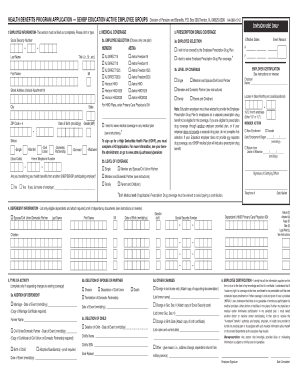
ON-This section must be filled out completely. Please print or type. . Social Security Number 3. PRESCRIPTION DRUG COVERAGE 2. MEDICAL COVERAGE 2a. EMPLOYEE SELECTION (Choose only one plan) - - Effective Dates: 3a. EMPLOYEE SELECTION AETNA HORIZON I wish to be covered by the Employee Prescription Drug Plan. Street Address (Include Apartment #) City State NJ DIRECT1525 Aetna Freedom1525 NJ DIRECT2030 Aetna Freedom2030 Aetna HMO Aetna HMO1525 Member and Domestic Partner (see instr.

How it works

  1. Open form

    Open form follow the instructions

  2. Easily sign form

    Easily sign the form with your finger

  3. Share form

    Send filled & signed form or save

How to fill out the Ha-0890 Active Ed App.qxp - State Of New Jersey - State Nj online

Filling out the Ha-0890 Active Ed App is an essential step for eligible employees seeking health benefits in New Jersey. This guide provides a clear and supportive overview of how to efficiently complete this application online, ensuring accuracy and completeness in your submission.

Follow the steps to successfully complete your application.

  1. Click ‘Get Form’ button to obtain the form and open it in the online editor.
  2. Begin with Section 1: Employee Information. Fill this section completely by providing your full name, Social Security number, date of birth, address, and contact information. Ensure that all details are accurate and typewritten or clearly printed.
  3. Move to Section 2: Medical Coverage. Choose one medical plan by marking the appropriate box and indicate your preferred level of coverage (Single, Family, or Domestic Partner). If you wish to decline medical coverage, mark the waiver option.
  4. Proceed to Section 3: Prescription Drug Coverage. Select whether you wish to enroll in the Employee Prescription Drug Plan. Again, choose your coverage level and mark the waiver if you do not wish to enroll.
  5. In Section 4: Dependent Information, list all eligible dependents. Include their names, dates of birth, genders, and Social Security numbers. Ensure the information corresponds with the coverage levels you have selected.
  6. Section 5: Type of Activity. Indicate any changes you need to make, such as adding or deleting dependents, or other changes. Provide relevant dates and reasons as instructed.
  7. Complete Section 6: Employee Certification. Review the certification statement carefully, then sign and date the application to confirm that all provided information is accurate.
  8. Finally, ensure that the employer certification section is filled by your employer to validate your application before submission. Save your changes, and you can choose to download, print, or share the completed form as necessary.

Complete your health benefits application online today for a smoother process.

Get form

Experience a faster way to fill out and sign forms on the web. Access the most extensive library of templates available.
Get form

Related content

Investments - Search / Commission Files
If the utility conducts operations both within and without the State of New York, ... 42...
Learn more

Related links form

Schedule TMB-1 Application For Certificate Of Eligibility Application For License: Advanced Practice Registered Nurse Minutes For Board Meeting Of The Nevada State Board Of Architecture, Interior Design And

Questions & Answers

Get answers to your most pressing questions about US Legal Forms API.

Contact support

To register for BenefitSolver in New Jersey, navigate to their website and choose the registration option. You will need to input your personal information to create your account. The Ha-0890 Active Ed App.qxp - State Of New Jersey - State Nj can assist you in managing your benefits efficiently throughout this process.

Typically, benefits begin shortly after the open enrollment period closes. You may experience a waiting period of a few weeks before your coverage activates. Utilizing the Ha-0890 Active Ed App.qxp - State Of New Jersey - State Nj can provide you with timelines and notifications to ensure you’re informed about your benefit start dates.

To register for the Member Benefits Online System (MBOS) in New Jersey, you will need to visit the official MBOS website. You'll find an online registration option that requires basic personal information. Once logged in, the Ha-0890 Active Ed App.qxp - State Of New Jersey - State Nj can keep you updated on your benefits and help you manage your account seamlessly.

The maximum weekly benefit in New Jersey can vary based on your previous earnings. However, as of now, it typically caps at $903 for eligible claimants. To determine your specific benefit, use the Ha-0890 Active Ed App.qxp - State Of New Jersey - State Nj, which can guide you through understanding your entitlements efficiently.

Checking the status of your NJ Medicaid can be done easily through several channels. You can visit the New Jersey Division of Medical Assistance and Health Services website or call their dedicated helpline. Additionally, having the Ha-0890 Active Ed App.qxp - State Of New Jersey - State Nj can streamline this process, allowing you to track your application and coverage status efficiently. Remember to have your personal information handy to facilitate quicker assistance.

While many refer to NJ FamilyCare and Medicaid interchangeably, they are technically different. NJ FamilyCare is essentially the program through which Medicaid is administered in New Jersey. It offers coverage to various demographics, including families with children and low-income adults. To navigate these options effectively, especially in the context of the Ha-0890 Active Ed App.qxp - State Of New Jersey - State Nj, individuals should assess their eligibility and coverage specifics.

NJ Medicaid and NJ FamilyCare are closely related but not identical. NJ FamilyCare serves as New Jersey's state health insurance program that encompasses Medicaid. While NJ Medicaid provides health coverage to certain eligible individuals, NJ FamilyCare includes additional plans for families, including low-income adults and children. Each program has its specific benefits, so it's essential to understand how they relate when reviewing the Ha-0890 Active Ed App.qxp - State Of New Jersey - State Nj.

To check your pension balance online, log into your NJ PERS account using your member credentials on the New Jersey Division of Pensions and Benefits website. Look for the option labeled 'Pension Balance' or similar to view your current status. If you need further assistance, the Ha-0890 Active Ed App.qxp - State Of New Jersey - State Nj provides easy access to detailed pension information, ensuring you stay informed about your financial future.

Accessing your pension requires you to log into your NJ PERS account through the state’s official website. Once logged in, navigate to the pension sections where you can view your benefit options. If you experience any issues, consider using the Ha-0890 Active Ed App.qxp - State Of New Jersey - State Nj for comprehensive guidance and support tailored to your situation.

To access your NJ PERS account, start by visiting the official New Jersey Division of Pensions and Benefits website. Look for the login section specifically for members, and enter your credentials. If you are a new user, you might need to register and create an account. Remember, the Ha-0890 Active Ed App.qxp - State Of New Jersey - State Nj offers additional resources to assist you in navigating the state's pension system.

Get This Form Now!

Use professional pre-built templates to fill in and sign documents online faster. Get access to thousands of forms.
Get form
If you believe that this page should be taken down, please follow our DMCA take down processhere.

Industry-leading security and compliance

US Legal Forms protects your data by complying with industry-specific security standards.
  • In businnes since 1997
    25+ years providing professional legal documents.
  • Accredited business
    Guarantees that a business meets BBB accreditation standards in the US and Canada.
  • Secured by Braintree
    Validated Level 1 PCI DSS compliant payment gateway that accepts most major credit and debit card brands from across the globe.
Get Ha-0890 Active Ed App.qxp - State Of New Jersey - State Nj
Get form
Form Packages
Adoption
Bankruptcy
Contractors
Divorce
Home Sales
Employment
Identity Theft
Incorporation
Landlord Tenant
Living Trust
Name Change
Personal Planning
Small Business
Wills & Estates
Packages A-Z
Form Categories
Affidavits
Bankruptcy
Bill of Sale
Corporate - LLC
Divorce
Employment
Identity Theft
Internet Technology
Landlord Tenant
Living Wills
Name Change
Power of Attorney
Real Estate
Small Estates
Wills
All Forms
Forms A-Z
Form Library
Customer Service
Terms of Service
Privacy Notice
Legal Hub
Content Takedown Policy
Bug Bounty Program
About Us
Help Portal
Legal Resources
Blog
Affiliates
Contact Us
Delete My Account
Site Map
Industries
Forms in Spanish
Localized Forms
State-specific Forms
Forms Kit
Legal Guides
Real Estate Handbook
All Guides
Prepared for You
Notarize
Incorporation services
Our Customers
For Consumers
For Small Business
For Attorneys
Our Sites
US Legal Forms
USLegal
FormsPass
pdfFiller
signNow
airSlate WorkFlow
DocHub
Instapage
Social Media
Call us now toll free:
+1 833 426 79 33
As seen in:
  • USA Today logo picture
  • CBC News logo picture
  • LA Times logo picture
  • The Washington Post logo picture
  • AP logo picture
  • Forbes logo picture
© Copyright 1997-2025
airSlate Legal Forms, Inc.
3720 Flowood Dr, Flowood, Mississippi 39232
Form Packages
Adoption
Bankruptcy
Contractors
Divorce
Home Sales
Employment
Identity Theft
Incorporation
Landlord Tenant
Living Trust
Name Change
Personal Planning
Small Business
Wills & Estates
Packages A-Z
Form Categories
Affidavits
Bankruptcy
Bill of Sale
Corporate - LLC
Divorce
Employment
Identity Theft
Internet Technology
Landlord Tenant
Living Wills
Name Change
Power of Attorney
Real Estate
Small Estates
Wills
All Forms
Forms A-Z
Form Library
Customer Service
Terms of Service
Privacy Notice
Legal Hub
Content Takedown Policy
Bug Bounty Program
About Us
Help Portal
Legal Resources
Blog
Affiliates
Contact Us
Delete My Account
Site Map
Industries
Forms in Spanish
Localized Forms
State-specific Forms
Forms Kit
Legal Guides
Real Estate Handbook
All Guides
Prepared for You
Notarize
Incorporation services
Our Customers
For Consumers
For Small Business
For Attorneys
Our Sites
US Legal Forms
USLegal
FormsPass
pdfFiller
signNow
airSlate WorkFlow
DocHub
Instapage
Social Media
Call us now toll free:
+1 833 426 79 33
As seen in:
  • USA Today logo picture
  • CBC News logo picture
  • LA Times logo picture
  • The Washington Post logo picture
  • AP logo picture
  • Forbes logo picture
© Copyright 1997-2025
airSlate Legal Forms, Inc.
3720 Flowood Dr, Flowood, Mississippi 39232