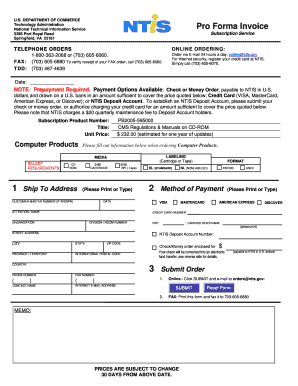
Get Pro Forma Invoice - National Technical Information Service - Ntis
How it works
-

Open form follow the instructions
-

Easily sign the form with your finger
-

Send filled & signed form or save
How to fill out the Pro Forma Invoice - National Technical Information Service - Ntis online
Filling out the Pro Forma Invoice for the National Technical Information Service (Ntis) can streamline your ordering process. This guide provides a step-by-step approach to help users complete the form accurately and efficiently, ensuring a smooth transaction.
Follow the steps to fill out the Pro Forma Invoice accurately.
- Click ‘Get Form’ button to obtain the form and open it in the editor.
- Begin by entering the date in the designated field to ensure the order is time-stamped appropriately.
- Fill out the subscription product number and title, ensuring correct spelling and formatting to avoid processing delays.
- Indicate the unit price for the product you are ordering, confirming the amount aligns with the pricing details provided.
- Complete the shipping address section. Input the attention/name, organization, division or room number if applicable, street address, city, state, zip code, province/territory, and country. Ensure accuracy to prevent delivery issues.
- Select the method of payment. Options include credit card (VISA, MasterCard, American Express, Discover) or a check/money order. Fill in necessary details for your chosen payment option, ensuring all required fields are properly addressed.
- If paying by credit card, provide the credit card number, expiration date, and cardholder’s name, making sure the information is clear and correctly formatted.
- Review all information for completeness and accuracy. Double-check that all required fields are filled out before submitting your order.
- Once all information is verified, choose to save changes, download, print, or share the form as needed.
Complete your Pro Forma Invoice online today to expedite your order with the National Technical Information Service.
Making an invoice proforma involves adjusting a standard invoice to serve as a preliminary document. Simply label your document as a 'Pro Forma Invoice' and include mock details of upcoming transactions. Clearly indicate that it is a proforma by stating its purpose at the top. The Pro Forma Invoice - National Technical Information Service - Ntis offers guidance that ensures you present a clear financial picture to your clients without finalizing any sales.
Industry-leading security and compliance
-
In businnes since 199725+ years providing professional legal documents.
-
Accredited businessGuarantees that a business meets BBB accreditation standards in the US and Canada.
-
Secured by BraintreeValidated Level 1 PCI DSS compliant payment gateway that accepts most major credit and debit card brands from across the globe.