Loading
Get Sf 425
How it works
-

Open form follow the instructions
-

Easily sign the form with your finger
-

Send filled & signed form or save
How to fill out the Sf 425 online
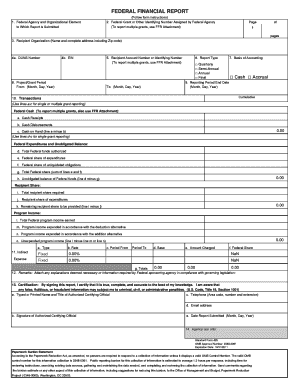
The Sf 425, also known as the Federal Financial Report, is an essential document for reporting financial information to federal agencies. This guide provides a clear, step-by-step method to help you fill out the form accurately online, ensuring compliance with federal reporting requirements.
Follow the steps to successfully complete your Sf 425 online.
- Press the ‘Get Form’ button to access the Sf 425 and open it in your preferred online editor.
- Begin by filling out the 'Federal Agency and Organizational Element to Which Report is Submitted' section. Ensure you identify the correct agency.
- In the 'Federal Grant or Other Identifying Number Assigned by Federal Agency' field, enter the identifying number from the federal grant. If you are reporting on multiple grants, use the FFR Attachment.
- Provide the full name and address, including the ZIP code, of your organization in the 'Recipient Organization' section.
- Input your unique Data Universal Numbering System (DUNS) Number in the given space.
- Enter your Employer Identification Number (EIN) as this is necessary for identification purposes.
- Specify the 'Project/Grant Period' by entering the starting date and the ending date.
- Fill in your 'Recipient Account Number' or identifying number related to the grant and repeat the use of FFR Attachment if reporting multiple grants.
- Select the 'Report Type' and the 'Basis of Accounting' options that apply — quarterly, semi-annual, or annual, along with cash or accrual.
- State the 'Reporting Period End Date' by filling in the specific date.
- In the 'Transactions' section, provide details on federal cash, including cash receipts, disbursements, and cash on hand. If reporting on multiple grants, ensure to keep using the FFR Attachment.
- Input the financial data under 'Federal Expenditures and Unobligated Balance' including total federal funds authorized, expenditures, liquidated obligations, and unobligated balances.
- Address 'Recipient Share' by entering information about the total recipient share required and expenditures.
- Document any program income earned and the amounts expended under given conditions.
- If applicable, fill out the 'Indirect Expense' section, providing necessary details such as type, rate, period, base, and amounts charged.
- In the 'Remarks' section, attach any necessary explanations or additional information as required by the federal sponsoring agency.
- Move to the 'Certification' section, where the authorized certifying official must print or type their name, title, and signature along with their contact information and the date of submission.
- Finally, review the entire form for accuracy. Save your changes, and download, print, or share the completed form as necessary.
Complete your Sf 425 online today for accurate reporting and compliance.
Grant Performance Frameworks (GPFs) must be prepared by recipients of federal grants. This typically involves team members who are familiar with the project outcomes and goals. Ensuring accurate and comprehensive GPFs can help streamline the reporting process and enhance your project’s effectiveness.