Loading
Get Bpxxxxxxxxxx Form
How it works
-

Open form follow the instructions
-

Easily sign the form with your finger
-

Send filled & signed form or save
How to fill out the Bpxxxxxxxxxx Form online
Filling out the Bpxxxxxxxxxx Form correctly is essential for a successful application process. This guide will provide you with step-by-step instructions to complete the form online, ensuring you include all necessary details.
Follow the steps to complete the Bpxxxxxxxxxx Form online.
- Click the ‘Get Form’ button to obtain the form and open it in your preferred editor.
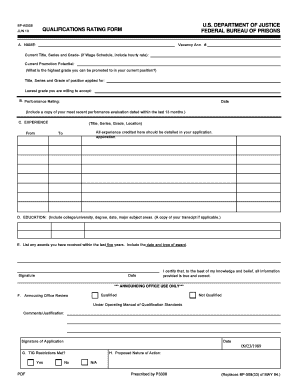
- Start by filling out section A with your name, vacancy announcement number, current title, series, grade, and promotion potential. Indicate your desired position title, series, and grade, along with the lowest grade you are willing to accept.
- In section B, provide your performance rating and the date when your most recent performance evaluation was completed, ensuring it is dated within the last 13 months.
- For section C, list your relevant experience by entering your title, series, grade, and location for each position held. Ensure that all experience credited is detailed in your application.
- In section D, provide your educational background. Include the name of your college or university, the degree obtained, date of graduation, and major subject areas. If applicable, attach a copy of your transcript.
- Section E requires you to list any awards received in the past five years, including the date and type of the award.
- Proceed to sign and date the form to certify that the information provided is true and correct.
- Review all completed sections for accuracy. After ensuring everything is correct, you can choose to save changes, download, print, or share the form.
Complete the Bpxxxxxxxxxx Form online today to advance your application process.