Loading
Get Sf1200
How it works
-

Open form follow the instructions
-

Easily sign the form with your finger
-

Send filled & signed form or save
How to fill out the Sf1200 online
Filling out the Sf1200 online can seem complex, but with clear instructions, you can navigate the process effectively. This guide provides a step-by-step approach to completing the necessary fields and submitting the form correctly.
Follow the steps to accurately complete and submit your Sf1200 form.
- Click ‘Get Form’ button to obtain the form and open it for editing.
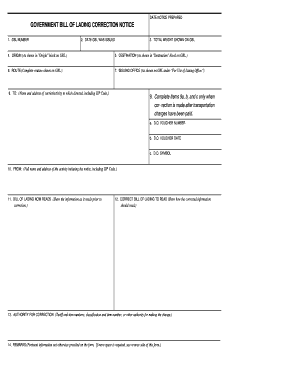
- Enter the GBL number in the designated field. This number is crucial for tracking the shipment and ensuring accurate processing.
- Fill in the date the GBL was issued. This date helps in tracking the timeline of shipment and corrections.
- Input the total weight as shown on the GBL. Ensure the accuracy of this figure, as it affects shipping costs.
- Provide the origin address as indicated in the 'Origin' block on the GBL. This section is vital for verifying shipment locations.
- Enter the destination address as shown on the 'Destination' block. Correct data ensures the timely delivery of goods.
- Complete the route as outlined on the GBL. This information routes the shipment and prevents delays.
- Fill in the issuing office details as presented under 'For Use of Issuing Office.' This identifies who is responsible for the notice.
- In the 'To:' section, provide the name and address of the carrier, including their ZIP code. This information directs the correction notice appropriately.
- Only complete items 9a, b, and c if the correction is made after transportation charges have been paid. Enter the D.O. voucher number, voucher date, and D.O. symbol if applicable.
- In the 'From:' section, include the full name and address of the activity initiating the notice, along with the ZIP code.
- Describe how the bill of lading currently reads before correction in the 'Bill of Lading Now Reads' section.
- State how the corrected information should read in the 'Correct Bill of Lading to Read' section. Clear correction helps prevent future misunderstandings.
- Provide the authority for correction, listing the relevant tariff and item numbers or other justifications for the changes.
- Add any pertinent remarks in the Remarks section. If more space is needed, use the reverse side of this form.
- Once all information is accurately filled out, save your changes. You may download, print, or share the form as needed.
Begin filling out your Sf1200 online today for a streamlined document management experience.
When spelling out $1300 on a check, write 'One thousand three hundred' on the designated line. Make sure to match this written amount into the box on the right by entering '1300'. This ensures clarity and helps avoid potential issues with processing. For further assistance with writing checks, consider utilizing the resources available through the Sf1200 system.