Get 4187 Example
How it works
-

Open form follow the instructions
-

Easily sign the form with your finger
-

Send filled & signed form or save
How to fill out the 4187 Example online
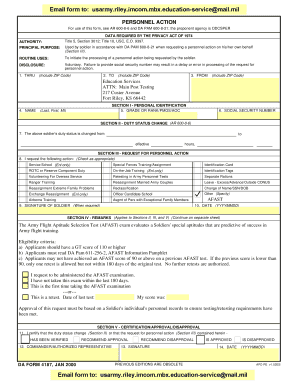
The 4187 Example is a crucial form used by personnel in the Army to request various actions. This guide provides a step-by-step approach to filling out the form accurately and effectively, ensuring that users can complete it with confidence.
Follow the steps to fill out the 4187 Example with ease.
- Press the ‘Get Form’ button to access the form and open it in your preferred editing software.
- Begin by entering your name in the designated section (Last, First, MI) to ensure proper identification.
- Fill in your grade or rank, PMOS, or AOC in the appropriate field.
- Input your social security number in the designated area to secure your identity.
- In Section II, indicate any changes to your duty status by filling out the relevant fields, including the effective date and time.
- In Section III, mark your requested action by checking the appropriate box, ensuring to select only the relevant options.
- If required, provide your signature in the designated field to validate your requests.
- Enter the date of your request in the YYYYMMDD format to document the timeline.
- Utilize Section IV for any additional remarks necessary to clarify your request or provide supplementary information.
- Finally, review all completed sections for accuracy, then save your changes, download the form, print it, or share it as needed.
Complete your documents online now for a seamless experience.
DA Form 4187 serves various purposes within the Army, including requests for changes in duty assignments, awards, or personal clothing. It is also commonly used to document requests for special permissions and other administrative needs. Familiarizing yourself with practical applications of the form can enhance your submission process. For more detailed examples and templates, USLegalForms can be an invaluable resource in navigating 4187 Example scenarios.