Loading
Get G:pdffor~1rutha3433_1.frj Printing - Jrtc-polk Army
How it works
-

Open form follow the instructions
-

Easily sign the form with your finger
-

Send filled & signed form or save
How to fill out the G:PDFFOR~1RUTHA3433_1.FRJ Printing - Jrtc-polk Army online
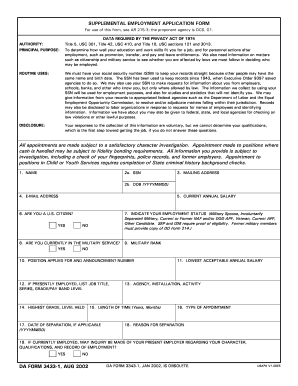
Filling out the G:PDFFOR~1RUTHA3433_1.FRJ Printing - Jrtc-polk Army form is an important step in applying for employment. This guide provides you with clear, step-by-step instructions to help you complete the form accurately and efficiently.
Follow the steps to successfully complete the form online.
- Click ‘Get Form’ button to obtain the form and open it in the editor.
- Begin by entering your full name in the first field. This is essential for identification purposes.
- In the second field, enter your social security number (SSN). This is necessary to maintain accurate records.
- Provide your mailing address in the next field to ensure you can receive any correspondence related to your application.
- Input your date of birth in the format YYYYMMDD to verify your age and eligibility.
- Enter your email address to allow for further communication regarding your application.
- Indicate your current annual salary. This may be relevant for determining compensation.
- Confirm your U.S. citizenship status by selecting 'Yes' or 'No' as applicable.
- Specify your employment status from the provided options, ensuring you include any necessary proof if required.
- If you are currently in military service, select 'Yes' or 'No' accordingly.
- List your military rank if applicable.
- Input the position you are applying for along with the announcement number.
- If presently employed, provide your job title, series, and grade/pay band level.
- Indicate the highest grade or level you have held in prior positions.
- Mention the agency, installation, or activity of your current or previous job.
- State the length of time you've been at your current position using years and months.
- If applicable, provide your date of separation from previous employment.
- Fill in your lowest acceptable annual salary for the position.
- Indicate the type of appointment you are seeking.
- Provide the reason for your separation from any previous employment, if applicable.
- You may confirm whether your present employer can be contacted for inquiries about your character and qualifications.
- List references who can speak to your qualifications and character, ensuring they are not related to you.
- Answer questions regarding any job terminations or legal offenses truthfully.
- Make sure to declare any relatives employed by a nonappropriated fund activity, the federal government, or military if applicable.
- Indicate whether you receive or have applied for retirement pay, pension, or other compensation.
- Finally, certify that all provided information is true, correct, and complete.
- Once all fields are completed, you can save your changes, download, print, or share the completed form as needed.
Start completing your documents online today to ensure a smooth application process.
To print your profile in the Army, navigate to the appropriate portal for Army profiles. Ensure you have the necessary access to your account. Once you locate your profile, look for the print option within the document settings. Using G:PDFFOR~1RUTHA3433_1.FRJ Printing - Jrtc-polk Army can streamline this process and provide a clear, organized printout of your information.
Industry-leading security and compliance
US Legal Forms protects your data by complying with industry-specific security standards.
-
In businnes since 199725+ years providing professional legal documents.
-
Accredited businessGuarantees that a business meets BBB accreditation standards in the US and Canada.
-
Secured by BraintreeValidated Level 1 PCI DSS compliant payment gateway that accepts most major credit and debit card brands from across the globe.