We use cookies to improve security, personalize the user experience, enhance our marketing activities (including cooperating with our marketing partners) and for other business use.
Click "here" to read our Cookie Policy. By clicking "Accept" you agree to the use of cookies. Read less
Read more
Accept
Loading
Form preview
  • US Legal Forms
  • Form Library
  • More Forms
  • More Uncategorized Forms
  • Sf 182, Dec 2006 - Armypubs Army

Get Sf 182, Dec 2006 - Armypubs Army

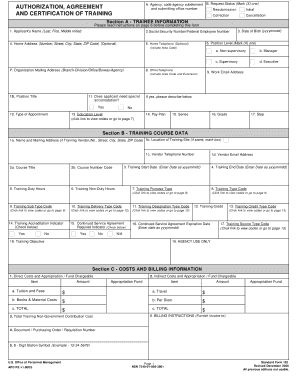
A. Agency, code agency subelement B. Request Status (Mark (X) one) and submitting office number Resubmission Initial AUTHORIZATION, AGREEMENT AND CERTIFICATION OF TRAINING Correction Cancellation.

How it works

  1. Open form

    Open form follow the instructions

  2. Easily sign form

    Easily sign the form with your finger

  3. Share form

    Send filled & signed form or save

How to fill out the SF 182, DEC 2006 - Armypubs Army online

The SF 182, DEC 2006 - Armypubs Army form is crucial for requesting federal training assistance. This guide provides step-by-step instructions to help users fill out the form accurately and effectively, ensuring compliance with all necessary requirements.

Follow the steps to successfully complete the SF 182 form.

  1. Press the ‘Get Form’ button to access the SF 182 form and open it in your selected editor.
  2. Begin with Section A, Trainee Information. Enter the applicant's name, Social Security number or Federal Employee number, date of birth, and contact information.
  3. Indicate whether the applicant needs special accommodations by selecting 'Yes' or 'No' and providing details if applicable.
  4. Complete the remaining fields in Section A, including position title, education level, pay plan, and organization mailing address.
  5. Move to Section B, Training Course Data. Fill out the training vendor's details, course title, training dates, and purpose.
  6. Specify whether a Continued Service Agreement is required and provide training costs in Section C, including direct and indirect costs.
  7. Proceed to Section D and Section E for necessary approvals from supervisors and the authorizing official.
  8. Complete Section F, Certification of Training Completion, ensuring all necessary evaluations are conducted.
  9. Once you have filled in all relevant sections, review the form for accuracy, make any necessary corrections, and then save your changes.
  10. You may opt to download, print, or share the completed form as required.

Complete your documents online today to streamline your training request process.

Get form

Experience a faster way to fill out and sign forms on the web. Access the most extensive library of templates available.
Get form

Related content

Authorization, Agreement, and Certification of...
U.S. Office of Personnel Management. Page 1. NSN 7540-01-008-3901. Standard Form 182...
Learn more
Authorization, Agreement, and Certification of...
U.S. Office of Personnel Management. Page 1. NSN 7540-01-008-3901. Standard Form 182...
Learn more
A Quantitative Decision Framework for Assessing...
Jun 30, 2015 — Quantitative Decision Framework for Assessing Navy VI Sites (NESDI#476)...
Learn more

Related links form

Information Institute Limited Use Password.pdf - Middle District Of Pennsylvania 12th Flying Training Wing Tour Request Form Please Fill Out The ... Application For Special Masters - District Of Connecticut

Questions & Answers

Get answers to your most pressing questions about US Legal Forms API.

Contact support

You can obtain a SF 50 notification of personnel action through your human resources department or agency. This important document records significant employment actions and changes in your federal employment status. To ensure you have the correct version, refer to official publications such as the SF 182, DEC 2006 - Armypubs Army for guidance. Accessing this documentation helps keep track of your employment history accurately.

When preparing for Army basic training, it's important to gather several essential documents. You should have items such as your birth certificate, social security card, and any college transcripts. Additionally, ensure that you have a copy of your enlistment contract and medical records. Being fully prepared, including understanding the SF 182, DEC 2006 - Armypubs Army, will help you transition smoothly into your new military role.

An SF 82 is a form used for requesting travel prior to or post-training. Often confused with the SF 182, the SF 82 focuses on logistical arrangements related to travel costs. Clearly, while both forms facilitate professional development, they cater to different aspects of a soldier’s training experience. Knowing the difference between SF 182, DEC 2006 - Armypubs Army and SF 82 can help you navigate your training needs more efficiently.

SF 82 is often confused with SF 182; however, it serves a different purpose and usually relates to application forms for federal employment. It's essential to distinguish between SF 182, DEC 2006 - Armypubs Army and SF 82 to avoid processing delays. For training funding inquiries, focus on using the correct form, which is SF 182, to ensure proper handling of training requests.

An SF 182 form is a government document used to request training funding for federal employees. This form captures essential details such as the type of training, costs involved, and authorization signatures. By utilizing the SF 182, DEC 2006 - Armypubs Army streamlines the training reimbursement process, making it easier for employees to access educational opportunities.

The limit for SF 182 training payments can vary based on agency policies and the nature of the training. Generally, agencies may set a specific budget for training costs, which can include tuition, travel, and materials. It's vital for employees to review their agency's guidelines to understand the applicable limits when using the SF 182, DEC 2006 - Armypubs Army.

The purpose of the SF 182 is to provide a structured process for U.S. government employees to request funding for training. This form identifies training needs and outlines the associated costs, ensuring transparency and accountability. By using the SF 182, DEC 2006 - Armypubs Army allows employees to improve their performance and meet their career objectives.

SF 182 training payment refers to a form used by U.S. government employees to request payment for training expenses. This form allows individuals to obtain financial support for their education or professional development. By completing the SF 182, DEC 2006 - Armypubs Army ensures that training payments are processed effectively, helping employees enhance their skills and knowledge.

Events and Courses The SF 182 also known as an “Authorization Agreement and Certification of Training” is a form used by the office of personnel management in the United States to collect and store employee's training records.

A: The Standard Form-182 (SF-182) is the Request, Authorization, Agreement and Certification for Training Form, which is used to document instances of completed military and civilian employee training in the Department of Defense (DoD).

Get This Form Now!

Use professional pre-built templates to fill in and sign documents online faster. Get access to thousands of forms.
Get form
If you believe that this page should be taken down, please follow our DMCA take down processhere.

Industry-leading security and compliance

US Legal Forms protects your data by complying with industry-specific security standards.
  • In businnes since 1997
    25+ years providing professional legal documents.
  • Accredited business
    Guarantees that a business meets BBB accreditation standards in the US and Canada.
  • Secured by Braintree
    Validated Level 1 PCI DSS compliant payment gateway that accepts most major credit and debit card brands from across the globe.
Get SF 182, DEC 2006 - Armypubs Army
Get form
Form Packages
Adoption
Bankruptcy
Contractors
Divorce
Home Sales
Employment
Identity Theft
Incorporation
Landlord Tenant
Living Trust
Name Change
Personal Planning
Small Business
Wills & Estates
Packages A-Z
Form Categories
Affidavits
Bankruptcy
Bill of Sale
Corporate - LLC
Divorce
Employment
Identity Theft
Internet Technology
Landlord Tenant
Living Wills
Name Change
Power of Attorney
Real Estate
Small Estates
Wills
All Forms
Forms A-Z
Form Library
Customer Service
Terms of Service
Privacy Notice
Legal Hub
Content Takedown Policy
Bug Bounty Program
About Us
Help Portal
Legal Resources
Blog
Affiliates
Contact Us
Delete My Account
Site Map
Industries
Forms in Spanish
Localized Forms
State-specific Forms
Forms Kit
Legal Guides
Real Estate Handbook
All Guides
Prepared for You
Notarize
Incorporation services
Our Customers
For Consumers
For Small Business
For Attorneys
Our Sites
US Legal Forms
USLegal
FormsPass
pdfFiller
signNow
airSlate WorkFlow
DocHub
Instapage
Social Media
Call us now toll free:
+1 833 426 79 33
As seen in:
  • USA Today logo picture
  • CBC News logo picture
  • LA Times logo picture
  • The Washington Post logo picture
  • AP logo picture
  • Forbes logo picture
© Copyright 1997-2025
airSlate Legal Forms, Inc.
3720 Flowood Dr, Flowood, Mississippi 39232
Form Packages
Adoption
Bankruptcy
Contractors
Divorce
Home Sales
Employment
Identity Theft
Incorporation
Landlord Tenant
Living Trust
Name Change
Personal Planning
Small Business
Wills & Estates
Packages A-Z
Form Categories
Affidavits
Bankruptcy
Bill of Sale
Corporate - LLC
Divorce
Employment
Identity Theft
Internet Technology
Landlord Tenant
Living Wills
Name Change
Power of Attorney
Real Estate
Small Estates
Wills
All Forms
Forms A-Z
Form Library
Customer Service
Terms of Service
Privacy Notice
Legal Hub
Content Takedown Policy
Bug Bounty Program
About Us
Help Portal
Legal Resources
Blog
Affiliates
Contact Us
Delete My Account
Site Map
Industries
Forms in Spanish
Localized Forms
State-specific Forms
Forms Kit
Legal Guides
Real Estate Handbook
All Guides
Prepared for You
Notarize
Incorporation services
Our Customers
For Consumers
For Small Business
For Attorneys
Our Sites
US Legal Forms
USLegal
FormsPass
pdfFiller
signNow
airSlate WorkFlow
DocHub
Instapage
Social Media
Call us now toll free:
+1 833 426 79 33
As seen in:
  • USA Today logo picture
  • CBC News logo picture
  • LA Times logo picture
  • The Washington Post logo picture
  • AP logo picture
  • Forbes logo picture
© Copyright 1997-2025
airSlate Legal Forms, Inc.
3720 Flowood Dr, Flowood, Mississippi 39232