Loading
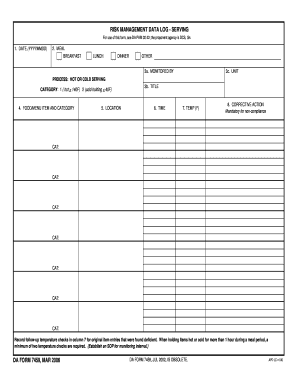
Get Da Form 7459
How it works
-

Open form follow the instructions
-

Easily sign the form with your finger
-

Send filled & signed form or save
How to fill out the Da Form 7459 online
Filling out the Da Form 7459 online can streamline your data management related to risk management in food service. This guide will provide a step-by-step approach to ensure you accurately complete the form.
Follow the steps to successfully complete and submit the Da Form 7459.
- Click ‘Get Form’ button to obtain the form and open it in the editor.
- Enter the date in the format YYYYMMDD in the designated field.
- Select the meal being documented by checking the appropriate box for breakfast, lunch, dinner, or other.
- Fill in the name of the person monitoring the meal service in the ‘monitored by’ section.
- Indicate the unit where the monitoring occurs in the corresponding field.
- Specify the process for food serving as either hot or cold. Select the appropriate category based on the temperature guidelines provided.
- In the food/menu item section, list the specific food items being served along with their corresponding category.
- Document the location where the serving takes place.
- Record the time of the meal service in the designated field.
- Input the temperature of the food in Fahrenheit in the appropriate field.
- If non-compliance occurs, provide a corrective action for each category. List multiple actions if needed.
- As per requirements, note any follow-up temperature checks in column 7 for items initially found deficient. Ensure to record a minimum of two temperature checks during the holding period.
- Once all fields are filled, you can save changes, download, print, or share the completed form as needed.
Start completing your documents online to enhance your efficiency and compliance!
Filling out a DA 2062, the hand receipt/annex, requires accurate itemization of equipment and supplies. Begin by referencing the Da Form 7459 to identify all necessary items and ensure proper accountability. Clearly list each item, including serial numbers and quantities, and have the document signed by the responsible personnel. Regular updates of this form help maintain organizational efficiency.