Loading
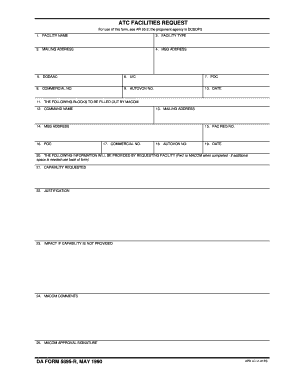
Get Atc Facilities Request. Da Form 5895-r, May 1990 - Armypubs Army
How it works
-

Open form follow the instructions
-

Easily sign the form with your finger
-

Send filled & signed form or save
How to use or fill out the ATC FACILITIES REQUEST. DA FORM 5895-R, MAY 1990 - Armypubs Army online
Filling out the ATC Facilities Request, DA Form 5895-R, May 1990, is essential for requesting specific capabilities and justifications in aviation contexts. This guide aims to provide clear, step-by-step instructions on how to complete the form accurately and effectively, ensuring all necessary information is captured.
Follow the steps to accurately fill out the form.
- Press the ‘Get Form’ button to access and open the form in your online editor.
- In the first section, provide the 'Facility Name' where the request will be fulfilled. This should be the official name of the facility.
- Next, select the 'Facility Type' from the available options. Ensure that this accurately describes the type of facility you are requesting.
- Fill in the 'Mailing Address' for the facility, ensuring it is complete and accurate for correspondence.
- Complete the 'Msg Address' field, which is essential for electronic messaging related to the request.
- Enter the 'DODAAC' (Department of Defense Activity Address Code) that uniquely identifies your unit.
- Input the 'UIC' (Unit Identification Code) relevant to the request being made.
- Provide the 'Point of Contact' (POC) who will be responsible for the request. Include their name and position.
- Fill in the 'Commercial No.' field with the phone number where the POC can be reached.
- Record the 'Autovon No.' to facilitate military telephone communication.
- Include the date on which you are completing the form.
- Complete the 'Command Name' section to identify the command overseeing the request.
- Fill in the 'Mailing Address' for the command. This ensures that correspondence goes to the correct location.
- Provide the 'Msg Address' for the command, similar to the earlier entry.
- Input the 'Point of Contact' (POC) for the command, ensuring it is clear who will handle inquiries.
- Note the 'FAC REQ No.' which serves as a reference identifier for the request.
- Provide the 'Commercial No.' for the command POC.
- Fill in the 'Autovon No.' for the command POC as well.
- Enter the date when the command’s information is being submitted.
- In the following sections, detail the 'Capability Requested' that outlines what you are seeking.
- Provide a 'Justification' for why this capability is necessary, ensuring it is concise and clear.
- Explain the 'Impact if Capability is Not Provided' to illustrate the urgency and importance of the request.
- Include 'MACOM Comments' if applicable, allowing for any additional instructions or notes.
- Lastly, obtain the 'MACOM Approval Signature' to finalize the request. This must be signed by the authorized individual.
- Once you have completed all sections, review the information for accuracy. You can then save changes, download, print, or share the form as needed.
Complete your ATC Facilities Request online today and ensure you have all necessary approvals and information accurately documented.
Making your own table is a fun and easy DIY project, but it does require planning. Something like a DIY nightstand is slightly easier than building a dining table, so if you're a beginner, consider starting small.
Industry-leading security and compliance
US Legal Forms protects your data by complying with industry-specific security standards.
-
In businnes since 199725+ years providing professional legal documents.
-
Accredited businessGuarantees that a business meets BBB accreditation standards in the US and Canada.
-
Secured by BraintreeValidated Level 1 PCI DSS compliant payment gateway that accepts most major credit and debit card brands from across the globe.