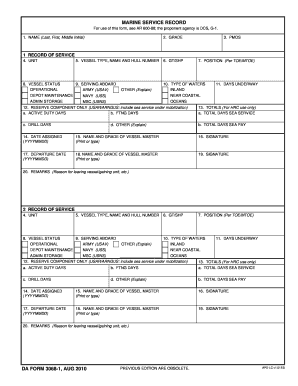
Get Marine Service Record. Da Form 3068-1, Aug 2010 - Armypubs Army
How it works
-

Open form follow the instructions
-

Easily sign the form with your finger
-

Send filled & signed form or save
How to use or fill out the MARINE SERVICE RECORD. DA FORM 3068-1, AUG 2010 - Armypubs Army online
Filling out the Marine Service Record, DA Form 3068-1, is an essential task for documenting marine service in the Army. This guide provides step-by-step instructions on how to accurately complete the form online, ensuring that all necessary information is captured correctly.
Follow the steps to successfully complete the Marine Service Record.
- Click ‘Get Form’ button to obtain the form and open it in your preferred editor.
- In the first section, enter the participant's name (last, first, middle initial) in the designated field labeled '1. NAME'.
- Indicate the participant's grade by filling in the '2. GRADE' section.
- Provide the primary military occupational specialty in the '3. PMOS' field.
- Enter the unit of assignment in the '4. UNIT' section.
- Fill out the type, name, and hull number of the vessel in the '5. VESSEL TYPE, NAME AND HULL NUMBER' field.
- Document the gross tonnage or shaft horsepower by completing '6. GT/SHP'.
- Select the vessel status such as operational or other in '8. VESSEL STATUS'.
- In the '9. SERVING ABOARD' section, specify the service branch (Army, Navy, etc.) with the corresponding type of waters.
- Indicate how many days the person was underway in the '11. DAYS UNDERWAY' field, specifying details for depot maintenance, admin storage, etc.
- Complete the '12. RESERVE COMPONENT ONLY' section if applicable, including relevant sea service.
- For totals, fill in the fields labeled '13. TOTALS (For HRC use only)', detailing active duty days, FTNG days, total days sea service, and any other necessary information.
- Enter the date assigned in '14. DATE ASSIGNED' in the YYYYMMDD format.
- Provide the name and grade of the vessel master in '15. NAME AND GRADE OF VESSEL MASTER' and ensure it is printed or typed.
- Affix the signature in the '16. SIGNATURE' field.
- Document the departure date in '17. DEPARTURE DATE' in the correct format.
- Repeat the process for the second vessel master in the '18. NAME AND GRADE OF VESSEL MASTER' section.
- Provide the second signature in '19. SIGNATURE'.
- In '20. REMARKS', write down the reason for leaving the vessel or gaining a new unit.
- Once all fields are completed, ensure to save your changes, and you may download, print, or share the form as necessary.
Complete your Marine Service Record online today to ensure proper documentation.
To obtain your military records, begin by filling out the standard request form, typically SF-180, and submit it to the appropriate agency. If your focus is on acquiring the MARINE SERVICE RECORD, DA FORM 3068-1, AUG 2010 - Armypubs Army, ensure that your request includes specific details for quicker processing. You can use services like USLegalForms to simplify the process and receive assistance in gathering the necessary documents. This approach can save you time and effort.
Industry-leading security and compliance
-
In businnes since 199725+ years providing professional legal documents.
-
Accredited businessGuarantees that a business meets BBB accreditation standards in the US and Canada.
-
Secured by BraintreeValidated Level 1 PCI DSS compliant payment gateway that accepts most major credit and debit card brands from across the globe.