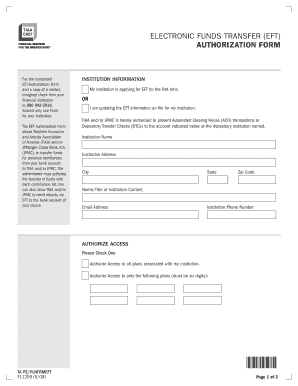
Get Electronic Funds Transfer (eft) Authorization Form - Tiaa-cref
How it works
-

Open form follow the instructions
-

Easily sign the form with your finger
-

Send filled & signed form or save
How to fill out the ELECTRONIC FUNDS TRANSFER (EFT) Authorization Form - Tiaa-cref online
Filling out the ELECTRONIC FUNDS TRANSFER (EFT) Authorization Form for Tiaa-cref online is a straightforward process that enables efficient fund transfers. This guide will walk you through each section of the form to ensure you complete it accurately and efficiently.
Follow the steps to successfully complete the form.
- Click the ‘Get Form’ button to obtain the form and open it in your preferred editor.
- Begin by selecting whether your institution is applying for EFT for the first time or updating existing EFT information. Check the appropriate box to indicate your choice.
- Enter the institution's name and address, including the city, state, and zip code. Also, provide the name and title of the institution contact, along with their email address and phone number.
- Authorize access by checking the appropriate option to permit access to all plans associated with your institution or to select specific plans by entering their six-digit codes.
- Fill in the bank information for EFT payments. This includes the bank's name, street address (no P.O. Boxes), city, state, zip code, account title, account number, and the ABA number (must be 9 digits).
- Indicate if your institution uses Online Contribution List (OCL) or File Exchange, and select how you want to authorize payments from the contribution list.
- Specify whether to use the above bank account for EFT refunds or if a different account will be used. If different, provide the required bank information as in step 5.
- Review all entries to ensure accuracy, then sign and date the form on the last page.
- Fax the completed EFT Authorization Form along with a copy of a voided, unsigned check from your financial institution to the provided fax number. Ensure you include all pages.
Start filling out your ELECTRONIC FUNDS TRANSFER (EFT) Authorization Form online today.
To authorize your bank for electronic funds transfer, you need to complete the necessary paperwork, such as the ELECTRONIC FUNDS TRANSFER (EFT) Authorization Form - Tiaa-cref. You will provide relevant information, including your account details and transfer preferences, enabling the bank to process your requests efficiently. This form serves as a simple means to facilitate your financial transactions.
Industry-leading security and compliance
-
In businnes since 199725+ years providing professional legal documents.
-
Accredited businessGuarantees that a business meets BBB accreditation standards in the US and Canada.
-
Secured by BraintreeValidated Level 1 PCI DSS compliant payment gateway that accepts most major credit and debit card brands from across the globe.