We use cookies to improve security, personalize the user experience, enhance our marketing activities (including cooperating with our marketing partners) and for other business use.
Click "here" to read our Cookie Policy. By clicking "Accept" you agree to the use of cookies. Read less
Read more
Accept
Loading
Form preview
  • US Legal Forms
  • Form Library
  • More Forms
  • More Uncategorized Forms
  • Dlsbdclaims Exchange Principle

Get Dlsbdclaims Exchange Principle

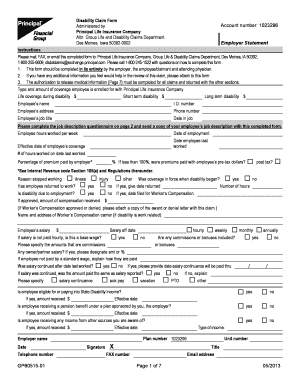
Administered by Attn: Group Life and Disability Claims Department Des Moines, Iowa 50392-0002 Account number: 1023296 Disability Claim Form Instructions Please mail, FAX, or email this completed form.

How it works

  1. Open form

    Open form follow the instructions

  2. Easily sign form

    Easily sign the form with your finger

  3. Share form

    Send filled & signed form or save

How to fill out the Dlsbdclaims Exchange Principle online

Completing the Dlsbdclaims Exchange Principle form online can be a straightforward process with the right guidance. This guide will provide step-by-step instructions to help users navigate through each section of the form efficiently.

Follow the steps to complete the Dlsbdclaims Exchange Principle form accurately.

  1. Click the ‘Get Form’ button to obtain the form and open it for editing.
  2. Begin by entering the account number, employee’s name, and other personal identification details in the specified fields on the form. Make sure to double-check for accuracy.
  3. Complete the employer statement section, including the type and amount of insurance coverage enrolled with Principal Life Insurance Company. Fill in any necessary job-related information such as job title, employment start date, and hours worked.
  4. Provide detailed information about the reason for stopping work, confirming whether any workers’ compensation claims have been filed and their associated details.
  5. Answer questions regarding previous salary received, any ongoing payments, and specify if any disability income or pension benefits are being received.
  6. Ensure to fill out the job description questionnaire thoroughly, detailing the physical demands of the position, working hours, and any technological skills required.
  7. Complete the attending physician's statement section with details about the employee's medical condition, treatment received, and any limitations placed on their ability to work.
  8. Fill out the employee statement, providing information about the nature of the disability and any interactions with other insurance policies or claims.
  9. Conclude by signing the form and adhering to any document submission requirements, including attachments like authorization for the release of information.
  10. Once all fields are completed, save changes, and proceed to download, print, or share the filled form as needed.

Start completing the Dlsbdclaims Exchange Principle form online today for a smoother claims process.

Get form

Experience a faster way to fill out and sign forms on the web. Access the most extensive library of templates available.
Get form

Related content

preliminary prospectus - SEC.gov
As filed with the Securities and Exchange Commission on July 11, 2019 ... filer,”...
Learn more
Disability Claim Form - ASA Miami
Please mail, FAX, or email this completed form to: Principal Life Insurance Company, Group...
Learn more

Related links form

Women's Health History Form - MU Student Health Center ... Proposed Internship For Conservation Biology Graduate Certificate Emergency Generator Rev1 - Campus Facilities - University Of ... Unit_Substation_rev1 - Campus Facilities - University Of Missouri

Questions & Answers

Get answers to your most pressing questions about US Legal Forms API.

Contact support

DBEB, or Data Bracket Email Block, is a security feature in Office 365 designed to filter and protect sensitive information. It aligns with the Dlsbdclaims Exchange Principle to ensure that data is handled properly across your organization. Utilizing these features helps mitigate risks and secure your communications.

Enabling a mailbox in Exchange Online starts with accessing the Microsoft 365 admin center. Navigate to users and select active users. Here, you can assign a new or existing user a mailbox, ensuring they can effectively communicate as per the Dlsbdclaims Exchange Principle.

To enable an external sender warning in Office 365, go to the Exchange admin center. Under the mail flow settings, create a new rule that triggers a warning when messages arrive from an external sender. This practice reinforces the Dlsbdclaims Exchange Principle by enhancing user awareness and security.

Migrating your DLP policy involves using the Microsoft 365 compliance center. First, determine the policies you want to migrate and review their settings. Once ready, follow the steps to apply the Dlsbdclaims Exchange Principle, ensuring that your new policies align with your organization’s compliance needs.

To add an exception to your DLP policy, access the Microsoft 365 compliance center. Find your established DLP policy and look for the exceptions section. You can then define specific criteria that aligns with the Dlsbdclaims Exchange Principle, allowing certain users or actions to bypass DLP restrictions.

The four types of Data Loss Prevention (DLP) are content inspection, contextual analysis, endpoint protection, and storage security. Understanding these types helps you tailor your DLP policies to fit the Dlsbdclaims Exchange Principle more effectively. By implementing them, you can protect sensitive information across your organization.

To whitelist a domain in Office 365 Exchange Online, begin by logging into the Exchange admin center. Then, go to the protection settings and select the allow lists feature. Here, you can add your desired domain to ensure smooth communication, aligning with the Dlsbdclaims Exchange Principle.

To enable Dbeb in Exchange Online, navigate to the Microsoft 365 admin center. From there, access the Exchange admin center and locate the features section. Once you find the Dlsbdclaims Exchange Principle option, switch it on and ensure to save your changes for the new settings to take effect.

To answer question 69 on the DLA form, describe the specific assistance you need with personal care tasks due to your condition. Be as detailed as possible, outlining the frequency and type of help required. Incorporating the Dlsbdclaims Exchange Principle into your response strategy can enhance the clarity and impact of your answer.

To send claims on dental exchange, collect all required documentation pertaining to your dental services. After that, follow your dental provider's instructions for submission. Utilizing the Dlsbdclaims Exchange Principle can help in organizing your claims and ensuring that nothing is overlooked.

Get This Form Now!

Use professional pre-built templates to fill in and sign documents online faster. Get access to thousands of forms.
Get form
If you believe that this page should be taken down, please follow our DMCA take down processhere.

Industry-leading security and compliance

US Legal Forms protects your data by complying with industry-specific security standards.
  • In businnes since 1997
    25+ years providing professional legal documents.
  • Accredited business
    Guarantees that a business meets BBB accreditation standards in the US and Canada.
  • Secured by Braintree
    Validated Level 1 PCI DSS compliant payment gateway that accepts most major credit and debit card brands from across the globe.
Get Dlsbdclaims Exchange Principle
Get form
Form Packages
Adoption
Bankruptcy
Contractors
Divorce
Home Sales
Employment
Identity Theft
Incorporation
Landlord Tenant
Living Trust
Name Change
Personal Planning
Small Business
Wills & Estates
Packages A-Z
Form Categories
Affidavits
Bankruptcy
Bill of Sale
Corporate - LLC
Divorce
Employment
Identity Theft
Internet Technology
Landlord Tenant
Living Wills
Name Change
Power of Attorney
Real Estate
Small Estates
Wills
All Forms
Forms A-Z
Form Library
Customer Service
Terms of Service
Privacy Notice
Legal Hub
Content Takedown Policy
Bug Bounty Program
About Us
Blog
Affiliates
Contact Us
Delete My Account
Site Map
Industries
Forms in Spanish
Localized Forms
State-specific Forms
Forms Kit
Legal Guides
Real Estate Handbook
All Guides
Prepared for You
Notarize
Incorporation services
Our Customers
For Consumers
For Small Business
For Attorneys
Our Sites
US Legal Forms
USLegal
FormsPass
pdfFiller
signNow
airSlate WorkFlow
DocHub
Instapage
Social Media
Call us now toll free:
+1 833 426 79 33
As seen in:
  • USA Today logo picture
  • CBC News logo picture
  • LA Times logo picture
  • The Washington Post logo picture
  • AP logo picture
  • Forbes logo picture
© Copyright 1997-2025
airSlate Legal Forms, Inc.
3720 Flowood Dr, Flowood, Mississippi 39232
Form Packages
Adoption
Bankruptcy
Contractors
Divorce
Home Sales
Employment
Identity Theft
Incorporation
Landlord Tenant
Living Trust
Name Change
Personal Planning
Small Business
Wills & Estates
Packages A-Z
Form Categories
Affidavits
Bankruptcy
Bill of Sale
Corporate - LLC
Divorce
Employment
Identity Theft
Internet Technology
Landlord Tenant
Living Wills
Name Change
Power of Attorney
Real Estate
Small Estates
Wills
All Forms
Forms A-Z
Form Library
Customer Service
Terms of Service
Privacy Notice
Legal Hub
Content Takedown Policy
Bug Bounty Program
About Us
Blog
Affiliates
Contact Us
Delete My Account
Site Map
Industries
Forms in Spanish
Localized Forms
State-specific Forms
Forms Kit
Legal Guides
Real Estate Handbook
All Guides
Prepared for You
Notarize
Incorporation services
Our Customers
For Consumers
For Small Business
For Attorneys
Our Sites
US Legal Forms
USLegal
FormsPass
pdfFiller
signNow
airSlate WorkFlow
DocHub
Instapage
Social Media
Call us now toll free:
+1 833 426 79 33
As seen in:
  • USA Today logo picture
  • CBC News logo picture
  • LA Times logo picture
  • The Washington Post logo picture
  • AP logo picture
  • Forbes logo picture
© Copyright 1997-2025
airSlate Legal Forms, Inc.
3720 Flowood Dr, Flowood, Mississippi 39232