Get Irs Salary
How it works
-

Open form follow the instructions
-

Easily sign the form with your finger
-

Send filled & signed form or save
How to fill out the IRS Salary online
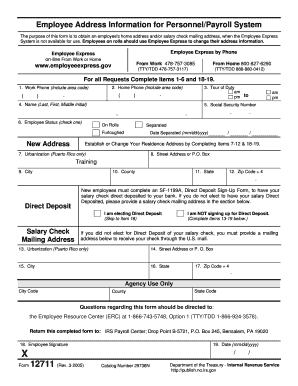
Filling out the IRS Salary form is a crucial process for ensuring that your address and payment information are correctly recorded. This guide will provide you with step-by-step instructions to navigate the form with ease, ensuring that you complete each section accurately.
Follow the steps to fill out the IRS Salary form online effectively.
- Click ‘Get Form’ button to obtain the form and open it in the online editor.
- Complete Items 1-6 and 18-19, providing necessary contact information. Input your work and home phone numbers, your name, and social security number, and indicate your employee status.
- If establishing or changing your residence address, fill out Items 7-12. Provide your urbanization (if applicable), street address or P.O. Box, city, state, county, and zip code.
- If you are opting for direct deposit, you can skip to Item 18. Otherwise, fill in Items 13-19 with your salary check mailing address, including urbanization (if applicable), street address, city, state, and zip code.
- Sign the form in Item 18. Ensure that you date the form in Item 19 for completion.
- Once all sections have been filled out, save your changes, and choose to download, print, or share the completed form as needed.
Complete your IRS Salary form online today for a streamlined process.
Reporting your wages to the IRS involves completing the necessary forms during tax season, such as Form 1040. Gather all your income statements, including W-2 forms from each employer, to ensure accurate reporting. Ensure that you account for any additional income streams as well. If you encounter difficulties, platforms like USLegalForms provide guidance to ensure you submit your wages correctly and efficiently.