Loading
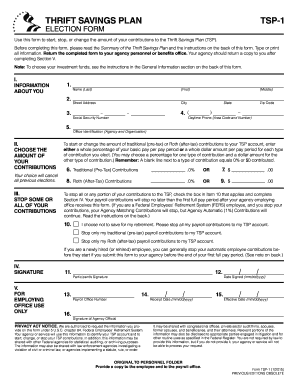
Get Tsp Fillable 2015 Form
How it works
-

Open form follow the instructions
-

Easily sign the form with your finger
-

Send filled & signed form or save
How to use or fill out the Tsp Fillable 2015 Form online
The Tsp Fillable 2015 Form is designed for individuals to start, stop, or modify their contributions to the Thrift Savings Plan. This guide provides clear, step-by-step instructions to ensure you fill out the form accurately and efficiently.
Follow the steps to complete your Tsp Fillable 2015 Form
- Click ‘Get Form’ button to access the Tsp Fillable 2015 Form. This will allow you to open the form in the editor for completion.
- Fill out Section I: Information About You. Include your name, address, social security number, daytime phone number, and office identification. Ensure that all information is accurate.
- Proceed to Section II: Choose the Amount of Your Contributions. Here, you can either select a percentage or a dollar amount for traditional (pre-tax) contributions and Roth (after-tax) contributions. Remember, a blank line indicates 0% or $0.
- Continue to Section III: Stop Some or All of Your Contributions. If you wish to halt your contributions, check the appropriate box to indicate your choice.
- Complete Section IV: Signature. This section requires your signature to validate the form.
- Move to Section V: For Employing Office Use Only. Ensure that your agency personnel complete this section after processing your form.
- Once you've filled out all necessary sections, save your changes, and consider downloading, printing, or sharing the form as needed.
Complete your Tsp Fillable 2015 Form online today to effectively manage your retirement contributions.
To file TSP on your taxes, you will need to gather all relevant documents, including your Form 1099-R and contributions data from your TSP Fillable 2015 Form. Report any withdrawals on your Form 1040, ensuring to indicate any taxable amounts correctly. If you need help, consider visiting uslegalforms, as they offer resources that can simplify the process.