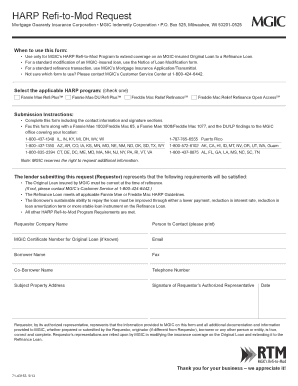
MGIC s Refi-to-Mod RTM Grayscale Live Text MGIC s Refi-to-Mod HARP Refi-to-Mod Request RTM The lender submitting this request (Requestor) represents that When to use this form Use only for MGIC s.
Open form follow the instructions
Easily sign the form with your finger
Send filled & signed form or save
How to fill out the HARP RTM Request Form - MGIC.com online
The HARP RTM Request Form is a crucial document for individuals seeking to extend mortgage insurance coverage through the HARP Refi-to-Mod Program. This guide will provide step-by-step instructions to assist users in accurately completing the form online.
Follow the steps to successfully complete the request form.
- Click ‘Get Form’ button to obtain the form and open it in the editor.
- Select the applicable HARP program by checking one of the options: Fannie Mae Refi Plus™, Fannie Mae DU Refi Plus™, Freddie Mac Relief RefinanceSM, or Freddie Mac Relief Refinance Open AccessSM.
- Fill in the Requestor Company Name in the designated field.
- Provide the name of the person to contact by printing it in the specified section.
- If known, enter the MGIC Certificate Number for the Original Loan.
- Fill out the email address of the Requestor.
- Enter the Borrower Name in the appropriate field.
- Include the Co-Borrower Name if applicable.
- Provide the Telephone Number to ensure proper communication.
- Input the Subject Property Address to identify the location relevant to the mortgage.
- Ensure the Signature of Requestor’s Authorized Representative is included.
- Date the form to validate the submission.
- Review all information for accuracy and completeness before submission.
- Upon final review, save changes. You may then choose to download, print, or share the completed form as needed.
Complete your HARP RTM Request Form online today for a smooth submission process.
Experience a faster way to fill out and sign forms on the web. Access the most extensive library of templates available.
Related content
Jun 26, 2020 — Provide the name, title and telephone number of a contact employee: Kyle...
Dearborn said he was uncomfortable with the request and also declined to deliver ... TIME...
Get answers to your most pressing questions about US Legal Forms API.
What is the HARP program and how does it work?
The HARP program, or Home Affordable Refinance Program, allows homeowners to refinance their mortgages even if their home values have declined. It aims to provide relief for those struggling with underwater mortgages, and the HARP RTM Request Form - MGIC is the first step to accessing this valuable opportunity. By filling out the form, you take a proactive step towards potentially lowering your monthly payments and stabilizing your financial situation.
Who is eligible for HARP?
Eligibility for HARP primarily includes homeowners who have a mortgage owned by Fannie Mae or Freddie Mac. If your mortgage is underwater, meaning you owe more than its current value, you can still qualify. By using the HARP RTM Request Form - MGIC, you can easily find out if you meet the criteria and take a step towards a financial relief.
What is the Freddie Mac relief refi?
The Freddie Mac relief refi is a refinance option designed to assist homeowners who are struggling with underwater mortgages. It allows eligible borrowers to refinance into a lower interest rate without the usual requirements of a traditional refinance. Essentially, this option simplifies the process, making it faster and more affordable through the HARP RTM Request Form - MGIC.
What is a conditionally required field in ?
Conditional fields only appear to the recipient when a specified condition is met. You can hide conditional fields until the recipient makes an entry in your documents that triggers the fields to show, such as selecting a dropdown option or marking a checkbox.
What are conditional fields for forms in Airtable?
Conditional form fields allow you to show fields in a form view based on the form submitter's values for previous fields. Fields with conditions are hidden until those conditions are met, meaning that those filling out your form will not be presented with unnecessary fields so they can complete the form more quickly.
What is conditional field logic?
Overview. Through Conditional Field Logic, user admins can control which profile fields are displayed—and which options are listed for those fields—based on how other fields are filled out. Certain selections act as a trigger for what is then presented to the user.
How do you create a conditional form?
0:30 4:29 How to Create Conditional Questions in Google Forms - YouTube YouTube Start of suggested clip End of suggested clip But it's the best way to make it. Work. Click add section from the menu on the right it'll beMoreBut it's the best way to make it. Work. Click add section from the menu on the right it'll be numbered by default. But it's a good idea to label your sections to help you keep track of them.
How do I create a conditional field in ?
How to Set up 's Conditional Logic Overview Choose a trigger field. Rename the label of the trigger field (optional) Select which fields are to be displayed when the condition is met. Delete or edit conditions. Set up advanced conditions with formula fields.
How do I use conditional formatting in ?
How to Set up 's Conditional Logic Overview Choose a trigger field. Rename the label of the trigger field (optional) Select which fields are to be displayed when the condition is met. Delete or edit conditions. Set up advanced conditions with formula fields.
What is a conditional field?
With conditional fields you can add rules that control what data that can be entered in a page; rules to make fields mandatory or read only, and rules that filter drop down lists, depending on values of other fields.
Use professional pre-built templates to fill in and sign documents online faster. Get access to thousands of forms.
If you believe that this page should be taken down, please follow our DMCA take down process here.