Loading
Get Edina Homestead Forms
How it works
-

Open form follow the instructions
-

Easily sign the form with your finger
-

Send filled & signed form or save
How to fill out the Edina Homestead Forms online
Completing the Edina Homestead Forms online is an essential process for individuals seeking homestead classification for their property. This guide provides a step-by-step approach to assist you in filling out the form accurately and efficiently.
Follow the steps to successfully complete the Edina Homestead Forms online.
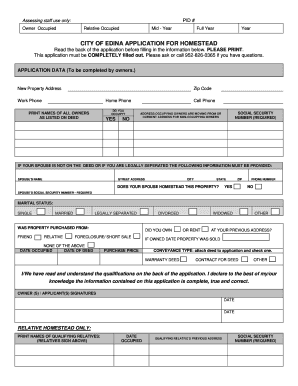
- Press the ‘Get Form’ button to access the Edina Homestead Forms. This will allow you to open the necessary form in an online editor for completion.
- In the 'Application Data' section, enter the new property address and zip code accurately. Include your work and home phone numbers.
- Indicate whether you occupy the property by selecting 'Yes' or 'No.' If applicable, print the names of all owners as they are listed on the deed.
- Fill in your cell phone number and provide the required Social Security number.
- If you are a non-occupying owner or the spouse is not listed on the deed, enter the spouse’s name, address, phone number, and their Social Security number.
- Select your marital status from the available options: single, married, legally separated, divorced, or widowed.
- Indicate where the property was purchased from, and provide details like purchase price and dates occupied.
- Select the conveyance type, attaching the deed to the application and checking one of the options provided.
- Read the qualifications thoroughly, ensuring you understand the requirements for homestead classification.
- Sign and date the application to confirm that the information provided is complete and accurate.
- Once completed, save your changes. You can choose to download, print, or share the form as needed.
Ensure your homestead application is submitted correctly by filling out the Edina Homestead Forms online today.
Get form
Experience a faster way to fill out and sign forms on the web. Access the most extensive library of templates available.
To qualify for the Minnesota homestead credit, ensure you own and reside in the property for the required duration, typically at least six months. Additionally, your income and other qualifying criteria might affect eligibility. Consider accessing Edina Homestead Forms through US Legal Forms to simplify your application process.
Get This Form Now!
Use professional pre-built templates to fill in and sign documents online faster. Get access to thousands of forms.