Loading
Get Piopac Flex Spending
How it works
-

Open form follow the instructions
-

Easily sign the form with your finger
-

Send filled & signed form or save
How to fill out the Piopac Flex Spending online
This guide provides clear, user-friendly instructions for filling out the Piopac Flex Spending form online. It aims to support users at all experience levels by detailing each component of the form systematically.
Follow the steps to complete the Piopac Flex Spending form online effectively.
- Press the ‘Get Form’ button to access the form and open it in your preferred editing application.
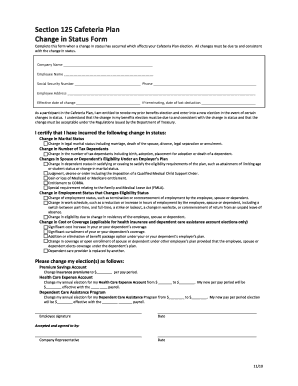
- Fill in the company name and your personal details, such as your name, Social Security number, phone number, and address. Ensure that all information is accurate to avoid any processing issues.
- Indicate the effective date of the change in status. If you are terminating your participation, specify the date of your last deduction.
- Next, certify your changes by selecting the method of change in status that applies to you from the provided list. Each option outlines different circumstances, so choose the one that accurately reflects your situation.
- For each benefit account (such as Health Care Expense Account or Dependent Care Assistance Program), specify your new elections by entering the new amounts you wish to contribute per pay period. Be thoughtful to ensure they align with your financial planning.
- At the end of the form, provide your signature and the date. This confirms your consent and understanding of the changes made.
- Finally, save your changes. You can download, print, or share the completed form as required for your records or submission.
Start completing your Piopac Flex Spending form online today to ensure you maximize your benefits.
Qualification for the Piopac Flex Spending card usually includes individuals who are enrolled in certain Medicare Advantage or Medicaid programs. Additionally, some employer-sponsored health plans may also offer this option. If you're unsure about your eligibility, check with your healthcare provider or plan, or explore solutions like USLegalForms that can help you navigate these details.