Loading
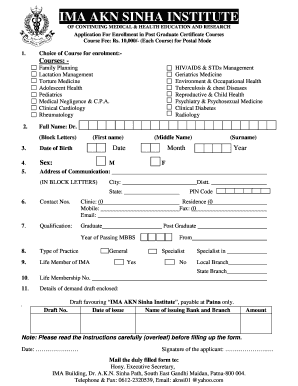
Get Akn Sinha Institute Lactation Management Form
How it works
-

Open form follow the instructions
-

Easily sign the form with your finger
-

Send filled & signed form or save
How to fill out the Akn Sinha Institute Lactation Management Form online
Filling out the Akn Sinha Institute Lactation Management Form online can help streamline your application process for the postgraduate certificate course in lactation management. This guide provides a clear and step-by-step approach to ensure that you complete the form accurately and efficiently.
Follow the steps to successfully complete the form.
- Click ‘Get Form’ button to obtain the form and open it in the editor.
- Begin by selecting your choice of course for enrollment. Available options include lactation management and several other specialties related to health education.
- Fill in your full name in block letters. Be sure to include your first name, middle name, and surname.
- Enter your date of birth accurately by including the day, month, and year.
- Indicate your sex by selecting the appropriate option.
- Provide your address of communication in block letters, including the city, district, state, and PIN code.
- List your contact numbers, including clinic, mobile, fax, and email, ensuring all information is up to date.
- Detail your qualifications by indicating whether you are a graduate or postgraduate, along with the year of passing.
- Specify your type of practice, indicating whether you are a general practitioner or a specialist.
- Indicate whether you are a life member of the IMA and provide your life membership number.
- Include details of the demand draft, such as the draft number, date of issue, name of the issuing bank and branch, and the amount enclosed.
- Make sure to date the form and sign it in the designated area.
- Once all sections are completed, save your changes. You may then choose to download, print, or share the completed form as required.
Complete your Akn Sinha Institute Lactation Management Form online today to ensure a smooth enrollment process.
Format the text in your table of contents Go to References > Table of Contents > Custom Table of Contents. Select Modify. ... In the Styles list, click the level that you want to change and then click Modify. In the Modify Style pane, make your changes. Select OK to save changes.
Industry-leading security and compliance
US Legal Forms protects your data by complying with industry-specific security standards.
-
In businnes since 199725+ years providing professional legal documents.
-
Accredited businessGuarantees that a business meets BBB accreditation standards in the US and Canada.
-
Secured by BraintreeValidated Level 1 PCI DSS compliant payment gateway that accepts most major credit and debit card brands from across the globe.