Loading
Get Adultproxy
How it works
-

Open form follow the instructions
-

Easily sign the form with your finger
-

Send filled & signed form or save
How to use or fill out the Adultproxy online
This guide provides clear and detailed instructions on how to fill out the Adultproxy form to gain access to the MyChart medical records of another adult. By ensuring you understand each section of the form, you can complete it efficiently and accurately.
Follow the steps to successfully complete the Adultproxy form.
- Click the ‘Get Form’ button to obtain the Adultproxy form and open it for editing.
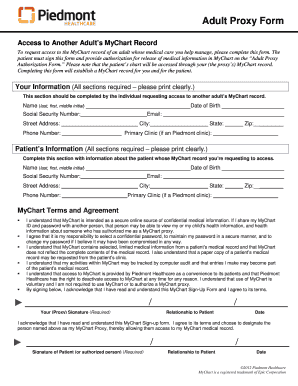
- In the 'Your Information' section, fill in your name (last, first, middle initial), Social Security number, date of birth, street address, phone number, email, city, state, zip, and primary clinic (if applicable). Ensure all fields are completed clearly.
- Move to the 'Patient’s Information' section and input the patient's name (last, first, middle initial), Social Security number, street address, phone number, date of birth, email, city, state, zip, and primary clinic (if applicable). Again, ensure clarity in your entries.
- Review the 'MyChart Terms and Agreement' carefully. Acknowledge your understanding of the terms by signing in the designated area for your (proxy) signature, and include your relationship to the patient and the date of signing.
- The patient must also sign below your signature, indicating their approval for you to act as their MyChart proxy. They should provide their relationship to the patient and the date.
- Ensure that the Adult Proxy Authorization for Release of Medical Information form accompanies the Adultproxy form. In this section, the patient provides their name, Social Security number, and date of birth. They must also authorize you as their designated MyChart proxy.
- Complete the remaining fields, which include the date, primary clinic, and signature of the patient or authorized person. If someone other than the patient signs, documentation of authority to sign must be attached.
- Once all sections are completed, review the entire form for accuracy. After confirming all entries are correct, you can save changes, download, print, or share the form as needed.
Complete your Adultproxy form online today to ensure seamless access to MyChart medical records.
Creating proxies is not illegal; however, it depends on the intent and use. If proxies are created for legitimate purposes, such as enhancing online privacy, they are generally acceptable. Always familiarize yourself with local laws to ensure compliant usage. Adultproxy offers guidance on lawful usage, simplifying your journey into proxy services.