Loading
Form preview
  • US Legal Forms
  • Other Templates
  • More Forms
  • More Uncategorized Forms
  • Dshs Burial Fund 14 251

Get Dshs Burial Fund 14 251

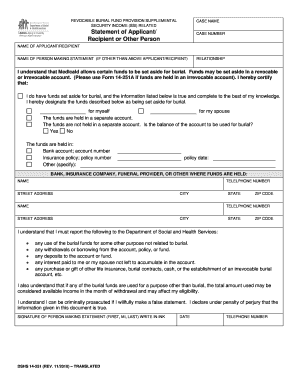
REVOCABLE BURIAL FUND PROVISION SUPPLEMENTAL SECURITY INCOME (SSI) RELATED CASE NAME Statement of Applicant/ Recipient or Other Person CASE NUMBER NAME OF APPLICANT/RECIPIENT NAME OF PERSON MAKING.

How it works

  1. Open form

    Open form follow the instructions

  2. Easily sign form

    Easily sign the form with your finger

  3. Share form

    Send filled & signed form or save

How to fill out the Dshs Burial Fund 14 251 online

Filling out the Dshs Burial Fund 14 251 online is a crucial step in ensuring that burial funds are properly documented, whether for yourself or on behalf of someone else. This guide will provide you with a clear and comprehensive approach to completing the form accurately and effectively.

Follow the steps to successfully complete the Dshs Burial Fund 14 251 online

  1. Click the ‘Get Form’ button to access the Dshs Burial Fund 14 251 form and open it in your browser.
  2. Begin filling in the case name, which refers to the designated title associated with the burial fund application.
  3. Enter the case number. This is the unique identifier assigned to your application which can be found on previous correspondence or documents.
  4. Fill in the name of the applicant or recipient, which is the person for whom the burial fund is being established.
  5. If the statement is being made by someone other than the applicant/recipient, include their name in this section.
  6. Specify the relationship of the person making the statement to the applicant or recipient. Be clear and concise in your description.
  7. Indicate whether burial funds have been set aside and affirm the accuracy of the provided information as true to the best of your knowledge.
  8. State who the funds are designated for—yourself or your partner, as applicable.
  9. Clarify whether the funds are held in a separate account or not. If so, provide details on the balance and its intended use.
  10. In the corresponding fields, input details about how the funds are held: whether in a bank account, insurance policy, or other specified method.
  11. If applicable, provide the bank or insurance company's name, telephone number, street address, city, state, and ZIP code of where the funds are held.
  12. Remember to include any necessary information about reporting changes to the Department of Social and Health Services, as outlined in the form.
  13. Familiarize yourself with the potential consequences of misusing burial funds and ensure that all statements are made truthfully.
  14. Sign the form using your first, middle initial, and last name in ink. Include the date and your telephone number.
  15. Once all sections of the form are completed, save your changes, download, print, or share the document as needed.

Complete your Dshs Burial Fund 14 251 form online today to ensure proper management of burial funds.

Get form

Experience a faster way to fill out and sign forms on the web. Access the most extensive library of templates available.
Get form

Related content

Eligibility A-Z Manual (EA-Z)
821 · Program Summary - Pregnant Women Assistance, May 14, 2012 ... 388-412-0046, What is...
Learn more
Proof, Social Justice, and Public Assistance...
Jan 1, 2010 — While death may be an uncommon outcome, ... 14 Statistics on...
Learn more

Related links form

Undergradua Te Applica Tion - National Technical Institute For The ... Campus Center Ticketing Services Campus Center Information ... Office Of Athletics And Recreation Objective-C Development: Get Started Building Mac And IOS Apps...

Questions & Answers

Get answers to your most pressing questions about US Legal Forms API.

Contact support

In Washington state, the death benefit provides a direct financial payment to help cover funeral expenses and related costs. The Dshs Burial Fund 14 251 may qualify as part of this benefit, allowing families to access crucial funds during a challenging time. It's important to confirm eligibility criteria, as benefits may differ among individuals. Explore platforms like uslegalforms to learn more and streamline your application process.

The $40,000 burial benefit refers to a specific financial assistance program under the Dshs Burial Fund 14 251 aimed to support families with funeral costs. This benefit helps families secure necessary services without overwhelming financial stress. Eligibility often depends on financial need and other factors, so it's advisable to evaluate your situation carefully. For assistance in applying, uslegalforms can provide valuable resources.

Yes, Medicaid can assist with funeral expenses in Washington state, but it comes with specific conditions. While Medicaid typically does not cover all costs, it may fund limited expenses when utilizing the Dshs Burial Fund 14 251. It's essential to check eligibility and covered services with your Medicaid caseworker to understand what support is available. Consider consulting uslegalforms for comprehensive information on Medicaid policies.

A burial fund, such as the Dshs Burial Fund 14 251, is designed to provide financial assistance for funeral expenses. When a loved one passes away, these funds can help cover costs associated with burial or cremation services. Typically, families can access these funds directly to ease the financial burden during a difficult time. Using resources like uslegalforms, you can navigate the process smoothly.

Setting up a burial fund involves assessing your financial situation and understanding available options, including the Dshs Burial Fund 14 251. Start by determining your budget and what expenses you want to cover. You may want to consult with financial advisors or use platforms like uslegalforms to create a tailored burial fund plan that meets your needs and complies with laws.

To qualify for burial assistance through the Dshs Burial Fund 14 251, individuals must meet specific eligibility criteria. These include demonstrating financial need and having limited resources. Additionally, applicants must provide necessary documentation regarding the burial plans and costs. Understanding these requirements will help you navigate the process smoothly.

Go to the REFERENCES tab and click Table of Contents. Then, choose which automatic table style you want, and click. And Word instantly creates a table of contents, based on your styled headings.

Applying character styles 1) On the Structure line, click the button that represents the element to which you want to apply a style. 2) From the Character Style drop-down list, select the desired style.

Title the Table of Contents. Add a title on the top of the Table of Contents. Usually the title is “Table of Contents” or “Contents.” You can put the title above the table or in a separate row on the top of the rest of the content.

Table of Contents Format Title the page “Table of Contents” and center the title at the top of the page. Use an outline format for the different sections of your paper. ... All main headings should be flush-left. Sub-headings should be indented five spaces. All entries should use title case.

Get This Form Now!

Use professional pre-built templates to fill in and sign documents online faster. Get access to thousands of forms.
Get form
If you believe that this page should be taken down, please follow our DMCA take down processhere.
Get Dshs Burial Fund 14 251
Get form
  • Adoption
  • Bankruptcy
  • Contractors
  • Divorce
  • Home Sales
  • Employment
  • Identity Theft
  • Incorporation
  • Landlord Tenant
  • Living Trust
  • Name Change
  • Personal Planning
  • Small Business
  • Wills & Estates
  • Packages A-Z
  • Affidavits
  • Bankruptcy
  • Bill of Sale
  • Corporate - LLC
  • Divorce
  • Employment
  • Identity Theft
  • Internet Technology
  • Landlord Tenant
  • Living Wills
  • Name Change
  • Power of Attorney
  • Real Estate
  • Small Estates
  • Wills
  • All Forms
  • Forms A-Z
  • Other Templates
  • Legal Hub
  • About Us
  • Help Portal
  • Legal Resources
  • Blog
  • Affiliates
  • Contact Us
  • Delete My Account
  • Site Map
  • Industries
  • Forms in Spanish
  • Localized Forms
  • State-specific Forms
  • Forms Kit
  • Real Estate Handbook
  • All Guides
  • Notarize
  • Incorporation services
  • For Consumers
  • For Small Business
  • For Attorneys
  • USLegal
  • FormsPass
  • pdfFiller
  • signNow
  • altaFlow
  • DocHub
  • Instapage
Form Packages
  • Adoption
  • Bankruptcy
  • Contractors
  • Divorce
  • Home Sales
  • Employment
  • Identity Theft
  • Incorporation
  • Landlord Tenant
  • Living Trust
  • Name Change
  • Personal Planning
  • Small Business
  • Wills & Estates
  • Packages A-Z
Form Categories
  • Affidavits
  • Bankruptcy
  • Bill of Sale
  • Corporate - LLC
  • Divorce
  • Employment
  • Identity Theft
  • Internet Technology
  • Landlord Tenant
  • Living Wills
  • Name Change
  • Power of Attorney
  • Real Estate
  • Small Estates
  • Wills
  • All Forms
  • Forms A-Z
  • Other Templates
Customer Service
  • Legal Hub
  • About Us
  • Help Portal
  • Legal Resources
  • Blog
  • Affiliates
  • Contact Us
  • Delete My Account
  • Site Map
  • Industries
  • Forms in Spanish
  • Localized Forms
  • State-specific Forms
  • Forms Kit
Legal Guides
  • Real Estate Handbook
  • All Guides
Prepared for you
  • Notarize
  • Incorporation services
Our Customers
  • For Consumers
  • For Small Business
  • For Attorneys
Our Sites
  • USLegal
  • FormsPass
  • pdfFiller
  • signNow
  • altaFlow
  • DocHub
  • Instapage
Social Media
Call us now toll free:
+1 833 426 79 33
As seen in:
© Copyright 1999-2026 airSlate Legal Forms, Inc. 17 Station Street, Ste. 203, Brookline, MA 02445
  • Your Privacy Choices
  • Terms of Service
  • Privacy Notice
  • Content Takedown Policy
  • Bug Bounty Program