Get Bmi Form
How it works
-

Open form follow the instructions
-

Easily sign the form with your finger
-

Send filled & signed form or save
How to fill out the Bmi Form online
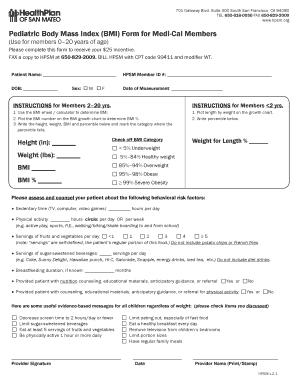
The Pediatric Body Mass Index (BMI) Form is a crucial document for Medi-Cal members aged 0–20, allowing users to assess the health status of children and receive an incentive. This guide provides step-by-step instructions on how to complete the form online effectively.
Follow the steps to complete the Bmi Form online.
- Press the ‘Get Form’ button to access the Bmi Form and open it in your preferred editing tool.
- Fill in the patient's name clearly in the designated field. Ensure accuracy as this information identifies the individual.
- Enter the HPSM Member ID number in the corresponding field to associate the form with the right member.
- Provide the date of birth (DOB) of the patient to ensure age-appropriate health assessments are made.
- Record the date of measurement. This should reflect the date when the height and weight were measured for the BMI calculation.
- Select the sex of the patient by checking either the box next to 'M' for male or 'F' for female.
- Using a BMI wheel or calculator, determine and record the BMI value in the relevant field.
- Plot the BMI on the BMI growth chart to ascertain the corresponding BMI percentile, and document this value.
- Record the height in inches and weight in pounds in their respective fields, ensuring the accuracy of these measurements.
- Check off the appropriate BMI category based on the percentile calculated earlier.
- Assess and document the behavioral risk factors by filling in details related to sedentary time, physical activity, servings of fruits and vegetables, and sugar-sweetened beverages.
- Provide information regarding breastfeeding duration if applicable, and indicate whether counseling and educational materials were provided.
- Finally, ensure that the provider signature, the date, and the provider name (printed or stamped) are entered clearly at the end of the form.
- Once all fields are completed, save the changes, and utilize the options to download, print, or share the form as required.
Complete your Bmi Form online today to help monitor your child's health and receive your incentive.
BMI typically does not require a social security number when filling out the BMI Form. However, providing your social security number may streamline the registration process in some cases. Always check the specific requirements on the BMI website or the form itself to ensure you have all the necessary information. This way, you can avoid any delays in registering or accessing BMI services.