Loading
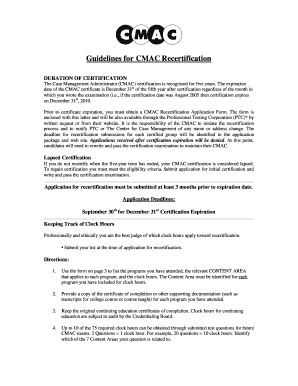
Get Guidelines For Cmac Recertification - Professional Testing ...
How it works
-

Open form follow the instructions
-

Easily sign the form with your finger
-

Send filled & signed form or save
How to fill out the Guidelines For CMAC Recertification - Professional Testing online
Filling out the Guidelines for CMAC Recertification - Professional Testing form online is a crucial step in ensuring your certification remains valid. This guide will provide you with clear, step-by-step instructions to effectively complete the recertification application.
Follow the steps to successfully complete your recertification application online.
- Click ‘Get Form’ button to access the recertification application form and open it in your preferred document management software.
- Start with Pages 1 and 2 by using only a NUMBER 2 pencil to fill in the required information. Make sure to print uppercase letters clearly, ensuring your marks are heavy and dark.
- On Page 1, input your name, mailing address, phone numbers, email address, and relevant certification dates as specified in the application.
- Complete the eligibility and background information section by answering all questions and darkening the corresponding circles. Note that all questions must be answered for your application to be processed.
- If you choose to provide optional information regarding race, gender, and age, remember that this information is not mandatory and will not affect your recertification outcome.
- Don't forget to sign your application on Page 2 only after you have completed all sections. An unsigned application will not be accepted.
- Proceed to Pages 3 and 4 where you will document your continuing education clock hours by listing programs attended, relevant content areas, and respective clock hours. Provide copies of supporting documentation for each program.
- After completing the required information on Pages 3 and 4, sign and date the authorizing statement on Page 4, then return to Page 2 to sign and date the application.
- Finally, check that you have completed all sections, signed where necessary, and included the application fee. Submit your completed application and fee to the specified address before the deadline.
Complete your recertification application online today to maintain your certification status.
Renewing your ACMA certification is a straightforward process. You must complete the required continuing education hours and adhere to the Guidelines For CMAC Recertification - Professional Testing. After accumulating sufficient credits, you can submit your renewal application through the appropriate channels for ACMA, ensuring that your credentials remain valid and current.
Industry-leading security and compliance
US Legal Forms protects your data by complying with industry-specific security standards.
-
In businnes since 199725+ years providing professional legal documents.
-
Accredited businessGuarantees that a business meets BBB accreditation standards in the US and Canada.
-
Secured by BraintreeValidated Level 1 PCI DSS compliant payment gateway that accepts most major credit and debit card brands from across the globe.