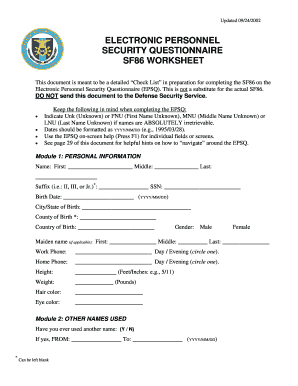
Onnel Security Questionnaire (EPSQ). This is not a substitute for the actual SF86. DO NOT send this document to the Defense Security Service. Keep the following in mind when completing the EPSQ: Indicate Unk (Unknown) or FNU (First Name Unknown), MNU (Middle Name Unknown) or LNU (Last Name Unknown) if names are ABSOLUTELY irretrievable. Dates should be formatted as YYYY/MM/DD (e.g., 1995/03/28). Use the EPSQ on-screen help (Press F1) for individual fields or screens. See page 29.

How it works
  • Open form

    Open form follow the instructions

  • Easily sign form

    Easily sign the form with your finger

  • Share form

    Send filled & signed form or save

How to fill out the B941epsqswaqra 3172715 Form online

Filling out the B941epsqswaqra 3172715 Form online can be straightforward with the right guidance. This guide will walk you through each section of the form, ensuring you have the necessary information to complete it accurately and efficiently.

Follow the steps to fill out the B941epsqswaqra 3172715 Form online effectively.

  1. Click ‘Get Form’ button to access the form, allowing you to open it in your preferred online format.
  2. Begin with Module 1: Personal Information. Fill out your first name, middle name, last name, suffix if applicable, SSN, birth date in YYYY/MM/DD format, city/state/county of birth, and country of birth.
  3. Proceed to Module 2: Other Names Used. Answer whether you have used another name, and if so, provide the timeframe and the names.
  4. In Module 3: Citizenship, indicate your current citizenship status and fill in the details as requested based on whether you are a U.S. citizen or not.
  5. Continue to Module 4: Where You Have Lived. Provide your residential history for the required period and specify contacts for each address.
  6. Fill out Module 5: Where You Went to School, detailing your education history and any degrees or diplomas earned.
  7. In Module 6: Your Employment Activities, provide your employment history covering the required years and include relevant details about your current and previous employers.
  8. Complete subsequent modules that delve into your military history, foreign activities, and police records as applicable to your personal circumstances.
  9. Before finalizing, review all entries for accuracy. Save any changes made, and at the end, choose to download, print, or share the completed form as needed.

Complete your documents online efficiently and accurately today!

Get form

Experience a faster way to fill out and sign forms on the web. Access the most extensive library of templates available.

Questions & Answers

Get answers to your most pressing questions about US Legal Forms API.

Contact support

What is the print number on a blueprint?

Title blocks are often found at the bottom right corner of the drawing frame. Also in the lower right is the drawing or print number, which is important for filing the blueprint and finding the right drawing when it's mentioned on another blueprint.

The main sections of a blueprint are: Title Sheets and Site Plans. Floor Plans. Elevations and Sections. Details and Schedules. Structural Drawings. Mechanical, Electrical, and Plumbing (MEP) Drawings.

4 Tips for Reading Blueprints Begin with the title block. The title block is the first piece of information you'll see in construction site plans. ... Study the plan legend. ... Find the blueprint's scale and orientation. ... Look for notes from the architect.

Alphabet and numbers are used in structural plans to indicate the size and type of materials used in a structure, as well as the placement and sequence of construction elements. For example, a “B20” might indicate a 20-foot beam, while a “6x12” may indicate a 6-inch by 12-inch column.

To ensure that blueprints stay in order, architects label plans with a classifying letter code and a sheet number. Consider this example, a sheet numbered A001 means it's an architectural sheet with general information, and it's the first page in that section.

Blueprints are documents that contain three major elements: the drawing, dimensions, and notes. The drawing illustrates the views of the part necessary to show its features. Together, the extension and dimension lines on the drawing indicate dimensions and specific tolerance information of each feature.

Get This Form Now!

Use professional pre-built templates to fill in and sign documents online faster. Get access to thousands of forms.

If you believe that this page should be taken down, please follow our DMCA take down process here.

Get B941epsqswaqra 3172715 Form