Loading
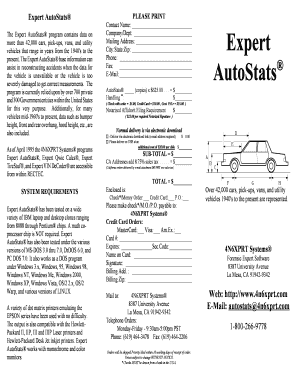
Get Expert Autostats
How it works
-

Open form follow the instructions
-

Easily sign the form with your finger
-

Send filled & signed form or save
How to fill out the Expert Autostats online
Filling out the Expert Autostats form is essential for accessing data on a wide range of vehicles. This guide will provide clear, step-by-step instructions to help users efficiently complete the form.
Follow the steps to successfully fill out the Expert Autostats form.
- Click ‘Get Form’ button to obtain the form and open it in your editor or chosen program.
- Begin by entering your contact name in the 'Contact Name' field. This should be the name of the person completing the form.
- In the 'Company/Dept' field, provide the name of your organization or department for which you are requesting the data.
- Fill in your mailing address in the respective fields, including 'City', 'State', and 'Zip'. This information is crucial for billing and communication purposes.
- Enter your phone number and fax number in the designated fields to ensure the processing team can reach you if needed.
- Provide your email address in the 'E-Mail' field. This is required for electronic delivery of the data.
- Specify the number of copies of AutoStats you wish to order in the 'AutoStats _____ (copies)' section, and calculate the total based on the price listed.
- Complete the 'Handling' section, choosing the appropriate option that corresponds with your payment choice.
- If required, indicate the cost for notarized affidavit signatures in the applicable field.
- Select your preferred delivery method by checking the appropriate box. Choose between electronic download or USB delivery.
- Calculate the subtotal and applicable sales tax if you are located in California, noting that electronic orders do not incur sales tax.
- Total all costs and ensure that you have selected the appropriate payment method indicator: check, money order, credit card, or purchase order.
- If paying by credit card, fill out the necessary details including card type, number, expiration date, security code, and billing address.
- Review all entered information for accuracy and completeness.
- Save changes, download or print your filled form for your records, and share it with the necessary parties as required.
Complete your Expert Autostats form online today to gain access to crucial vehicle data.
The best format for a car logbook is a structured document that includes all essential details like date, mileage, fuel purchases, and maintenance records. A well-organized logbook not only tracks your vehicle's history but also maximizes the value for potential buyers. Using Expert Autostats can streamline this process by providing easy-to-read reports and integrating with your existing systems to ensure accurate and updated entries.