Loading
Get This Form Is Available Electronically - Ocio Home Page - Us ... - Ocio Usda
How it works
-

Open form follow the instructions
-

Easily sign the form with your finger
-

Send filled & signed form or save
How to fill out the This Form Is Available Electronically - OCIO Home Page - US ... - Ocio Usda online
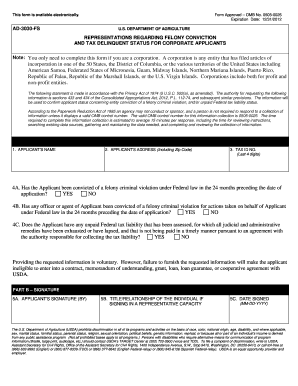
This guide provides a clear and detailed walkthrough for completing the 'This Form Is Available Electronically - OCIO Home Page - US ... - Ocio Usda'. It is designed to assist users, including those with limited experience, in successfully filling out the necessary information for corporate applicants.
Follow the steps to complete the form accurately and efficiently.
- Click the ‘Get Form’ button to access the form electronically. This action will open the form for you to begin filling it out.
- Fill out the applicant's name in the first field. Ensure that the name is the official name of the corporation as registered.
- Enter the applicant's address, including the zip code, in the second field. Double-check that the address is complete and accurate.
- Input the last four digits of the tax identification number in the designated field. This is critical for identifying the corporation's tax records.
- For question 4A, indicate whether the applicant has been convicted of a felony criminal violation under Federal law in the last 24 months by selecting 'Yes' or 'No'.
- In question 4B, respond whether any officer or agent of the applicant has been convicted of a felony criminal violation for actions taken on behalf of the applicant in the previous 24 months.
- For question 4C, state whether the applicant has any unpaid Federal tax liability assessed, and if they are not paying it in a timely manner as agreed.
- Proceed to Part B. Sign the form in the applicant's signature section, ensuring to use the official signature of the individual completing it.
- In the next field, indicate the title or relationship of the person signing if they are doing so in a representative capacity.
- Finally, provide the date signed in the format MM-DD-YYYY to complete the form. Make sure all information is correct before submission.
- Once all fields are filled out accurately, save any changes, and choose to download, print, or share the form as needed.
Start completing your documents online today to ensure timely submission and compliance.
An eAuth login is an electronic authentication method that allows users to securely access USDA services. By creating an eAuth account, you gain access to various online features, including forms available electronically. This login ensures your personal information remains safe while you navigate the OCIO Home Page - US ... - Ocio Usda.
Industry-leading security and compliance
US Legal Forms protects your data by complying with industry-specific security standards.
-
In businnes since 199725+ years providing professional legal documents.
-
Accredited businessGuarantees that a business meets BBB accreditation standards in the US and Canada.
-
Secured by BraintreeValidated Level 1 PCI DSS compliant payment gateway that accepts most major credit and debit card brands from across the globe.