We use cookies to improve security, personalize the user experience, enhance our marketing activities (including cooperating with our marketing partners) and for other business use.
Click "here" to read our Cookie Policy. By clicking "Accept" you agree to the use of cookies. Read less
Read more
Accept
Loading
Form preview
  • US Legal Forms
  • Form Library
  • More Forms
  • More Uncategorized Forms
  • Ics 211

Get Ics 211

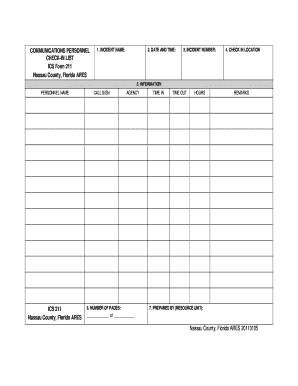
COMMUNICATIONS PERSONNEL CHECK-IN LIST ICS Form 211 Nassau County, Florida ARES 1. INCIDENT NAME: 2. DATE AND TIME: 3. INCIDENT NUMBER: 4. CHECK IN LOCATION 5. INFORMATION PERSONNEL NAME ICS 211 Nassau.

How it works

  1. Open form

    Open form follow the instructions

  2. Easily sign form

    Easily sign the form with your finger

  3. Share form

    Send filled & signed form or save

How to fill out the Ics 211 online

Filling out the ICS 211 form accurately is crucial for tracking personnel and equipment at an incident. This guide will walk you through the process of completing the form online, ensuring you provide all necessary information.

Follow the steps to accurately complete the Ics 211 form online.

  1. Click ‘Get Form’ button to access the Ics 211 form and open it in the digital editor.
  2. In the 'Incident Name' field, enter the name of the incident you are participating in or reporting about.
  3. Locate the 'Date and Time' fields, and fill in the date and time when you are preparing the form.
  4. In the 'Incident Number' section, input the specific number assigned to the incident, if available.
  5. Fill in the 'Check-In Location' by providing the name or description of where you are checking in.
  6. Under the 'Information' section, complete the following fields: a. 'Personnel Name': Write the name of the individual. b. 'Call Sign': Enter their radio call sign, if applicable. c. 'Agency': Specify the agency connected to this individual, being as detailed as possible.
  7. Record the 'Time In' and 'Time Out' along with the total 'Hours' worked. Ensure to note that individuals on-site must remain checked in even during breaks.
  8. In the 'Number of Pages' section, keep track of the total pages of the form. Add new pages as required throughout the event.
  9. Finally, in the 'Prepared By' field, indicate the name of the preparer and their agency affiliation. Ensure all completed forms are returned to the Documentation Unit at the end of an event.
  10. Once all fields are completed, you have the option to save changes, download, print, or share the completed form according to your needs.

Complete your Ics 211 form online today to ensure seamless incident reporting.

Get form

Experience a faster way to fill out and sign forms on the web. Access the most extensive library of templates available.
Get form

Related content

ics 211 - FEMA.gov
Check-in consists of reporting specific information, which is recorded on the Check-In...
Learn more
ICS 211p Check-In List (Personnel)
June 2000. CHECK-IN LIST (Personnel). ICS 211p-OS. 1. Incident Name. 2. Operational Period...
Learn more
Operational Templates and Guidance for EMS Mass...
coordinated by using an Incident Check-In List (ICS Form 211). â–¡ Incident Action Plan...
Learn more

Related links form

Health Insurance External Review Appeal - Minnesota.gov - Mn Minnesota Uniform Companion Guide For The ASC X12 ... - Health State Mn Department Revises FROI Form, EDI Implementation Guide - Dli Mn Farm To Cafeteria - Minnesota Department Of Health - Health State Mn

Questions & Answers

Get answers to your most pressing questions about US Legal Forms API.

Contact support

To obtain ICS certifications, you can complete online courses offered by various organizations, such as FEMA or your local emergency management agency. These courses cover essential ICS concepts and provide you with the knowledge needed to effectively use ICS. Upon successful completion, you will receive a certificate that demonstrates your understanding of ICS, which may enhance your professional qualifications.

The ICS 214 form is a tool used in incident management to document the activities and resources utilized during an operational period. This form is essential for tracking progress and resource usage. By maintaining an accurate ICS 214, teams can enhance their operational efficiency and ensure accountability in incident response. It plays a crucial role in the overall incident action planning.

The ICS 213 form is used as a message log for sharing information between various teams involved in incident management. It serves to communicate thoughts, requests, or updates clearly and efficiently. Though related to ICS 211, which focuses on resource requests, ICS 213 emphasizes the communication aspect, ensuring all team members stay informed. Together, these forms create a comprehensive communication strategy for effective incident handling.

ICS 211 is a specific form used within the Incident Command System framework. This form supports the planning and documentation needed for resource management during an emergency. By clearly outlining requests for resources, the ICS 211 helps improve communication among responders, ensuring everyone is on the same page. Implementing ICS 211 is key to successfully managing incidents and ensuring effective resource utilization.

The purpose of the ICS form is to standardize the operation of incident command systems during emergency situations. These forms guide responders in documenting critical information, which enhances communication and accountability. By using various ICS forms, teams can streamline their processes, making it easier to manage emergencies efficiently. This standardization is vital to ensure effective coordination across all participating areas.

Form 211 is used to officially request and document the status of needed resources during an incident. It acts as a key communication tool among incident teams, ensuring clarity and coordination. Utilizing Form 211 helps to prevent resource gaps that could hinder response efforts. Overall, it is an essential component for effective incident command.

The purpose of the ICS 211 form is to request and report resources needed during an incident. This form streamlines communication between different teams and helps track essential supplies or personnel on-site. When you utilize the ICS 211, you enhance your operational efficiency by ensuring everyone stays informed about resource needs. This clarity is crucial for effective incident management.

The ICS 214 form is used for recording detailed information about the specific activities and resources used in an incident. This includes tracking personnel, equipment, and assignments over time. Having an accurate ICS 214 is critical for post-incident analysis and reporting. Incorporating the ICS 211 into your documentation practices will help ensure that all pertinent information is captured effectively.

The ICS 215 form is typically completed by the planning section or operations section staff, often under the guidance of the planning section chief. This form is crucial for identifying specific resource needs and assignments during incident management. It is important that this information aligns with the comprehensive strategies outlined in the ICS 211. Effective collaboration ensures accurate completion and implementation of the documentation.

The responsibility for ICS documentation falls primarily on the incident commander and the planning section chief. These individuals oversee the completion of necessary forms like the ICS 211 and ensure compliance with established guidelines. Proper documentation facilitates accountability and effective communication within response teams. Leveraging tools from USLegalForms can help streamline your documentation efforts.

Get This Form Now!

Use professional pre-built templates to fill in and sign documents online faster. Get access to thousands of forms.
Get form
If you believe that this page should be taken down, please follow our DMCA take down processhere.

Industry-leading security and compliance

US Legal Forms protects your data by complying with industry-specific security standards.
  • In businnes since 1997
    25+ years providing professional legal documents.
  • Accredited business
    Guarantees that a business meets BBB accreditation standards in the US and Canada.
  • Secured by Braintree
    Validated Level 1 PCI DSS compliant payment gateway that accepts most major credit and debit card brands from across the globe.
Get Ics 211
Get form
Form Packages
Adoption
Bankruptcy
Contractors
Divorce
Home Sales
Employment
Identity Theft
Incorporation
Landlord Tenant
Living Trust
Name Change
Personal Planning
Small Business
Wills & Estates
Packages A-Z
Form Categories
Affidavits
Bankruptcy
Bill of Sale
Corporate - LLC
Divorce
Employment
Identity Theft
Internet Technology
Landlord Tenant
Living Wills
Name Change
Power of Attorney
Real Estate
Small Estates
Wills
All Forms
Forms A-Z
Form Library
Customer Service
Terms of Service
Privacy Notice
Legal Hub
Content Takedown Policy
Bug Bounty Program
About Us
Help Portal
Legal Resources
Blog
Affiliates
Contact Us
Delete My Account
Site Map
Industries
Forms in Spanish
Localized Forms
State-specific Forms
Forms Kit
Legal Guides
Real Estate Handbook
All Guides
Prepared for You
Notarize
Incorporation services
Our Customers
For Consumers
For Small Business
For Attorneys
Our Sites
US Legal Forms
USLegal
FormsPass
pdfFiller
signNow
airSlate WorkFlow
DocHub
Instapage
Social Media
Call us now toll free:
+1 833 426 79 33
As seen in:
  • USA Today logo picture
  • CBC News logo picture
  • LA Times logo picture
  • The Washington Post logo picture
  • AP logo picture
  • Forbes logo picture
© Copyright 1997-2025
airSlate Legal Forms, Inc.
3720 Flowood Dr, Flowood, Mississippi 39232
Form Packages
Adoption
Bankruptcy
Contractors
Divorce
Home Sales
Employment
Identity Theft
Incorporation
Landlord Tenant
Living Trust
Name Change
Personal Planning
Small Business
Wills & Estates
Packages A-Z
Form Categories
Affidavits
Bankruptcy
Bill of Sale
Corporate - LLC
Divorce
Employment
Identity Theft
Internet Technology
Landlord Tenant
Living Wills
Name Change
Power of Attorney
Real Estate
Small Estates
Wills
All Forms
Forms A-Z
Form Library
Customer Service
Terms of Service
Privacy Notice
Legal Hub
Content Takedown Policy
Bug Bounty Program
About Us
Help Portal
Legal Resources
Blog
Affiliates
Contact Us
Delete My Account
Site Map
Industries
Forms in Spanish
Localized Forms
State-specific Forms
Forms Kit
Legal Guides
Real Estate Handbook
All Guides
Prepared for You
Notarize
Incorporation services
Our Customers
For Consumers
For Small Business
For Attorneys
Our Sites
US Legal Forms
USLegal
FormsPass
pdfFiller
signNow
airSlate WorkFlow
DocHub
Instapage
Social Media
Call us now toll free:
+1 833 426 79 33
As seen in:
  • USA Today logo picture
  • CBC News logo picture
  • LA Times logo picture
  • The Washington Post logo picture
  • AP logo picture
  • Forbes logo picture
© Copyright 1997-2025
airSlate Legal Forms, Inc.
3720 Flowood Dr, Flowood, Mississippi 39232