Loading
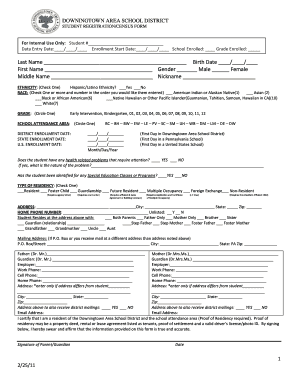
Get Registration For Downingtown School District Form
How it works
-

Open form follow the instructions
-

Easily sign the form with your finger
-

Send filled & signed form or save
How to fill out the Registration For Downingtown School District Form online
Filling out the Registration For Downingtown School District Form online is an important step in preparing for your child's educational journey. This guide aims to provide you with clear, supportive instructions to navigate each section of the form effectively.
Follow the steps to complete the form accurately and efficiently.
- Click the ‘Get Form’ button to obtain the form and open it in your preferred editing tool.
- Begin by entering the student's last name, first name, and middle name in the designated fields. Ensure that all spelling is accurate. Next, input the student's birth date in the format of month, day, and year.
- Select the student's gender by marking the appropriate box for either male or female. If applicable, you can also provide a nickname.
- For ethnicity, check 'Yes' or 'No' for Hispanic/Latino ethnicity. Then check one or more boxes to indicate the student's race, numbering them in the order of preference, if applicable.
- Circle the appropriate grade level that the student will be entering. Options range from Early Intervention, Kindergarten, and grades 1 through 12.
- Indicate the student's school attendance area by circling one of the district options. Additionally, fill in the dates for district enrollment, state enrollment, and U.S. enrollment.
- Answer whether the student has any health-related problems requiring attention, and if so, describe the nature of the problem in the provided space. Next, indicate if the student has been identified for any special education classes or programs.
- Select the type of residency by checking one box that best describes the student's situation. Attach any required documentation if necessary.
- Fill out the address where the student resides, including city, state, and zip code. Provide the home phone number and indicate if it is unlisted.
- Detail who the student resides with by selecting the appropriate option from the list. For any additional mailing address, fill out the P.O. Box or street address as applicable.
- Provide contact information for parents or guardians, including names, employers, and phone numbers. If the addresses differ from the student's address, fill in those details as well.
- Confirm the address for district mailings and input email addresses for easy communication.
- Certify residency by signing the form and dating it. Make sure that the signature matches the name of the person completing the form.
- List any emergency contacts, including names, relationships, and phone numbers. Provide details about any siblings residing at the same address.
- Complete the census information by indicating the municipality and type of residence where your family resides.
- For immunization records, check the appropriate box indicating the status of the student's immunizations and provide documents as necessary.
- Attach proof of residency documents as required, selecting the appropriate options from the list provided in the form.
- Finally, review the filled form for accuracy and completeness. Save your changes, and choose to download, print, or share the document as needed.
Get started today and complete the Registration For Downingtown School District Form online to ensure a smooth enrollment process!
The Downingtown STEM Academy is a public school, not a private institution. It offers specialized programs focused on science, technology, engineering, and math, catering to students’ academic needs. If you wish to apply for this unique program, use the Registration For Downingtown School District Form to get started.
Industry-leading security and compliance
US Legal Forms protects your data by complying with industry-specific security standards.
-
In businnes since 199725+ years providing professional legal documents.
-
Accredited businessGuarantees that a business meets BBB accreditation standards in the US and Canada.
-
Secured by BraintreeValidated Level 1 PCI DSS compliant payment gateway that accepts most major credit and debit card brands from across the globe.