Loading
Get Claim For Loss - Rmic
How it works
-

Open form follow the instructions
-

Easily sign the form with your finger
-

Send filled & signed form or save
How to fill out the Claim For Loss - RMIC online
This guide provides clear and detailed instructions for completing the Claim For Loss - RMIC form online. Users will find helpful information to navigate each section of the form with confidence.
Follow the steps to complete your Claim For Loss form effectively.
- Press the ‘Get Form’ button to access the Claim For Loss - RMIC form and open it in your preferred online editing tool.
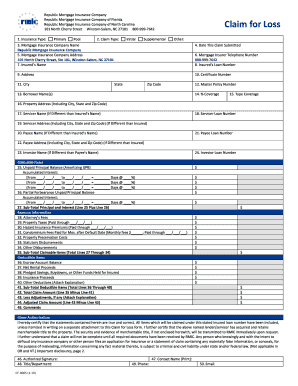
- In the first section, indicate the insurance type by selecting either 'Primary' or 'Pool'. Next, specify the claim type by choosing 'Initial', 'Supplemental', 'Claim for Loss', or 'Other'.
- Provide the name of the mortgage insurance company, which is 'Republic Mortgage Insurance Company', and enter its address at '101 North Cherry Street, Winston‐Salem, NC 27101'.
- Fill in the date when this claim is being submitted, followed by the insured's name in the designated field. Make sure to complete the address, certificate number, and loan number as well.
- Continue by providing the details of the borrower, including their names and master policy number, if applicable. Specify the percentage coverage and type of coverage being claimed.
- Enter the property address, including city, state, and zip code, and provide details for the servicer, if different from the insured. This includes the servicer's name, loan number, and address.
- Document the claimable items by filling out sections for unpaid principal balance, accumulated interest, and any applicable forbearance details. Ensure you clearly indicate all relevant dates and interest rates.
- Complete the expense information section, detailing attorney’s fees, property taxes, hazard insurance premiums, condominium fees, property preservation costs, and any other disbursements.
- Fill in the deductible items, which include the escrow account balance and any other reductions. Calculate the total claim amount by subtracting the total deductible items from the claimable items.
- Finalize the form by providing your comments where necessary, signing the authorization section, and entering your contact information. Attach any required documents as specified in the enclosures section.
- Lastly, after reviewing all inputs for accuracy, you can save changes, download, print, or share the completed Claim For Loss form as needed.
Complete your Claim For Loss form online today to ensure a smooth processing of your claim.
Proof of loss is a legal document that explains what's been damaged or stolen and how much money you're claiming. Your insurer may have you fill one out, depending on the loss. Homeowners, condo and renters insurance can typically help cover personal property.