Loading
Get Bogw
How it works
-

Open form follow the instructions
-

Easily sign the form with your finger
-

Send filled & signed form or save
How to fill out the Bogw online
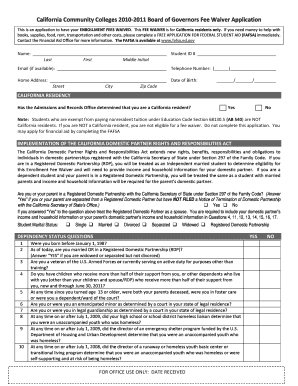
Completing the Board of Governors Fee Waiver application (Bogw) online is a straightforward process designed to help California residents waive their enrollment fees. This guide provides a step-by-step approach to ensure you successfully fill out the form.
Follow the steps to complete the Bogw application online.
- Press the ‘Get Form’ button to access the Bogw application form and open it in the online editor.
- Begin by entering your personal information in the designated fields, including your name, student ID number, email, telephone number, and home address.
- Provide your date of birth in the specified format (MM/DD/YYYY) and confirm your California residency status by selecting 'Yes' or 'No'.
- Indicate your marital status from the options provided, including choices for single, married, divorced, separated, widowed, or registered domestic partnership.
- Answer the dependency status questions truthfully, determining whether you are classified as an independent or dependent student based on your answers.
- If you are an independent student, provide your income and household information in the appropriate sections. If a dependent student, you will need to fill in your parent’s income details instead.
- Complete the section regarding the enrollment fee waiver method you are applying for by answering questions related to current cash assistance and household size.
- If applicable, answer the special classifications enrollment fee waivers questions, providing necessary documentation where required.
- Carefully read the certification statement before signing it and dating the form to confirm all provided information is accurate.
- Once all sections are completed, proceed to save changes, and from there you have the option to download, print, or share your completed Bogw application.
Start filling out your Bogw application online today to ensure you receive the financial assistance you need.
To return your online order to BIG W, log into your account and navigate to the order history. From there, you can select the order you wish to return and follow the instructions provided. The process is user-friendly and efficient, especially when using the Bogw platform to facilitate your return.