Loading
Form preview
  • US Legal Forms
  • Other Templates
  • More Forms
  • More Uncategorized Forms
  • You May Now Pay The Balance Due By Electronic

Get You May Now Pay The Balance Due By Electronic

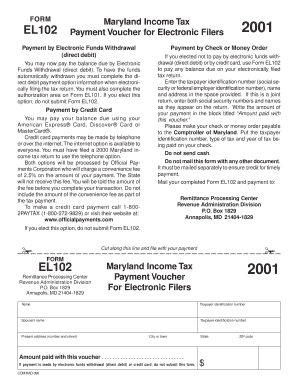
T). To have the funds automatically withdrawn you must complete the direct debit payment option information when electronically filing the tax return. You must also complete the authorization area on Form EL101. If you elect this option, do not submit Form EL102. Payment by Credit Card You may pay your balance due using your American Express Card, Discover Card or MasterCard . Credit card payments may be made by telephone or over the internet. The internet option is available to everyone.

How it works

  1. Open form

    Open form follow the instructions

  2. Easily sign form

    Easily sign the form with your finger

  3. Share form

    Send filled & signed form or save

How to fill out the You May Now Pay The Balance Due By Electronic online

This guide provides clear instructions on how to complete the You May Now Pay The Balance Due By Electronic form. Whether you are paying by check or money order, this step-by-step approach ensures a smooth submission process.

Follow the steps to complete your payment voucher.

  1. Click 'Get Form' button to access the payment voucher. This will open the form in your preferred editor for easier completion.
  2. Enter the taxpayer identification number in the designated field. This may be your social security number or federal employer identification number.
  3. Fill in your name and the name of your spouse, if applicable. Ensure that both names are entered exactly as they appear on your tax return.
  4. Complete the present address section, including the street address, city or town, state, and ZIP code.
  5. Indicate the amount being paid in the 'Amount paid with this voucher' section. Ensure this amount reflects the balance due.
  6. If you choose to pay by check or money order, make it payable to the Comptroller of Maryland. Remember to include your taxpayer identification number, type of tax, and the year of the tax being paid on the check.
  7. Do not mail this form with any other documents. It must be sent separately to ensure timely credit for your payment.
  8. Finally, mail your completed Form EL102 and payment to: Remittance Processing Center, Revenue Administration Division, P.O. Box 1829, Annapolis, MD 21404-1829.

Complete your payment voucher online today to ensure timely processing of your balance due.

Get form

Experience a faster way to fill out and sign forms on the web. Access the most extensive library of templates available.
Get form

Related content

What payment methods can I use to pay my balance...
... and the tax year in the lower left-hand corner of your payment. Note: You may...
Learn more
Payment Options | Student Accounting, Billing, and...
Payment is accepted in the form of check, credit card, electronic check ... Please note...
Learn more
Instructions for Form 7004 (Rev. December 2017)...
Feb 1, 2018 — If you do not file electronically, file Form 7004 with the Internal...
Learn more

Related links form

Regional Income Tax Agency - City Of Bellefontaine, Ohio Geneva_FR_Fillable_2023.pdf Reminder From The City Of Perrysburg Income Tax Division 2024 Instructions For Form IT-203, Nonresident And Part-Year ...

Questions & Answers

Get answers to your most pressing questions about US Legal Forms API.

Contact support

You can make electronic payments through various platforms, including bank websites, payment apps, or specific service providers. Just select the payment option, provide the necessary details, and authorize the transaction. Remember, with online solutions, you may now pay the balance due by electronic methods, ensuring your payments are timely and secure.

To make an electronic payment to the IRS, you can use the IRS Direct Pay feature or various approved payment processors. Simply visit the IRS website, choose the type of payment you need to make, and follow the prompts. Don't forget, you may now pay the balance due by electronic methods, simplifying your tax payment process.

A balance due payment refers to the remaining amount you owe after partial payments or credits have been applied. It is often necessary for settling invoices or bills with various institutions. If you're looking for a convenient solution, remember that you may now pay the balance due by electronic means, streamlining the process and avoiding delays.

The safest form of electronic payment typically involves using encrypted payment systems, such as those provided by major banks or reputable payment processors. These systems protect your financial information and offer fraud detection measures. When you decide to pay the balance due, you may now pay the balance due by electronic methods that ensure your transaction remains secure.

To pay by electronic transfer, you start by accessing your bank's online banking portal or mobile app. From there, you can choose the option to make an electronic payment, then enter the required payment details. Remember, you may now pay the balance due by electronic transfer easily, ensuring your payment is processed quickly and securely.

If you notice that the IRS hasn’t yet withdrawn your payment from your account, it could be due to processing times or pending status. The IRS typically processes payments within one business day, but factors like weekends or holidays can affect this timeframe. Additionally, having a scheduled electronic payment might also lead to delays. Remember that You May Now Pay The Balance Due By Electronic to ensure timely payment in the future.

The Electronic Federal Tax Payment System (EFTPS) is a service offered by the U.S. Department of the Treasury that allows you to pay federal taxes electronically. This secure platform gives you the flexibility to pay your taxes anytime and anywhere, offering you reassurance in managing your tax obligations. By using EFTPS, you can easily schedule payments in advance, ensuring you never miss a due date. You May Now Pay The Balance Due By Electronic using this reliable system.

Generally, the IRS processes electronic payments within one business day. After initiating the payment, you can have peace of mind knowing that it will quickly reflect in your tax account. This expediency is especially beneficial if you are aiming to pay off any balance due promptly. Remember, You May Now Pay The Balance Due By Electronic for a straightforward resolution.

When you see the notice 'you have a pending electronic payment', it indicates that the IRS has received your payment, but it is not yet fully processed. This status usually occurs right after you submit your payment through electronic methods. During this time, it is wise to keep track of your payment and ensure it accurately reflects in your account. Fortunately, You May Now Pay The Balance Due By Electronic, ensuring prompt updates.

The IRS provides several electronic payment options to make settling your taxes straightforward. You can use the IRS Direct Pay for bank account payments, debit or credit cards through third-party providers, and the Electronic Federal Tax Payment System (EFTPS). These options give you flexibility and security when addressing your tax responsibilities. You May Now Pay The Balance Due By Electronic, allowing you to choose the method that suits you best.

Get This Form Now!

Use professional pre-built templates to fill in and sign documents online faster. Get access to thousands of forms.
Get form
If you believe that this page should be taken down, please follow our DMCA take down processhere.
Get You May Now Pay The Balance Due By Electronic
Get form
  • Adoption
  • Bankruptcy
  • Contractors
  • Divorce
  • Home Sales
  • Employment
  • Identity Theft
  • Incorporation
  • Landlord Tenant
  • Living Trust
  • Name Change
  • Personal Planning
  • Small Business
  • Wills & Estates
  • Packages A-Z
  • Affidavits
  • Bankruptcy
  • Bill of Sale
  • Corporate - LLC
  • Divorce
  • Employment
  • Identity Theft
  • Internet Technology
  • Landlord Tenant
  • Living Wills
  • Name Change
  • Power of Attorney
  • Real Estate
  • Small Estates
  • Wills
  • All Forms
  • Forms A-Z
  • Other Templates
  • Legal Hub
  • About Us
  • Help Portal
  • Legal Resources
  • Blog
  • Affiliates
  • Contact Us
  • Delete My Account
  • Site Map
  • Industries
  • Forms in Spanish
  • Localized Forms
  • State-specific Forms
  • Forms Kit
  • Real Estate Handbook
  • All Guides
  • Notarize
  • Incorporation services
  • For Consumers
  • For Small Business
  • For Attorneys
  • USLegal
  • FormsPass
  • pdfFiller
  • signNow
  • altaFlow
  • DocHub
  • Instapage
Form Packages
  • Adoption
  • Bankruptcy
  • Contractors
  • Divorce
  • Home Sales
  • Employment
  • Identity Theft
  • Incorporation
  • Landlord Tenant
  • Living Trust
  • Name Change
  • Personal Planning
  • Small Business
  • Wills & Estates
  • Packages A-Z
Form Categories
  • Affidavits
  • Bankruptcy
  • Bill of Sale
  • Corporate - LLC
  • Divorce
  • Employment
  • Identity Theft
  • Internet Technology
  • Landlord Tenant
  • Living Wills
  • Name Change
  • Power of Attorney
  • Real Estate
  • Small Estates
  • Wills
  • All Forms
  • Forms A-Z
  • Other Templates
Customer Service
  • Legal Hub
  • About Us
  • Help Portal
  • Legal Resources
  • Blog
  • Affiliates
  • Contact Us
  • Delete My Account
  • Site Map
  • Industries
  • Forms in Spanish
  • Localized Forms
  • State-specific Forms
  • Forms Kit
Legal Guides
  • Real Estate Handbook
  • All Guides
Prepared for you
  • Notarize
  • Incorporation services
Our Customers
  • For Consumers
  • For Small Business
  • For Attorneys
Our Sites
  • USLegal
  • FormsPass
  • pdfFiller
  • signNow
  • altaFlow
  • DocHub
  • Instapage
Social Media
Call us now toll free:
+1 833 426 79 33
As seen in:
© Copyright 1999-2026 airSlate Legal Forms, Inc. 17 Station Street, Ste. 203, Brookline, MA 02445
  • Your Privacy Choices
  • Terms of Service
  • Privacy Notice
  • Content Takedown Policy
  • Bug Bounty Program