Loading
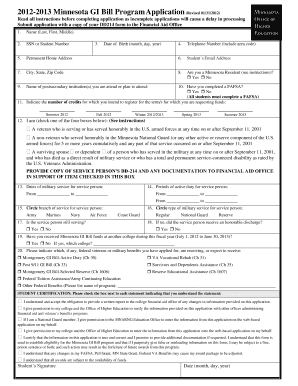
Get Mn Gi Bill Get Ready For College New Program Form
How it works
-

Open form follow the instructions
-

Easily sign the form with your finger
-

Send filled & signed form or save
How to fill out the Mn Gi Bill Get Ready For College New Program Form online
Filling out the Mn Gi Bill Get Ready For College New Program Form online can be a straightforward process when approached step by step. This guide is designed to help users navigate the form, ensuring all required information is accurately provided to facilitate efficient processing.
Follow the steps to complete your application successfully.
- Click ‘Get Form’ button to access the Mn Gi Bill Get Ready For College New Program Form in the editor.
- Begin by entering your name in the 'Name' field, listing your last name followed by your first and middle names. Ensure spelling is accurate to avoid processing delays.
- Input your Social Security Number or student number in the designated field to help identify your application.
- Fill in your date of birth using the format 'month, day, year' for clarity.
- Include your telephone number with the area code, ensuring accessibility for any follow-up correspondence.
- Provide your permanent home address, ensuring every field is filled correctly, including city, state, and zip code.
- Specify whether you are a Minnesota resident by selecting the appropriate option: Yes or No.
- List the name(s) of the postsecondary institution(s) you are attending or plan to attend. Be precise to avoid confusion.
- Confirm if you have completed a FAFSA by checking either Yes or No, as all students must complete this form.
- Indicate the number of credits for which you intend to register for each term listed (Summer 2012, Fall 2012, etc.).
- Select your eligibility category by checking the appropriate box based on your service history or relationship to a service member.
- Provide the dates of military service and periods of active duty for the service person. Ensure accuracy in these dates.
- Circle the branch of service and type of military service to specify the relevant information regarding the service person.
- Confirm if the service person is still serving and select Yes or No accordingly.
- If the service member is not currently serving, indicate whether they received an honorable discharge.
- State if you have received Minnesota GI Bill funds at another college during this fiscal year, selecting Yes or No.
- List any federal veterans or military benefits you have applied for, are receiving, or expect to receive.
- Review the Student Certification section and check each statement box to acknowledge awareness before signing.
- Provide your signature and date upon completion to affirm the accuracy of your application.
- Once you have filled out the form, you may save your changes, download a copy, print it, or share it as needed.
Start filling out the Mn Gi Bill Get Ready For College New Program Form online today.
When changing your program or place of training, you'll need to fill out the appropriate form through the VA. This form helps ensure your benefits continue without interruption. The Mn Gi Bill Get Ready For College New Program Form is essential as it provides detailed instructions for completing this process correctly.