Loading
Form preview
  • US Legal Forms
  • Form Library
  • More Forms
  • More Uncategorized Forms
  • Ally Roth Ira - Transfer Request

Get Ally Roth Ira - Transfer Request

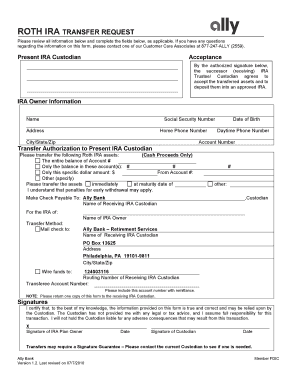
ROTH IRA TRANSFER REQUEST Please review all information below and complete the fields below, as applicable. If you have any questions regarding the information on this form, please contact one of.

How it works

  1. Open form

    Open form follow the instructions

  2. Easily sign form

    Easily sign the form with your finger

  3. Share form

    Send filled & signed form or save

How to fill out the Ally Roth IRA - Transfer Request online

Filling out the Ally Roth IRA - Transfer Request form online can seem daunting, but with the right guidance, you can complete it efficiently. This guide provides clear instructions for each section of the form, ensuring a smooth transfer process.

Follow the steps to complete your transfer request accurately.

  1. Press the ‘Get Form’ button to access the Ally Roth IRA - Transfer Request form and open it in your preferred editor.
  2. Fill in your personal details in the 'IRA Owner Information' section. This includes your name, Social Security number, address, home phone number, city/state/zip code, date of birth, daytime phone number, and your account number.
  3. In the 'Transfer Authorization to Present IRA Custodian' section, specify the assets you wish to transfer. You can choose to transfer the entire balance, only specific amounts, or certain accounts. Ensure you indicate your preference clearly.
  4. Indicate the transfer method by filling in the postal address for mailing or specifying the wire transfer details, including the routing number and transferee account number.
  5. Review the 'Acceptance' section, making sure you are aware that the receiving IRA trustee/custodian agrees to accept the transferred assets when you provide your authorized signature.
  6. Read and acknowledge the certification statement, indicating that the information provided is accurate. You will need to provide your signature and the date of signature in this section.
  7. If required, contact your current custodian to determine whether a signature guarantee is necessary for this transfer.
  8. Once you have completed the form, save your changes. You may then choose to download it for your records, print a copy, or share it as required.

Complete your Ally Roth IRA - Transfer Request online today to ensure a seamless transfer of your assets.

Get form

Experience a faster way to fill out and sign forms on the web. Access the most extensive library of templates available.
Get form

Related content

Publication 590-A - Internal Revenue Service
ditional IRA. Modified AGI limit for Roth IRA contributions. For. 2019, your Roth IRA...
Learn more
How To Report Roth Ira Distributions - Center on...
4 days ago — If you ally craving such a referred how to report roth ira distributions...
Learn more
Scully - technical audio
other speeds on special request. MULTI- CHANNEL ... wlwels are spec!flcally manced for...
Learn more

Related links form

CALIFORNIA HISTORICAL RESOURCES INFORMATION SYSTEM - Ohp Parks Ca California Office Of Historic Preservation - Ohp Parks Ca L/L-52l - Clrc Ca What Is An "Inmate Appeal Assignment Notice? Archive - Prison Talk - Cdcr Ca

Questions & Answers

Get answers to your most pressing questions about US Legal Forms API.

Contact support

Transferring a Roth IRA from one institution to another involves a few straightforward steps. First, contact your new financial institution and inquire about their Ally Roth IRA - Transfer Request process. You will typically need to fill out a transfer form to initiate the move, allowing the new institution to contact your old one directly. This ensures that the transfer is completed securely and in compliance with IRS rules.

To transfer your Roth IRA, start by gathering your account information from both the current and new financial institutions. You will need to complete your Ally Roth IRA - Transfer Request form, which is available online or through customer service. After submitting the form, the new institution will handle the transfer process on your behalf. It’s important to check for any fees or requirements to ensure a smooth transition.

Transferring your Roth IRA requires a few simple steps to ensure everything goes smoothly. First, contact the financial institution holding your current Roth IRA and request an Ally Roth IRA - Transfer Request form. Next, fill out the required information and submit it to your new provider, who will handle the transfer process on your behalf. Finally, you can monitor the progress and ensure your funds are safely moved without any tax implications.

Withdrawing from your Ally Roth IRA involves submitting a request for distribution. You can initiate this by logging into your Ally account and navigating to the withdrawal section. Fill out the required information for your withdrawal request, making sure to specify the amount and the method of receiving your funds. It's important to consider any potential tax implications, so reviewing your options can guide you to make informed decisions.

To transfer your Roth IRA from one company to another, you will need to initiate an Ally Roth IRA - Transfer Request with your new financial institution. Start by contacting them and requesting the appropriate transfer forms. Complete the forms and provide any necessary information, such as account numbers and the amount you wish to transfer. Your new provider will handle the transfer process with your previous institution, ensuring a seamless transition.

Most pre-retirement payments you receive from a retirement plan or IRA can be “rolled over” by depositing the payment in another retirement plan or IRA within 60 days. You can also have your financial institution or plan directly transfer the payment to another plan or IRA.

Transfers from SIMPLE IRAs You may be able to transfer money in a tax-free rollover from your SIMPLE IRA to another IRA (except a Roth IRA) or to an employer-sponsored retirement plan (such as a 401(k), 403(b), or governmental 457(b) plan).

If you want to transfer your Roth IRA from one company to another, a direct transfer is likely the easiest path to take. With a direct transfer, you can move your assets straight to the new broker without having to sell them or deal with waiting on a check in the mail.

While there is no limit to the number of Roth IRAs you can own, you can't go over the contribution limits set by the IRS. In this case, if you are 53 and have two Roth IRA accounts, you can contribute a maximum of $3,500 to each of them, giving you a total of $7,000, the IRS limit.

A Roth IRA can only be transferred to another Roth IRA. Because the accounts on both ends have the same tax-deferred status, you can also transfer between employer IRA plans like a SEP or SIMPLE and a Traditional IRA.

Get This Form Now!

Use professional pre-built templates to fill in and sign documents online faster. Get access to thousands of forms.
Get form
If you believe that this page should be taken down, please follow our DMCA take down processhere.

Industry-leading security and compliance

US Legal Forms protects your data by complying with industry-specific security standards.
  • In businnes since 1997
    25+ years providing professional legal documents.
  • Accredited business
    Guarantees that a business meets BBB accreditation standards in the US and Canada.
  • Secured by Braintree
    Validated Level 1 PCI DSS compliant payment gateway that accepts most major credit and debit card brands from across the globe.
Get Ally Roth IRA - Transfer Request
Get form
  • Adoption
  • Bankruptcy
  • Contractors
  • Divorce
  • Home Sales
  • Employment
  • Identity Theft
  • Incorporation
  • Landlord Tenant
  • Living Trust
  • Name Change
  • Personal Planning
  • Small Business
  • Wills & Estates
  • Packages A-Z
  • Affidavits
  • Bankruptcy
  • Bill of Sale
  • Corporate - LLC
  • Divorce
  • Employment
  • Identity Theft
  • Internet Technology
  • Landlord Tenant
  • Living Wills
  • Name Change
  • Power of Attorney
  • Real Estate
  • Small Estates
  • Wills
  • All Forms
  • Forms A-Z
  • Form Library
  • Legal Hub
  • About Us
  • Help Portal
  • Legal Resources
  • Blog
  • Affiliates
  • Contact Us
  • Delete My Account
  • Site Map
  • Industries
  • Forms in Spanish
  • Localized Forms
  • State-specific Forms
  • Forms Kit
  • Real Estate Handbook
  • All Guides
  • Notarize
  • Incorporation services
  • For Consumers
  • For Small Business
  • For Attorneys
  • USLegal
  • FormsPass
  • pdfFiller
  • signNow
  • altaFlow
  • DocHub
  • Instapage
Form Packages
  • Adoption
  • Bankruptcy
  • Contractors
  • Divorce
  • Home Sales
  • Employment
  • Identity Theft
  • Incorporation
  • Landlord Tenant
  • Living Trust
  • Name Change
  • Personal Planning
  • Small Business
  • Wills & Estates
  • Packages A-Z
Form Categories
  • Affidavits
  • Bankruptcy
  • Bill of Sale
  • Corporate - LLC
  • Divorce
  • Employment
  • Identity Theft
  • Internet Technology
  • Landlord Tenant
  • Living Wills
  • Name Change
  • Power of Attorney
  • Real Estate
  • Small Estates
  • Wills
  • All Forms
  • Forms A-Z
  • Form Library
Customer Service
  • Legal Hub
  • About Us
  • Help Portal
  • Legal Resources
  • Blog
  • Affiliates
  • Contact Us
  • Delete My Account
  • Site Map
  • Industries
  • Forms in Spanish
  • Localized Forms
  • State-specific Forms
  • Forms Kit
Legal Guides
  • Real Estate Handbook
  • All Guides
Prepared for you
  • Notarize
  • Incorporation services
Our Customers
  • For Consumers
  • For Small Business
  • For Attorneys
Our Sites
  • USLegal
  • FormsPass
  • pdfFiller
  • signNow
  • altaFlow
  • DocHub
  • Instapage
Social Media
Call us now toll free:
+1 833 426 79 33
As seen in:
© Copyright 1999-2026 airSlate Legal Forms, Inc. 3720 Flowood Dr, Flowood, Mississippi 39232
  • Your Privacy Choices
  • Terms of Service
  • Privacy Notice
  • Content Takedown Policy
  • Bug Bounty Program