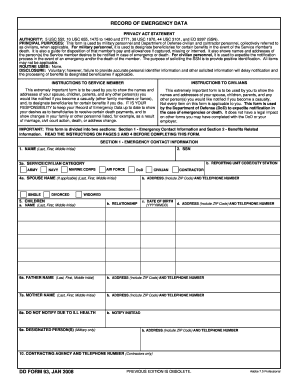
Personnel and Department of Defense civilian and contractor personnel, collectively referred to as civilians, when applicable. For military personnel, it is used to designate beneficiaries for certain benefits in the event of the Service member's death. It is also a guide for disposition of that member's pay and allowances if captured, missing or interned. It also shows names and addresses of the person(s) the Service member desires to be notified in case of emergency or death. For civilian per.
Open form follow the instructions
Easily sign the form with your finger
Send filled & signed form or save
How to fill out the DD Form 93 online
Filling out the DD Form 93, also known as the Record of Emergency Data, is crucial for military personnel and Department of Defense civilians to ensure accurate emergency contact and beneficiary information. This guide provides clear steps for completing the form online to facilitate the process.
Follow the steps to complete the DD Form 93 online effectively.
- Click ‘Get Form’ button to obtain the DD Form 93 and open it in an electronic editor.
- Begin by filling out Section 1: Emergency Contact Information. This section requests your full name, social security number (SSN), service or civilian category, and emergency contacts such as spouse, children, and parents.
- For Item 1, enter your last name, first name, and middle initial accurately. In Item 2, ensure you provide your SSN.
- In Item 3a, select your military branch or civilian designation. Mark the appropriate box for Army, Navy, Marine Corps, Air Force, or DoD, and complete the reporting unit code or duty station as required.
- Continue to fill in the spouse's information in Item 4, including their name and address. If applicable, provide children's names, relationships, and dates of birth in Item 5.
- Proceed to list the names and addresses of your parents in Items 6 and 7, and indicate anyone not to notify due to health issues in Item 8.
- Complete Section 2: Benefits Related Information. If you are military, include details about beneficiaries for death gratuity and unpaid pay/allowances in Items 11 and 12.
- Ensure all relevant beneficiaries are listed, complete with addresses and contact details. Specify the percentages for any shared beneficiaries.
- Finally, review all entries for accuracy. Sign the form and provide the date in Items 15 and 17. If a witness is required, ensure they sign in Item 16.
- After completing the form, you may save changes, download, print, or share the DD Form 93 as necessary.
Complete your DD Form 93 online today to ensure your emergency and beneficiary information is current.
Experience a faster way to fill out and sign forms on the web. Access the most extensive library of templates available.
Related content
PRINCIPAL PURPOSES: This form is used by military personnel and Department of Defense...
Jan 29, 2014 — appointment letter and a DD Form 577, a unit Supply Officer to perform...
Get answers to your most pressing questions about US Legal Forms API.
How to fill out a DD 93 form?
Filling out the DD Form 93 requires careful attention to detail. Start by gathering all necessary information, including your contact details and those of your emergency contacts. Follow the instructions provided on the form to ensure accurate completion, as any mistakes can impact the benefits your loved ones receive. Utilizing platforms like USLegalForms can provide step-by-step guidance, simplifying the process and ensuring accuracy.
Where can I find my DD 93?
You can find your DD Form 93 through your military personnel office or online through the official military websites. If you have served, your records may also be accessed via the National Archives or the eBenefits portal. Additionally, USLegalForms offers resources that guide you on how to obtain your DD Form 93 efficiently. Ensuring that you have the correct version of this form is essential for your records.
What is the DD 93 form?
The DD Form 93, also known as the Record of Emergency Data, is a critical document for military personnel. It captures essential information about a service member's emergency contacts and beneficiaries. Filling out the DD Form 93 correctly ensures that your loved ones receive support in the event of an emergency. This form is an integral part of your personnel records and is frequently updated to reflect any changes.
Where do I find my DD Form 93?
To find your DD Form 93, you should check with your personnel office or visit the Defense Enrollment Eligibility Reporting System (DEERS) website. Alternatively, you can easily download or request your DD Form 93 through USLegalForms, which provides straightforward access to this important document. Ensuring you have this form on hand keeps your emergency contacts organized and up to date.
Is the DD93 form still in use today?
Yes, the DD Form 93 is still actively used by military personnel today. It remains an essential document for recording emergency contact information and preferences for notification. Keeping your DD Form 93 updated is crucial, as it ensures that your wishes are respected and relayed to the appropriate parties when necessary.
What is DD Form 93 for?
The DD Form 93 is used to record emergency contact information for service members. It helps military personnel communicate vital details regarding their preferences and contacts in case of emergencies. This form is essential for ensuring that your loved ones are notified promptly and effectively, thereby minimizing complications during critical situations.
Where can I find the DD Form 93?
You can find the DD Form 93 on the official Department of Defense website or through military service branches' websites. Additionally, USLegalForms offers easy access to this form for your convenience. Simply visit our site, and you can download the DD Form 93 directly, ensuring you have the most up-to-date version.
How to complete DD 93?
Completing the DD Form 93 involves providing accurate information about your emergency contacts and beneficiaries. Begin by filling out your personal details, and then identify individuals you want to be notified in case of an emergency. Once you have completed the form, review it to ensure all information is correct before submitting it to your commanding officer. For further assistance, you can utilize platforms like US Legal Forms, which provide templates and guides for completing the DD Form 93 effortlessly.
What is a DD form 93?
The DD Form 93, often referred to as the Record of Emergency Data, is a vital document that captures important information about military personnel. This form includes details about emergency contacts, beneficiaries, and how to notify loved ones in case of unforeseen events. Understanding the purpose of the DD Form 93 helps service members ensure their families are taken care of should the unthinkable occur. By keeping this form current, service members actively protect their interests.
How to fill out a DD 93?
To fill out a DD 93, start by entering your personal identification details. Next, provide necessary beneficiary information, covering all possible scenarios for your estate and insurance. It is crucial to check and double-check all entries for accuracy to prevent any issues. For comprehensive assistance in completing the DD 93 correctly, consider using the resources on US Legal Forms.
Use professional pre-built templates to fill in and sign documents online faster. Get access to thousands of forms.
If you believe that this page should be taken down, please follow our DMCA take down process here.