We use cookies to improve security, personalize the user experience, enhance our marketing activities (including cooperating with our marketing partners) and for other business use.
Click "here" to read our Cookie Policy. By clicking "Accept" you agree to the use of cookies. Read less
Read more
Accept
Loading
Form preview
  • US Legal Forms
  • Form Library
  • More Forms
  • More Uncategorized Forms
  • Accufacts W 9 Form

Get Accufacts W 9 Form

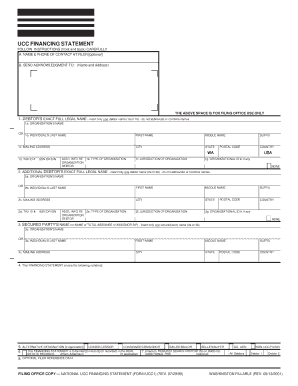
Clear Entire Form UCC FINANCING STATEMENT FOLLOW INSTRUCTIONS (front and back) CAREFULLY A. NAME & PHONE OF CONTACT AT FILER optional Phone B. SEND ACKNOWLEDGMENT TO: (Name and Address) Name:.

How it works

  1. Open form

    Open form follow the instructions

  2. Easily sign form

    Easily sign the form with your finger

  3. Share form

    Send filled & signed form or save

How to fill out the Accufacts W 9 Form online

Completing the Accufacts W 9 Form online is a straightforward process that ensures accurate reporting of taxpayer information. This guide provides clear, step-by-step instructions to help you fill out the form correctly, ensuring compliance with the required information.

Follow the steps to complete the Accufacts W 9 Form online.

  1. Click ‘Get Form’ button to obtain the form and open it in your preferred viewer.
  2. Provide your exact full legal name in the designated fields, ensuring accuracy without abbreviations. This includes inserting either your organization’s name or your individual name.
  3. Fill out the mailing address section completely, including city, state, and postal code.
  4. Enter your taxpayer identification number (SSN or EIN) as required, noting that providing this information may be optional in certain states.
  5. If applicable, input additional information about your organization type and jurisdiction in the specified fields.
  6. For each additional debtor, repeat the process, ensuring you include their exact full legal name and relevant information.
  7. Provide information for the secured party as per the instructions, inserting either an organization’s name or an individual’s name.
  8. Describe the collateral covered by the financing statement. Make sure that the description is clear and concise.
  9. If you wish to check the box for alternative designations such as lessee/lessor, tick the appropriate box.
  10. Review all entries for accuracy and completeness before proceeding.
  11. Once satisfied with the completed form, choose to save your changes, download, print, or share the form as needed.

Get started now and complete the Accufacts W 9 Form online effortlessly.

Get form

Experience a faster way to fill out and sign forms on the web. Access the most extensive library of templates available.
Get form

Related content

Standing Rock Sioux Tribe v. U.S. Army Corps of...
Jun 14, 2017 — Case 1:16-cv-01534-JEB Document 239 Filed 06/14/17 Page 9 of 91...
Learn more
SEC NEWS DIGEST Issue 2003-77 April 23, 2003 ...
The reported information appears as follows: Form, Name, Address and Phone ... Item 9...
Learn more

Related links form

REQUEST TO AMEND PROTECTED HEALTH INFORMATION BY PARENT, GUARDIAN OR LEGAL REPRESENTATIVE. DHCS Fillable Ohio Mechanics Lien Release Form Templates To Submit Online ... Regular Infant Formulas: MM08-21.doc

Questions & Answers

Get answers to your most pressing questions about US Legal Forms API.

Contact support

The best way to send your Accufacts W 9 Form largely depends on the requester's requirements. If they allow electronic submission, securely emailing the form can be quick and efficient. If you must send it by mail, use a tracked service for peace of mind that it arrives safely at its destination.

To submit the completed Accufacts W 9 Form, you typically need to send it to the requester who asked for it. This could be done via mail or electronically, depending on their preferred method. If using mail, ensure you use a reliable service to protect valuable information.

Yes, you can submit the Accufacts W 9 Form electronically. Many organizations accept electronic submissions for tax forms, which can streamline the process. However, ensure that the recipient of your W-9 has a secure method for you to send your information digitally, as this protects your personal data.

Filling out the Accufacts W 9 Form requires attention to detail. Start by providing your name, business name (if applicable), and address. Next, select the correct tax classification and include your taxpayer identification number. Finally, sign and date the form, which confirms the information provided is accurate.

When requesting the Accufacts W 9 Form, clarity and politeness are essential. You can reach out via email or phone, explaining why you need the form, and emphasizing its importance for tax records. Additionally, providing a link to the form on your website or suggesting platforms like uslegalforms for easy access can help streamline the process.

If a vendor is unable to provide you with the Accufacts W 9 Form, you have a few options. First, you can download the form yourself from reliable sources like the IRS or uslegalforms and ask the vendor to fill it out. If that does not work, consider discussing the situation with your accounting team, as they may have alternative solutions.

Typically, the person requesting your taxpayer information will provide the appropriate Accufacts W 9 Form. This could be a client, employer, or financial institution that needs your information for tax purposes. If you find yourself in need, you can also download the form directly from the IRS website or platforms like uslegalforms for convenience.

Common mistakes on the Accufacts W 9 Form include providing incorrect names or taxpayer identification numbers. Additionally, neglecting to sign the form or failing to specify the correct tax classification can lead to issues. To avoid these errors, ensure you double-check your information and consider using platforms like uslegalforms for guidance.

When completing the Accufacts W 9 Form, the choice between 0 or 1 refers to how many exemptions you are claiming. If you are not claiming any exemptions, you should enter '0.' This selection is important for tax withholding purposes, so make sure it aligns with your tax situation.

Filling out the Accufacts W 9 Form is simple. Begin by entering your name and business name if applicable. Next, provide your taxpayer identification number, check the appropriate tax classification, and sign the form. This process ensures that you provide the necessary details for accurate reporting and compliance.

Get This Form Now!

Use professional pre-built templates to fill in and sign documents online faster. Get access to thousands of forms.
Get form
If you believe that this page should be taken down, please follow our DMCA take down processhere.

Industry-leading security and compliance

US Legal Forms protects your data by complying with industry-specific security standards.
  • In businnes since 1997
    25+ years providing professional legal documents.
  • Accredited business
    Guarantees that a business meets BBB accreditation standards in the US and Canada.
  • Secured by Braintree
    Validated Level 1 PCI DSS compliant payment gateway that accepts most major credit and debit card brands from across the globe.
Get Accufacts W 9 Form
Get form
Form Packages
Adoption
Bankruptcy
Contractors
Divorce
Home Sales
Employment
Identity Theft
Incorporation
Landlord Tenant
Living Trust
Name Change
Personal Planning
Small Business
Wills & Estates
Packages A-Z
Form Categories
Affidavits
Bankruptcy
Bill of Sale
Corporate - LLC
Divorce
Employment
Identity Theft
Internet Technology
Landlord Tenant
Living Wills
Name Change
Power of Attorney
Real Estate
Small Estates
Wills
All Forms
Forms A-Z
Form Library
Customer Service
Terms of Service
Privacy Notice
Legal Hub
Content Takedown Policy
Bug Bounty Program
About Us
Help Portal
Legal Resources
Blog
Affiliates
Contact Us
Delete My Account
Site Map
Industries
Forms in Spanish
Localized Forms
State-specific Forms
Forms Kit
Legal Guides
Real Estate Handbook
All Guides
Prepared for You
Notarize
Incorporation services
Our Customers
For Consumers
For Small Business
For Attorneys
Our Sites
US Legal Forms
USLegal
FormsPass
pdfFiller
signNow
airSlate WorkFlow
DocHub
Instapage
Social Media
Call us now toll free:
+1 833 426 79 33
As seen in:
  • USA Today logo picture
  • CBC News logo picture
  • LA Times logo picture
  • The Washington Post logo picture
  • AP logo picture
  • Forbes logo picture
© Copyright 1997-2025
airSlate Legal Forms, Inc.
3720 Flowood Dr, Flowood, Mississippi 39232
Form Packages
Adoption
Bankruptcy
Contractors
Divorce
Home Sales
Employment
Identity Theft
Incorporation
Landlord Tenant
Living Trust
Name Change
Personal Planning
Small Business
Wills & Estates
Packages A-Z
Form Categories
Affidavits
Bankruptcy
Bill of Sale
Corporate - LLC
Divorce
Employment
Identity Theft
Internet Technology
Landlord Tenant
Living Wills
Name Change
Power of Attorney
Real Estate
Small Estates
Wills
All Forms
Forms A-Z
Form Library
Customer Service
Terms of Service
Privacy Notice
Legal Hub
Content Takedown Policy
Bug Bounty Program
About Us
Help Portal
Legal Resources
Blog
Affiliates
Contact Us
Delete My Account
Site Map
Industries
Forms in Spanish
Localized Forms
State-specific Forms
Forms Kit
Legal Guides
Real Estate Handbook
All Guides
Prepared for You
Notarize
Incorporation services
Our Customers
For Consumers
For Small Business
For Attorneys
Our Sites
US Legal Forms
USLegal
FormsPass
pdfFiller
signNow
airSlate WorkFlow
DocHub
Instapage
Social Media
Call us now toll free:
+1 833 426 79 33
As seen in:
  • USA Today logo picture
  • CBC News logo picture
  • LA Times logo picture
  • The Washington Post logo picture
  • AP logo picture
  • Forbes logo picture
© Copyright 1997-2025
airSlate Legal Forms, Inc.
3720 Flowood Dr, Flowood, Mississippi 39232