Loading
Form preview
  • US Legal Forms
  • Form Library
  • More Forms
  • More Uncategorized Forms
  • Ncdordownloadse585 Form

Get Ncdordownloadse585 Form

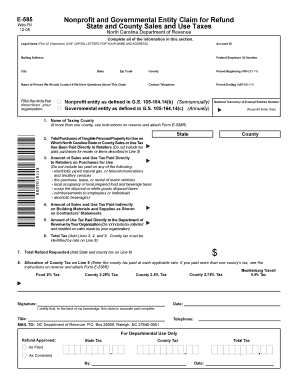
Legal Name (First 32 Characters) (USE CAPITAL LETTERS FOR YOUR NAME AND ADDRESS) Account ID Mailing Address Federal Employer ID Number City State Zip Code Name of Person We Should Contact if We Have Questions About This Claim Fill in the circle that describes your organization. County Period Beginning (MM-DD-YY) Contact Telephone Period Ending (MM-DD-YY) Nonproit entity as deined in G.S. 105-164.14(b) (Semiannually) Governmental entity as deined in G.S. 105-164.14(c) (Annually) Nat.

How it works

  1. Open form

    Open form follow the instructions

  2. Easily sign form

    Easily sign the form with your finger

  3. Share form

    Send filled & signed form or save

How to fill out the Ncdordownloadse585 Form online

The Ncdordownloadse585 Form is essential for non-profit and governmental entities seeking a refund for sales and use taxes paid in North Carolina. This guide will provide you with clear, step-by-step instructions on how to accurately complete the form online, ensuring a seamless filing process.

Follow the steps to fill out the Ncdordownloadse585 Form online

  1. Press the ‘Get Form’ button to obtain the Ncdordownloadse585 Form and open it in the editor.
  2. Begin by completing the section that requires your legal name, using capital letters for both your name and address. Ensure the first 32 characters accurately reflect the entity name.
  3. Next, enter the account ID for your organization. This is a required field for processing your claim.
  4. Provide your mailing address, including city, state, and zip code to ensure any correspondence is directed to the correct location.
  5. Input the Federal Employer ID Number, which identifies your organization for federal tax purposes.
  6. Designate a contact person for any inquiries related to your claim. Enter their name in the appropriate field.
  7. Select the circle that describes the type of entity you represent—non-profit or governmental—as defined in the respective statutes.
  8. Fill in the period for which you're claiming the refund, specifying the start date MM-DD-YY and end date MM-DD-YY.
  9. Provide a contact telephone number where you can be reached for further communication.
  10. List the taxing county name, ensuring to attach Form E-536R if applicable to identify multiple counties.
  11. Enter the total purchases of tangible personal property on which North Carolina state or county sales or use tax was paid directly to retailers.
  12. Specify the amount of sales and use tax paid directly to retailers on those purchases.
  13. Detail the amount of sales and use tax paid indirectly on building materials and supplies as shown on contractor's statements.
  14. Input the amount of use tax that your organization paid directly to the Department of Revenue.
  15. Calculate the total tax by adding the amounts from Lines 3, 4, and 5, ensuring to identify the county tax rate on Line 8.
  16. Finally, state the total refund requested, which should include both state and county tax from Line 6.
  17. Allocate the county tax included in Line 6 to the applicable rates, ensuring that this matches Form E-536R if necessary.
  18. Review the entire document for accuracy, then sign and date the form. Ensure the title and telephone number of the individual signing are also provided.
  19. Once completed, save your changes and proceed to download, print, or share the form as needed.

Begin your document filing process by completing the Ncdordownloadse585 Form online.

Get form

Experience a faster way to fill out and sign forms on the web. Access the most extensive library of templates available.
Get form

Related content

Enterprise Resource Planning Project Outcomes - NC...
Download Programs Approved by ... Deliver easy, intuitive mobile-compatible electronic...
Learn more

Related links form

Arizona AIM System - Azdhs State Human Resources Office - Department Of Emergency ... SUPREME COURT OF ARIZONA En Banc EDWARD POWELL And ... SERVICE DEFINITION: - Supreme State Az

Questions & Answers

Get answers to your most pressing questions about US Legal Forms API.

Contact support

When filing taxes by mail in North Carolina, the required forms typically include the Ncdordownloadse585 Form along with your federal tax documents. Ensure that you have all necessary attachments and supporting documents before sending them. It’s beneficial to double-check the most current requirements on the NC Department of Revenue website for any updates. For a smooth filing experience, consider using online services that guide you through this process.

Indeed, North Carolina offers eFile forms, and the Ncdordownloadse585 Form is among them. Utilizing this electronic filing method is convenient for submitting your tax documents from the comfort of your home or office. This process can save you time and reduce the risk of errors. For more information, visit the state’s tax website.

Yes, North Carolina does provide e-file forms, including the Ncdordownloadse585 Form. This online option simplifies the filing process for many taxpayers. By using this electronic form, you can ensure accurate submissions and receive quicker responses from the state. Make sure to check with the official NC Department of Revenue website for the latest updates.

Quarterly Filers - Employers who withhold an average of less than $250 from wages each month must file Form NC-5 and pay the withheld taxes on a quarterly basis. All quarterly returns and payments are due by the last day of the month following the end of the calendar quarter.

To download forms from this website, go to NC Individual Income Tax Forms. To order forms, call 1-877-252-3052. Touch tone callers may order forms 24 hours a day, seven days a week. You may also obtain forms from a service center or from our Order Forms page.

Which form should I use, the NC-4EZ or the NC-4? A4. Any employee may use the NC-4EZ. Employees who will claim zero (0) allowances or only allowances available for taxpayers who expect to claim a tax credit for children will find the NC-4EZ easier to complete.

Your North Carolina income tax return (Form D-400). Federal forms W-2 and 1099 showing the amount of North Carolina tax withheld as reported on Form D-400, Line 20.

Filing a claim for refund using Form E-588, Business Claim for Refund State, County and Transit Sales and Use Taxes. The claim must identify the taxpayer, the type and amount of tax overpaid, the filing period to which the overpayment applies, and the basis for the claim.

All North Carolina withholding taxpayers are required to file Form NC-3, Annual Withholding Reconciliation. For information and instructions on filing your Form NC-3, see eNC3 Filing Options and Information.

To download forms from this website, go to NC Individual Income Tax Forms. To order forms, call 1-877-252-3052. Touch tone callers may order forms 24 hours a day, seven days a week. You may also obtain forms from a service center or from our Order Forms page.

Get This Form Now!

Use professional pre-built templates to fill in and sign documents online faster. Get access to thousands of forms.
Get form
If you believe that this page should be taken down, please follow our DMCA take down processhere.

Industry-leading security and compliance

US Legal Forms protects your data by complying with industry-specific security standards.
  • In businnes since 1997
    25+ years providing professional legal documents.
  • Accredited business
    Guarantees that a business meets BBB accreditation standards in the US and Canada.
  • Secured by Braintree
    Validated Level 1 PCI DSS compliant payment gateway that accepts most major credit and debit card brands from across the globe.
Get Ncdordownloadse585 Form
Get form
  • Adoption
  • Bankruptcy
  • Contractors
  • Divorce
  • Home Sales
  • Employment
  • Identity Theft
  • Incorporation
  • Landlord Tenant
  • Living Trust
  • Name Change
  • Personal Planning
  • Small Business
  • Wills & Estates
  • Packages A-Z
  • Affidavits
  • Bankruptcy
  • Bill of Sale
  • Corporate - LLC
  • Divorce
  • Employment
  • Identity Theft
  • Internet Technology
  • Landlord Tenant
  • Living Wills
  • Name Change
  • Power of Attorney
  • Real Estate
  • Small Estates
  • Wills
  • All Forms
  • Forms A-Z
  • Form Library
  • Legal Hub
  • About Us
  • Help Portal
  • Legal Resources
  • Blog
  • Affiliates
  • Contact Us
  • Delete My Account
  • Site Map
  • Industries
  • Forms in Spanish
  • Localized Forms
  • State-specific Forms
  • Forms Kit
  • Real Estate Handbook
  • All Guides
  • Notarize
  • Incorporation services
  • For Consumers
  • For Small Business
  • For Attorneys
  • USLegal
  • FormsPass
  • pdfFiller
  • signNow
  • altaFlow
  • DocHub
  • Instapage
Form Packages
  • Adoption
  • Bankruptcy
  • Contractors
  • Divorce
  • Home Sales
  • Employment
  • Identity Theft
  • Incorporation
  • Landlord Tenant
  • Living Trust
  • Name Change
  • Personal Planning
  • Small Business
  • Wills & Estates
  • Packages A-Z
Form Categories
  • Affidavits
  • Bankruptcy
  • Bill of Sale
  • Corporate - LLC
  • Divorce
  • Employment
  • Identity Theft
  • Internet Technology
  • Landlord Tenant
  • Living Wills
  • Name Change
  • Power of Attorney
  • Real Estate
  • Small Estates
  • Wills
  • All Forms
  • Forms A-Z
  • Form Library
Customer Service
  • Legal Hub
  • About Us
  • Help Portal
  • Legal Resources
  • Blog
  • Affiliates
  • Contact Us
  • Delete My Account
  • Site Map
  • Industries
  • Forms in Spanish
  • Localized Forms
  • State-specific Forms
  • Forms Kit
Legal Guides
  • Real Estate Handbook
  • All Guides
Prepared for you
  • Notarize
  • Incorporation services
Our Customers
  • For Consumers
  • For Small Business
  • For Attorneys
Our Sites
  • USLegal
  • FormsPass
  • pdfFiller
  • signNow
  • altaFlow
  • DocHub
  • Instapage
Social Media
Call us now toll free:
+1 833 426 79 33
As seen in:
© Copyright 1999-2026 airSlate Legal Forms, Inc. 3720 Flowood Dr, Flowood, Mississippi 39232
  • Your Privacy Choices
  • Terms of Service
  • Privacy Notice
  • Content Takedown Policy
  • Bug Bounty Program