Loading
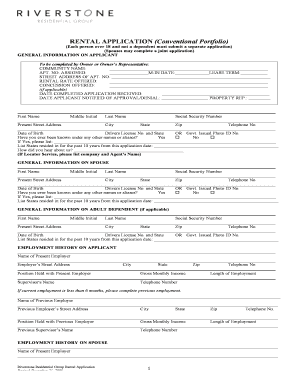
Get Rental Application (conventional Portfolio)
How it works
-

Open form follow the instructions
-

Easily sign the form with your finger
-

Send filled & signed form or save
How to fill out the RENTAL APPLICATION (Conventional Portfolio) online
Filling out the rental application online is a straightforward process that ensures your information is accurately captured for consideration. This guide will provide step-by-step instructions to help you complete the RENTAL APPLICATION (Conventional Portfolio) efficiently.
Follow the steps to fill out the rental application online.
- Click ‘Get Form’ button to access the rental application form and open it in your preferred online editor.
- Begin with the 'General Information on Applicant' section. Provide your full name, social security number, contact details, and present address. Ensure your personal information is current and accurate.
- If applicable, complete the 'General Information on Spouse' section by entering the personal details of your partner.
- Fill out the 'General Information on Adult Dependent' section if you have dependents over 18. Include their relevant personal information.
- Continue to the 'Employment History on Applicant' section. List your current and previous employers, along with contact details and your position with gross monthly income.
- Repeat the 'Employment History on Spouse' section for your partner to provide their employment details.
- Proceed to the 'Credit History' section. Fill in information about your bank accounts and any non-work income you wish to be considered.
- In the 'Rental and Criminal History' section, provide at least two years of rental history, including landlord information and rental rates. Respond to any questions related to past evictions or criminal history.
- Complete the 'Other Occupants' section by listing anyone who will be living with you but is not signing the lease.
- If applicable, describe any pets in the 'Animals' section, including type, breed, and weight.
- Include information in the 'Your Vehicle(s)' section regarding any vehicles that will be parked on the property.
- Fill out the 'Emergency' section with the contact details of someone to notify in case of an emergency.
- Review all information provided for accuracy before submission. Ensure that you have authorized for a credit check and that all necessary signatures have been completed.
Start filling out your rental application online today.
A rental application may be denied for various reasons, including poor credit history, insufficient income, or unfavorable rental references. Negative marks, such as evictions or criminal history, can also lead to denial. To enhance your chances, be sure to present a well-rounded application and address any potential concerns.