Get Applicationredtermination For Elderly And Disabled Programs Form
How it works
-

Open form follow the instructions
-

Easily sign the form with your finger
-

Send filled & signed form or save
How to fill out the Applicationredtermination for Elderly and Disabled Programs Form online
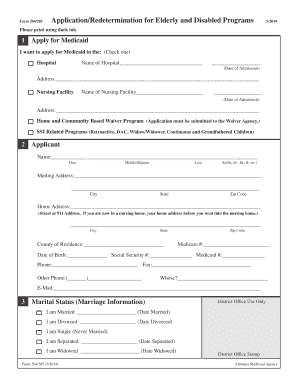
Completing the Applicationredtermination for Elderly and Disabled Programs Form online can streamline the process of applying for necessary Medicaid benefits. This guide will provide clear, step-by-step instructions for successfully navigating each section of the form, ensuring that all required information is accurately provided.
Follow the steps to fill out the Applicationredtermination for Elderly and Disabled Programs Form online.
- Click the ‘Get Form’ button to access the Applicationredtermination for Elderly and Disabled Programs Form and open it in the online editor.
- Start by providing the type of Medicaid assistance you are applying for. Check the appropriate box to indicate whether you are applying for services in a hospital, nursing facility, home and community-based waiver program, or SSI related programs.
- In the Applicant section, fill in your personal information, including your full name, mailing address, home address, Medicare number, date of birth, Social Security number, and contact information.
- Indicate your marital status by checking the appropriate box and providing relevant dates for marriage, divorce, separation, or widowhood.
- Next, in the Race section, select the applicable option regarding your racial identity.
- In the Living Arrangement section, check the box that best describes your current living situation and indicate whether you pay for utilities or buy your own food.
- Complete the Residency Information section, confirming your citizenship status and how long you have lived in Alabama.
- Moving on to the Supplemental Security Income (SSI) section, indicate if you have ever applied for or received SSI benefits.
- If applicable, fill out the Sponsor section with details of the person assisting you with the application, including their relationship to you.
- Proceed to the Legal Status section. If you have a power of attorney or guardian, provide their information.
- Complete the Spouse Identification section, which is necessary if you are married or separated.
- In the Household Members section, list any individuals under 19 living in your household along with their ages and relationships to you.
- Fill in the Income section by detailing all sources of gross income for you, your spouse, or any other relevant party.
- In the Property section, provide comprehensive information about any property you or your spouse currently own or have owned in the last five years.
- For the Resources section, disclose any bank accounts, investments, and other financial resources held by you or your spouse.
- In the Transfer of Resources section, disclose any significant gifts or sales of resources in the past five years.
- Complete the Life Insurance and Burial or Vault Insurance sections by listing policies held and their estimated values.
- Lastly, review the entire form for accuracy, ensure that all required documentation is attached, and submit the application electronically.
Take the first step towards securing your benefits by completing your Applicationredtermination for Elderly and Disabled Programs Form online today!
An SSI redetermination can be triggered by changes in your financial situation, living arrangements, or any reported adjustments to your personal circumstances. Regular reviews are also scheduled to ensure compliance with eligibility requirements. When prompted, you must complete the Applicationredetermination For Elderly And Disabled Programs Form accurately and promptly. Keeping open communication with your local office can help clarify any questions or concerns you may have.