Loading
Get Blank Nco Reports Form
How it works
-

Open form follow the instructions
-

Easily sign the form with your finger
-

Send filled & signed form or save
How to fill out the Blank Nco Reports Form online
Completing the Blank Nco Reports Form online is a vital process for documenting non-commissioned officer evaluations. This guide provides comprehensive instructions to help users navigate each section of the form seamlessly.
Follow the steps to complete the Blank Nco Reports Form effectively.
- Press the ‘Get Form’ button to access the Blank Nco Reports Form and open it in the online editor.
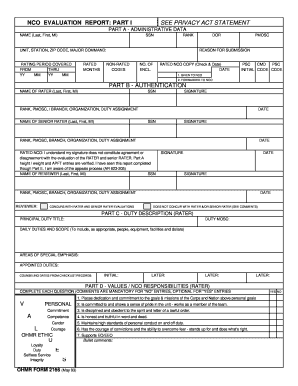
- Fill out Part A - Administrative Data. Enter your name (last, first, middle initial) and social security number (SSN), rank, unit, station, ZIP code, and major command. Specify the rating period by filling in the 'From' and 'Thru' fields with the respective year and month. Indicate the rated months, date of rank (DOR), personnel management occupational specialty code (PMOSC), and reason for submission. Include the number of enclosures and check the appropriate boxes.
- In Part B - Authentication, input the name of the rater and their SSN. Obtain rater's signature, rank, PMOSC, branch, organization, and duty assignment information. Repeat this for the senior rater. Underneath, acknowledge the authentication by filling out the reviewer information including their name, SSN, signature, and date.
- Move on to Part C - Duty Description (Rater). Provide the principal duty title and duty MOSC. Describe daily duties and scope, including responsibilities related to people, equipment, facilities, and funds. Note any special emphasis areas and appointed duties, as well as counseling dates.
- Complete Part D - Values / NCO Responsibilities (Rater) by answering each question. Include comments where required, particularly for 'No' entries. Ensure to cover dedication to duty, personal conduct, and commitment to the organization's goals.
- After filling out Part D, continue with Part II where you will address overall performance and potential. Provide bullet comments for excellence or needs improvement in specified areas. This will reflect the rated NCO's performance, leadership, training, and accountability.
- Upon completion of all parts of the form, review the information for accuracy. Save your changes and choose to download, print, or share the Blank Nco Reports Form as needed.
Take the next step in documenting evaluations—fill out your Blank Nco Reports Form online today!
Creating your own army is not legal under U.S. law, as the military is a federally regulated entity. Any attempt to form a private military force can lead to severe legal consequences. Instead, focusing on the official processes, like using the Blank Nco Reports Form for army evaluations, is advisable.