Loading
Form preview
  • US Legal Forms
  • Form Library
  • More Forms
  • More Uncategorized Forms
  • Bethune Cookman 1098 T

Get Bethune Cookman 1098 T

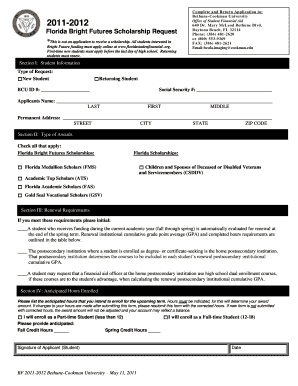
2011-2012 Florida Bright Futures Scholarship Request *This is not an application to receive a scholarship. All students interested in Bright Future funding must apply online at www.floridastudenfinancial.

How it works

  1. Open form

    Open form follow the instructions

  2. Easily sign form

    Easily sign the form with your finger

  3. Share form

    Send filled & signed form or save

How to fill out the Bethune Cookman 1098 T online

Filling out the Bethune Cookman 1098 T can be essential for managing your educational expenses and tax benefits effectively. This guide provides clear, step-by-step instructions to assist users in completing the form accurately and efficiently online.

Follow the steps to complete the Bethune Cookman 1098 T form online

  1. Locate and select the ‘Get Form’ button to access the Bethune Cookman 1098 T form. This button allows you to retrieve the necessary document in an editable format.
  2. Begin by entering your student identification number in the designated field. This identifier ensures your records are correctly linked to your application.
  3. Provide your Social Security number in the specified area. Correct entry of this number is crucial for tax processing and verification.
  4. Fill in your name, ensuring you complete all sections: last name, first name, and middle name. Accuracy in this field prevents potential discrepancies in your records.
  5. Enter your permanent address, which includes your street address, city, state, and ZIP code. This information is essential for communication and documentation purposes.
  6. In section II, check all applicable boxes to indicate the types of Florida Bright Futures Scholarships you are requesting. Ensure you select the appropriate categories that reflect your eligibility.
  7. Review section III for renewal requirements. Initial next to each requirement you meet to confirm your understanding and compliance.
  8. In section IV, indicate the anticipated credit hours you intend to enroll in for the upcoming term, specifying whether you will be a part-time or full-time student. Adjustments after submission may require resubmission of the form.
  9. Finally, sign and date the application where indicated. Your signature confirms the accuracy of the information provided and your intent to apply for funding.
  10. Once all fields are completed, you can save your changes, download the form for your records, print it for submission, or share it as needed.

Take the next step and complete your Bethune Cookman 1098 T online today.

Get form

Experience a faster way to fill out and sign forms on the web. Access the most extensive library of templates available.
Get form

Related content

Prepared Remarks by U.S. Secretary of Education...
May 10, 2017 — The whole of your time at Bethune-Cookman University – your ... story...
Learn more
Important Tax Information | Bethune-Cookman...
The 1098-T form also referred to as the "Tuition Payment Statement", is mailed to the...
Learn more
TT Toliver - T. T. Toliver - qaz.wiki
Nov 28, 2020 — Později přešel na Bethune-Cookman University , kde hrál basketbal...
Learn more

Related links form

Dteb 858.d.004010 Express Package Bill Of - United States ... - Transcom OAR 14 - Whs CIV-699 Instructions For Adult Change Of Name (2-12). Civil Forms 2006 Equity Plan-RSU Agr-Employees Performance FINAL .d - Sec

Questions & Answers

Get answers to your most pressing questions about US Legal Forms API.

Contact support

You should enter your Bethune Cookman 1098-T information in the education section of your tax return. Most commonly, you will fill out Schedule 3 or Form 8863, depending on the tax benefits you are claiming. Utilizing resources like US Legal Forms can help clarify these steps and ensure you complete your tax return accurately and efficiently.

To file your Bethune Cookman 1098-T on your taxes, include the relevant information from the form on your tax return. Most tax preparation software will guide you through this process. If you're unsure, consider consulting a tax professional or utilizing platforms like US Legal Forms, which provide resources and support for accurate filing.

Filing your Bethune Cookman 1098-T with your taxes is not mandatory, but it is highly recommended. This form provides essential information that may qualify you for education-related tax benefits. While not required, you may miss out on valuable deductions or credits if you do not utilize the information in your tax return.

Yes, you can add a Bethune Cookman 1098-T after filing your taxes. If you receive the form after your tax submission, it is possible to amend your return. By filing an amended return, you can include the new information and potentially qualify for additional benefits. However, be sure to understand how this will affect your tax situation.

Including the Bethune Cookman 1098-T on your tax return can potentially increase your refund, particularly if you qualify for education tax credits. These credits can directly reduce your tax liability, leading to a larger refund amount. It’s essential to review the eligibility requirements and calculate your potential benefits.

The Bethune Cookman 1098-T generally helps your taxes by providing important information that can enable you to access education tax credits and deductions. This form can reduce your taxable income depending on the qualified expenses declared. Thus, it is a valuable document when filing your tax return.

For the Bethune Cookman 1098-T, typically the taxpayer who claims the student as a dependent also claims the education tax credits. If the student is independent, they can claim these credits on their own return. This aspect can significantly affect your overall tax liability and potential refunds.

To report the Bethune Cookman 1098-T on your tax return, you typically use IRS Form 1040 or 1040A. You will enter the amounts from the 1098-T in the appropriate sections that pertain to education expenses. Additionally, you may need to complete Form 8863 if you are claiming an education tax credit.

The responsibility for filing the Bethune Cookman 1098-T generally falls to the person who claims the student as a dependent. If the student is independent and not claimed by anyone else, then they would file the 1098-T themselves. This form is crucial for both students and parents, as it enables them to access education tax credits.

When it comes to the Bethune Cookman 1098-T, it depends on who claims you as a dependent. If your parents claim you as a dependent, they should report the 1098-T on their tax return. However, if you file independently, you will report your own income and the related tax forms, including the 1098-T.

Get This Form Now!

Use professional pre-built templates to fill in and sign documents online faster. Get access to thousands of forms.
Get form
If you believe that this page should be taken down, please follow our DMCA take down processhere.

Industry-leading security and compliance

US Legal Forms protects your data by complying with industry-specific security standards.
  • In businnes since 1997
    25+ years providing professional legal documents.
  • Accredited business
    Guarantees that a business meets BBB accreditation standards in the US and Canada.
  • Secured by Braintree
    Validated Level 1 PCI DSS compliant payment gateway that accepts most major credit and debit card brands from across the globe.
Get Bethune Cookman 1098 T
Get form
  • Adoption
  • Bankruptcy
  • Contractors
  • Divorce
  • Home Sales
  • Employment
  • Identity Theft
  • Incorporation
  • Landlord Tenant
  • Living Trust
  • Name Change
  • Personal Planning
  • Small Business
  • Wills & Estates
  • Packages A-Z
  • Affidavits
  • Bankruptcy
  • Bill of Sale
  • Corporate - LLC
  • Divorce
  • Employment
  • Identity Theft
  • Internet Technology
  • Landlord Tenant
  • Living Wills
  • Name Change
  • Power of Attorney
  • Real Estate
  • Small Estates
  • Wills
  • All Forms
  • Forms A-Z
  • Form Library
  • Legal Hub
  • About Us
  • Help Portal
  • Legal Resources
  • Blog
  • Affiliates
  • Contact Us
  • Delete My Account
  • Site Map
  • Industries
  • Forms in Spanish
  • Localized Forms
  • State-specific Forms
  • Forms Kit
  • Real Estate Handbook
  • All Guides
  • Notarize
  • Incorporation services
  • For Consumers
  • For Small Business
  • For Attorneys
  • USLegal
  • FormsPass
  • pdfFiller
  • signNow
  • altaFlow
  • DocHub
  • Instapage
Form Packages
  • Adoption
  • Bankruptcy
  • Contractors
  • Divorce
  • Home Sales
  • Employment
  • Identity Theft
  • Incorporation
  • Landlord Tenant
  • Living Trust
  • Name Change
  • Personal Planning
  • Small Business
  • Wills & Estates
  • Packages A-Z
Form Categories
  • Affidavits
  • Bankruptcy
  • Bill of Sale
  • Corporate - LLC
  • Divorce
  • Employment
  • Identity Theft
  • Internet Technology
  • Landlord Tenant
  • Living Wills
  • Name Change
  • Power of Attorney
  • Real Estate
  • Small Estates
  • Wills
  • All Forms
  • Forms A-Z
  • Form Library
Customer Service
  • Legal Hub
  • About Us
  • Help Portal
  • Legal Resources
  • Blog
  • Affiliates
  • Contact Us
  • Delete My Account
  • Site Map
  • Industries
  • Forms in Spanish
  • Localized Forms
  • State-specific Forms
  • Forms Kit
Legal Guides
  • Real Estate Handbook
  • All Guides
Prepared for you
  • Notarize
  • Incorporation services
Our Customers
  • For Consumers
  • For Small Business
  • For Attorneys
Our Sites
  • USLegal
  • FormsPass
  • pdfFiller
  • signNow
  • altaFlow
  • DocHub
  • Instapage
Social Media
Call us now toll free:
+1 833 426 79 33
As seen in:
© Copyright 1999-2026 airSlate Legal Forms, Inc. 3720 Flowood Dr, Flowood, Mississippi 39232
  • Your Privacy Choices
  • Terms of Service
  • Privacy Notice
  • Content Takedown Policy
  • Bug Bounty Program