We use cookies to improve security, personalize the user experience, enhance our marketing activities (including cooperating with our marketing partners) and for other business use.
Click "here" to read our Cookie Policy. By clicking "Accept" you agree to the use of cookies. Read less
Read more
Accept
Loading
Form preview
  • US Legal Forms
  • Form Library
  • More Forms
  • More Uncategorized Forms
  • Processing Acknowledgement Form - Ribbs - Usps - Ribbs Usps

Get Processing Acknowledgement Form - Ribbs - Usps - Ribbs Usps

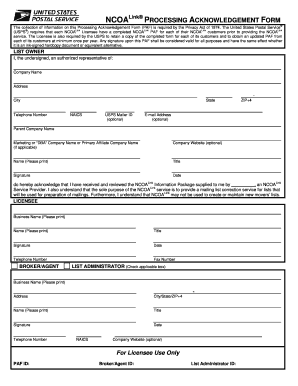
(USPS ) requires that each NCOALink Licensee have a completed NCOALink PAF for each ... it is an ink-signed hardcopy document or equivalent alternative.

How it works

  1. Open form

    Open form follow the instructions

  2. Easily sign form

    Easily sign the form with your finger

  3. Share form

    Send filled & signed form or save

How to fill out the PROCESSING ACKNOWLEDGEMENT FORM - RIBBS - USPS - Ribbs Usps online

This guide provides a clear and comprehensive overview of how to effectively fill out the Processing Acknowledgement Form, required by the United States Postal Service. By following these steps, users can ensure accurate and timely completion of their form, adhering to all necessary guidelines.

Follow the steps to successfully fill out your form.

  1. Press the ‘Get Form’ button to access the Processing Acknowledgement Form. This will allow you to open the document in the appropriate editor for completion.
  2. Begin by providing your list owner's information. Fill out the fields for Company Name, Address, City, State, ZIP+4, and Telephone Number. If applicable, include the Parent Company Name, Marketing or DBA Company Name, and Company Website.
  3. In the designated area, print your Name, Title, and provide your Signature and Date. This part confirms your authorization and acknowledgment regarding the NCOALink Information Package received.
  4. Complete the Licensee section by printing the Business Name, Name, Title, and providing another Signature and Date. Ensure your Telephone Number and Fax Number are included, if required.
  5. If applicable, fill out the Broker/Agent section with the Business Name, Address, City/State/ZIP+4, Name, Title, Signature, Date, and Telephone Number.
  6. If there are additional identifiers required, complete the For Licensee Use Only section, including PAF ID, Broker/Agent ID, and List Administrator ID.
  7. Once all fields are filled out, review your responses for completeness and accuracy. After confirming that all required information is correct, you can save, download, print, or share the completed form as necessary.

Start completing your documents online today for a streamlined process.

Get form

Experience a faster way to fill out and sign forms on the web. Access the most extensive library of templates available.
Get form

Related content

Processing Acknowledgement Form - TrueNCOA
The United States Postal Service®. (USPS®) requires that each NCOALink Licensee have a...
Learn more
GAO-06-733 U.S. Postal Service: Delivery...
Jul 27, 2006 — processing system, USPS has no current plans to implement and report on...
Learn more

Related links form

OMB APPROVAL OMB Number: 32350116 Expires: August 31, 2005 Estimated Average Burden Hours Per JPMorgan Chase & Co.;Rule 14a-8 No-action Letter Operation OPERATING EXPENSES BY FUNCTIONAL GROUPING - Rita Dot Eugene A. Ludwig, Chairman - Securities And Exchange Commission

Questions & Answers

Get answers to your most pressing questions about US Legal Forms API.

Contact support

To submit the USPS Form 1583, you need to complete the form with accurate information and have it notarized. Next, gather identification documents such as a driver's license or passport. You can then submit the form at your local USPS post office. For efficient tracking and processing, consider using the PROCESSING ACKNOWLEDGEMENT FORM - RIBBS - USPS - Ribbs Usps during submission.

To verify if a USPS email is legitimate, check for common signs like the sender's address and look for any spelling errors. Legitimate emails from USPS will guide you to their official website and include tracking information. Always ensure you are using the right resources, such as the PROCESSING ACKNOWLEDGEMENT FORM - RIBBS - USPS - Ribbs Usps, to confirm package details securely.

The delivery time by USPS after processing can vary based on several factors, including the destination and the shipping method selected. Generally, you can expect delivery within 1 to 3 business days for Priority Mail after processing. Using the PROCESSING ACKNOWLEDGEMENT FORM - RIBBS - USPS - Ribbs Usps helps you stay informed throughout the entire delivery process.

You may receive emails from USPS as updates regarding your package's status. These messages inform you of important milestones such as when your package is processed or out for delivery. It's essential to keep track of these updates to ensure timely receipt. Consider using the PROCESSING ACKNOWLEDGEMENT FORM - RIBBS - USPS - Ribbs Usps for enhanced tracking and communication.

Begin by selecting the correct USPS customs form based on your shipment's value and type. Clearly write a description of the contents, including their value in U.S. dollars, and provide accurate sender and recipient details. Ensure you sign the form, affirming the truthfulness of the information. The PROCESSING ACKNOWLEDGEMENT FORM - RIBBS - USPS - Ribbs Usps can assist you in managing these documents effectively for international shipments.

To fill out the USPS certified mail receipt, start by entering your return address in the designated area. Next, write the recipient's address clearly to ensure accurate delivery. Make sure to choose the appropriate service options based on your needs. For a seamless experience, consider using the PROCESSING ACKNOWLEDGEMENT FORM - RIBBS - USPS - Ribbs Usps, which helps track your mailing and provides proof of delivery.

A Processing Acknowledgement Form is required by the US Department of Commerce and must be completed by your organization to process DeceasedRecordFinder files. This form must be filled out once a year prior to your DeceasedRecordFinder screening.

This document is an NCOALink® processing acknowledgement form.

Understand. The Position Action Form (PAF) should be used whenever you are establishing, updating, or delimiting a position.

What is a PAF? The PAF (Processing Acknowledgement Form) is required by USPS to verify the ower of mailing address lists. This is the USPS way to track where mail spam is coming from if needed.

Get This Form Now!

Use professional pre-built templates to fill in and sign documents online faster. Get access to thousands of forms.
Get form
If you believe that this page should be taken down, please follow our DMCA take down processhere.

Industry-leading security and compliance

US Legal Forms protects your data by complying with industry-specific security standards.
  • In businnes since 1997
    25+ years providing professional legal documents.
  • Accredited business
    Guarantees that a business meets BBB accreditation standards in the US and Canada.
  • Secured by Braintree
    Validated Level 1 PCI DSS compliant payment gateway that accepts most major credit and debit card brands from across the globe.
Get PROCESSING ACKNOWLEDGEMENT FORM - RIBBS - USPS - Ribbs Usps
Get form
Form Packages
Adoption
Bankruptcy
Contractors
Divorce
Home Sales
Employment
Identity Theft
Incorporation
Landlord Tenant
Living Trust
Name Change
Personal Planning
Small Business
Wills & Estates
Packages A-Z
Form Categories
Affidavits
Bankruptcy
Bill of Sale
Corporate - LLC
Divorce
Employment
Identity Theft
Internet Technology
Landlord Tenant
Living Wills
Name Change
Power of Attorney
Real Estate
Small Estates
Wills
All Forms
Forms A-Z
Form Library
Customer Service
Terms of Service
Privacy Notice
Legal Hub
Content Takedown Policy
Bug Bounty Program
About Us
Help Portal
Legal Resources
Blog
Affiliates
Contact Us
Delete My Account
Site Map
Industries
Forms in Spanish
Localized Forms
State-specific Forms
Forms Kit
Legal Guides
Real Estate Handbook
All Guides
Prepared for You
Notarize
Incorporation services
Our Customers
For Consumers
For Small Business
For Attorneys
Our Sites
US Legal Forms
USLegal
FormsPass
pdfFiller
signNow
altaFlow
DocHub
Instapage
Social Media
Call us now toll free:
+1 833 426 79 33
As seen in:
  • USA Today logo picture
  • CBC News logo picture
  • LA Times logo picture
  • The Washington Post logo picture
  • AP logo picture
  • Forbes logo picture
© Copyright 1997-2025
airSlate Legal Forms, Inc.
3720 Flowood Dr, Flowood, Mississippi 39232
Form Packages
Adoption
Bankruptcy
Contractors
Divorce
Home Sales
Employment
Identity Theft
Incorporation
Landlord Tenant
Living Trust
Name Change
Personal Planning
Small Business
Wills & Estates
Packages A-Z
Form Categories
Affidavits
Bankruptcy
Bill of Sale
Corporate - LLC
Divorce
Employment
Identity Theft
Internet Technology
Landlord Tenant
Living Wills
Name Change
Power of Attorney
Real Estate
Small Estates
Wills
All Forms
Forms A-Z
Form Library
Customer Service
Terms of Service
Privacy Notice
Legal Hub
Content Takedown Policy
Bug Bounty Program
About Us
Help Portal
Legal Resources
Blog
Affiliates
Contact Us
Delete My Account
Site Map
Industries
Forms in Spanish
Localized Forms
State-specific Forms
Forms Kit
Legal Guides
Real Estate Handbook
All Guides
Prepared for You
Notarize
Incorporation services
Our Customers
For Consumers
For Small Business
For Attorneys
Our Sites
US Legal Forms
USLegal
FormsPass
pdfFiller
signNow
altaFlow
DocHub
Instapage
Social Media
Call us now toll free:
+1 833 426 79 33
As seen in:
  • USA Today logo picture
  • CBC News logo picture
  • LA Times logo picture
  • The Washington Post logo picture
  • AP logo picture
  • Forbes logo picture
© Copyright 1997-2025
airSlate Legal Forms, Inc.
3720 Flowood Dr, Flowood, Mississippi 39232