Loading
Get Nf37 509
How it works
-

Open form follow the instructions
-

Easily sign the form with your finger
-

Send filled & signed form or save
How to fill out the Nf37 509 online
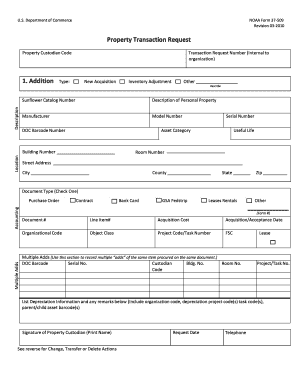
Filling out the NOAA Form 37-509 online may seem daunting, but this guide will provide you with the clear, step-by-step instructions needed to navigate each section effectively. Whether you are adding, changing, transferring, or deleting property information, this comprehensive guide aims to make the process straightforward and accessible.
Follow the steps to successfully complete the Nf37 509 form.
- Click ‘Get Form’ button to obtain the form and open it in the editor.
- Fill in the property custodian code, entering the nine-digit alphanumeric code, such as '5401TN300'.
- If applicable, enter the transaction request number for your internal tracking. This is optional but helps in referencing specific transactions.
- Choose the transaction type from the 'Addition' section. Select 'New Acquisition', 'Inventory Adjustment', or 'Other', and describe it if 'Other' is selected.
- Provide the sunflower catalog number created by the DOC Sunflower Help Desk, followed by a general description of the personal property.
- Enter manufacturer details and the model number. Ensure you provide any serial numbers and the DOC barcode number accurately.
- Fill out the asset category, useful life in years, and the location of the property including building number, street address, city, county, state, and zip code.
- Check the appropriate document type that corresponds to your transaction, such as 'Accounting' or 'Purchase Order', and attach any required supporting documents.
- Fill in acquisition cost and acceptance date, and ensure to include the organizational code and relevant project code/task number.
- If recording multiple additions, use the multiple adds section as directed, including respective details for each item.
- The property custodian, or their designee, must print their name and sign the form, indicating their approval.
- Finally, submit the completed NF 37-509 form along with any necessary supporting documentation to the relevant office.
Start completing your Nf37 509 form online today!