Loading
Form preview
  • US Legal Forms
  • Form Library
  • More Forms
  • More Uncategorized Forms
  • Patient Demographic Sheet

Get Patient Demographic Sheet

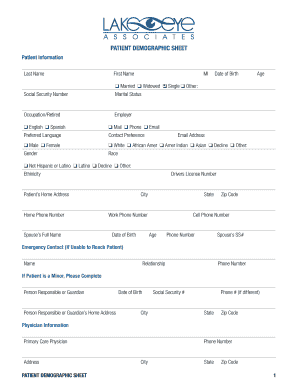
PATIENT DEMOGRAPHIC SHEET Patient Information Last Name First Name Married Widowed Single Other: s MI Date of Birth Age Social Security Number Marital Status Occupation/Retired English Spanish Preferred.

How it works

  1. Open form

    Open form follow the instructions

  2. Easily sign form

    Easily sign the form with your finger

  3. Share form

    Send filled & signed form or save

How to fill out the Patient Demographic Sheet online

Completing your Patient Demographic Sheet online is a straightforward process that ensures your healthcare provider has accurate and up-to-date information. This guide will walk you through each section of the form clearly to make the process smooth and efficient.

Follow the steps to accurately fill out your Patient Demographic Sheet.

  1. Click ‘Get Form’ button to access the Patient Demographic Sheet and open it in your preferred online editor.
  2. Start by entering your personal information. Input your last name, first name, middle initial, date of birth, and age in the designated fields. Select your marital status from the provided options.
  3. Provide your social security number, occupation or indicate if you are retired, and enter your employer's name.
  4. Choose your preferred language and mode of contact by marking one of the options available for each category.
  5. Fill out the gender section by selecting the appropriate option and continue with your race and ethnicity. Enter your email address to facilitate communication.
  6. Complete your address details, including your home address, city, state, and zip code. Also, provide your home phone number and any other relevant phone numbers.
  7. If applicable, provide your spouse’s full name and their date of birth. Fill in the emergency contact section with the relationship and phone number.
  8. If you are completing the form for a minor, ensure to provide information about the person responsible or guardian and their details.
  9. Complete the physician and pharmacy information sections by entering the required details of your primary care physician and preferred pharmacy.
  10. Supply all relevant insurance information, including your primary and secondary insurance details, ensuring to enter the policyholder’s information accurately.
  11. Indicate how you were referred to the practice, checking any applicable boxes and providing additional information if necessary.
  12. Review all the entered information for any inaccuracies or missing fields. Make any necessary adjustments.
  13. Upon completion, you can choose to save your changes, download, print, or share the form as needed.

Take the first step towards seamless healthcare by completing your Patient Demographic Sheet online today.

Get form

Experience a faster way to fill out and sign forms on the web. Access the most extensive library of templates available.
Get form

Related content

CDC Sample Data Collection Form - Extended
Permission from physician to contact patient or patient's family ? 09. ... SAMPLE EXTENDED...
Learn more
Patient Demographic Form
Relationship to Patient. ❑ Self (If self, skip to Emergency / Next of Kin) ❑ Spouse...
Learn more
Healthcare in Pakistan - Wikipedia
The healthcare delivery system of Pakistan (تحفّظ صحتِ عامّہ ،...
Learn more

Related links form

Musch, Ph - Fda Safely And Effectively RANCH HAND ADVISORY COMMITTEE MEETING October 19-20 ... - Fda GGD-86-81 Tax Policy And Administration. Tax Policy And Administration

Questions & Answers

Get answers to your most pressing questions about US Legal Forms API.

Contact support

Writing patient demographics involves gathering essential information like name, age, gender, and contact details. When compiling a Patient Demographic Sheet, it's important to ensure accuracy and completeness, as this data supports effective patient care. Include relevant sections for medical history and insurance information to facilitate smoother healthcare processes. For added convenience, US Legal Forms provides templates that guide you in creating comprehensive and standardized patient demographic sheets.

Filing patient information can be done through various methods such as electronic health record (EHR) systems and paper files. Using a digital approach, like a Patient Demographic Sheet, makes information easily accessible and minimizes errors. Additionally, ensuring that data is regularly updated fosters better patient care and management. You can streamline this process with the US Legal Forms platform, where templates can assist you in organizing patient demographics effectively.

In the patient's demographic section, you should include details such as the patient's full name, date of birth, address, and contact information. Additionally, insurance information and emergency contacts are crucial. Including these elements on a Patient Demographic Sheet allows clinics to provide efficient services. Having all necessary data readily available enhances the patient experience.

A patient demographic sheet is a formal document that collects essential information about each patient. This sheet acts as a central repository for data, which can include personal and insurance details. By using a Patient Demographic Sheet, healthcare providers can ensure that they have accurate and up-to-date patient information. This facilitates better communication and improves overall patient care.

Demographic data for a patient refers to specific information that identifies and describes individuals receiving care. This data typically includes age, gender, ethnicity, and geographic location. Gathering this data is important for healthcare providers to deliver tailored services. A comprehensive Patient Demographic Sheet helps in managing this vital information efficiently.

The patient demographic service organizes and manages important information about patients. This includes collecting data such as names, contact details, and insurance information. Essentially, it helps medical offices streamline patient interactions. Utilizing a Patient Demographic Sheet ensures that healthcare providers easily access essential details.

Patient demographic data refers to all of the non-clinical data about a patient, including: name, date of birth, address, phone number, email address, sex, race, etc.

An electronic health record (EHR) contains patient health information, such as: Administrative and billing data. Patient demographics.

Addressing demographic data allows public health professionals to study health disparities in a population. Identifying these health disparities in a broad range of social dimensions can expose patterns of health literacy between populations and how they contribute to health inequities.

Demographic data is a subset of administrative data which identifies the patient and usually includes name, date of birth, gender, social security number, marital status, address, and telephone number.

Get This Form Now!

Use professional pre-built templates to fill in and sign documents online faster. Get access to thousands of forms.
Get form
If you believe that this page should be taken down, please follow our DMCA take down processhere.

Industry-leading security and compliance

US Legal Forms protects your data by complying with industry-specific security standards.
  • In businnes since 1997
    25+ years providing professional legal documents.
  • Accredited business
    Guarantees that a business meets BBB accreditation standards in the US and Canada.
  • Secured by Braintree
    Validated Level 1 PCI DSS compliant payment gateway that accepts most major credit and debit card brands from across the globe.
Get Patient Demographic Sheet
Get form
  • Adoption
  • Bankruptcy
  • Contractors
  • Divorce
  • Home Sales
  • Employment
  • Identity Theft
  • Incorporation
  • Landlord Tenant
  • Living Trust
  • Name Change
  • Personal Planning
  • Small Business
  • Wills & Estates
  • Packages A-Z
  • Affidavits
  • Bankruptcy
  • Bill of Sale
  • Corporate - LLC
  • Divorce
  • Employment
  • Identity Theft
  • Internet Technology
  • Landlord Tenant
  • Living Wills
  • Name Change
  • Power of Attorney
  • Real Estate
  • Small Estates
  • Wills
  • All Forms
  • Forms A-Z
  • Form Library
  • Legal Hub
  • About Us
  • Help Portal
  • Legal Resources
  • Blog
  • Affiliates
  • Contact Us
  • Delete My Account
  • Site Map
  • Industries
  • Forms in Spanish
  • Localized Forms
  • State-specific Forms
  • Forms Kit
  • Real Estate Handbook
  • All Guides
  • Notarize
  • Incorporation services
  • For Consumers
  • For Small Business
  • For Attorneys
  • USLegal
  • FormsPass
  • pdfFiller
  • signNow
  • altaFlow
  • DocHub
  • Instapage
Form Packages
  • Adoption
  • Bankruptcy
  • Contractors
  • Divorce
  • Home Sales
  • Employment
  • Identity Theft
  • Incorporation
  • Landlord Tenant
  • Living Trust
  • Name Change
  • Personal Planning
  • Small Business
  • Wills & Estates
  • Packages A-Z
Form Categories
  • Affidavits
  • Bankruptcy
  • Bill of Sale
  • Corporate - LLC
  • Divorce
  • Employment
  • Identity Theft
  • Internet Technology
  • Landlord Tenant
  • Living Wills
  • Name Change
  • Power of Attorney
  • Real Estate
  • Small Estates
  • Wills
  • All Forms
  • Forms A-Z
  • Form Library
Customer Service
  • Legal Hub
  • About Us
  • Help Portal
  • Legal Resources
  • Blog
  • Affiliates
  • Contact Us
  • Delete My Account
  • Site Map
  • Industries
  • Forms in Spanish
  • Localized Forms
  • State-specific Forms
  • Forms Kit
Legal Guides
  • Real Estate Handbook
  • All Guides
Prepared for you
  • Notarize
  • Incorporation services
Our Customers
  • For Consumers
  • For Small Business
  • For Attorneys
Our Sites
  • USLegal
  • FormsPass
  • pdfFiller
  • signNow
  • altaFlow
  • DocHub
  • Instapage
Social Media
Call us now toll free:
+1 833 426 79 33
As seen in:
© Copyright 1999-2026 airSlate Legal Forms, Inc. 3720 Flowood Dr, Flowood, Mississippi 39232
  • Your Privacy Choices
  • Terms of Service
  • Privacy Notice
  • Content Takedown Policy
  • Bug Bounty Program